We’d like to remind Forumites to please avoid political debate on the Forum.
This is to keep it a safe and useful space for MoneySaving discussions. Threads that are – or become – political in nature may be removed in line with the Forum’s rules. Thank you for your understanding.
📨 Have you signed up to the Forum's new Email Digest yet? Get a selection of trending threads sent straight to your inbox daily, weekly or monthly!
The Forum now has a brand new text editor, adding a bunch of handy features to use when creating posts. Read more in our how-to guide
Very poorly PC, help needed with virus removal

EverDecreasingCircles
Posts: 7,010 Forumite



PC started to play up last night. We started getting fake virus alerts, then it opened IE and displayed a !!!!!! site (17 Y/O DS thought it was very amusing).
Last night it wouldn't let me do anything, access internet, run Antivir, so I had to just turn it off. This morning I've managed a restore to yesterday but proplem's still there.
I've started an Antivir scan but the screen has 4 fake alert messages on it that I can't get rid of and looks like it's opening the !!!!!! site again :mad:
Any advice please?
EDC
Last night it wouldn't let me do anything, access internet, run Antivir, so I had to just turn it off. This morning I've managed a restore to yesterday but proplem's still there.
I've started an Antivir scan but the screen has 4 fake alert messages on it that I can't get rid of and looks like it's opening the !!!!!! site again :mad:
Any advice please?
EDC
Biggest win: £10,000 from Pepsi
Favourite win: Handmade jewellery worth £1000
ITV Winners Club Member #1
Check out the ITV Winners Club in IWIWIW
I shall write in ever decreasing circles until I have nothing left to say
0
Comments
-
Can you do a hijack this scan and copy the result and post it on this thread
http://download.cnet.com/Trend-Micro-HijackThis/3000-8022_4-10227353.htmlEvery day when I wake up I thank the Lord I'm WELSH. .0 -
alanwjones wrote: »Can you do a hijack this scan and copy the result and post it on this thread
http://download.cnet.com/Trend-Micro-HijackThis/3000-8022_4-10227353.html
No, it won't let me access the website.
EDCBiggest win: £10,000 from PepsiFavourite win: Handmade jewellery worth £1000ITV Winners Club Member #1Check out the ITV Winners Club in IWIWIWI shall write in ever decreasing circles until I have nothing left to say0 -
You said you did a system restore. In safe mode? If not, I would try a restore in safe mode to an even earlier date (last wk or wk before that). And I would seriously ditch IE and move to Firefox. Is your current anti-virus automatically updating?0
-
I'm not very computer literate, I think I did it in safe mode. I pressed F10 on setup and went via that route but it started up Windows before opening the restore option. I don't know if there's another way?
EDCBiggest win: £10,000 from PepsiFavourite win: Handmade jewellery worth £1000ITV Winners Club Member #1Check out the ITV Winners Club in IWIWIWI shall write in ever decreasing circles until I have nothing left to say0 -
To get into the Windows 2000 / XP Safe mode, as the computer is booting press and hold your "F8 Key" which should bring up the "Windows Advanced Options Menu" as shown below. Use the arrow keys to move to "Safe Mode" and press your Enter key.0
-
Download MALWAREBYTES (Make sure you click 'DOWNLOAD LATEST VERSION')
http://www.filehippo.com/download_malwarebytes_anti_malware/
Open malwarebytes and goto UPDATE and click 'check for updates'. After its updated goto SCANNER and click PERFORM FULL SCAN then click SCAN
Post the log COMPLETE here AFTER youve deleted everything it finds
reboot
Download HIJACK THIS (Make sure you click 'DOWNLOAD LATEST VERSION')
http://www.filehippo.com/download_hijackthis/
Click DO A SCAN AND SAVE A LOGFILE (Takes seconds) then post the log so we can see whats running
(do NOT do anything else with Hijack but scan and post the FULL log)
Keep pressing F8 to get into SAFE MODE WITH NETWORKING if you cant download them:idea:0 -
Got into safe mode.
I've now got to a screen that says
Microsoft Wiondows XP Recovery Console
The Recovery Console provides system repair and recovery functionality.
Type EXIT to quit the Recovery Console and restart the computer.
1: C:\WINDOWS
2: \MiniNT
3:\1386
Which Windows installation would you like to log onto
<To cancel, press ENTER>?
I typed 1 and it now says underneath
C:\WINDOWS
but nothing else happens What should I do now?
EDCBiggest win: £10,000 from PepsiFavourite win: Handmade jewellery worth £1000ITV Winners Club Member #1Check out the ITV Winners Club in IWIWIWI shall write in ever decreasing circles until I have nothing left to say0 -
EverDecreasingCircles wrote: »Got into safe mode.
I've now got to a screen that says
Microsoft Wiondows XP Recovery Console
The Recovery Console provides system repair and recovery functionality.
Type EXIT to quit the Recovery Console and restart the computer.
1: C:\WINDOWS
2:\MiniNT
3:\1386
Which Windows installation would you like to log onto
<To cancel, press ENTER>?
I typed 1 and it now says underneath
C:\WINDOWS
but nothing else happens What should I do now?
EDC
Thats not the safe mode screen
This is safe mode ~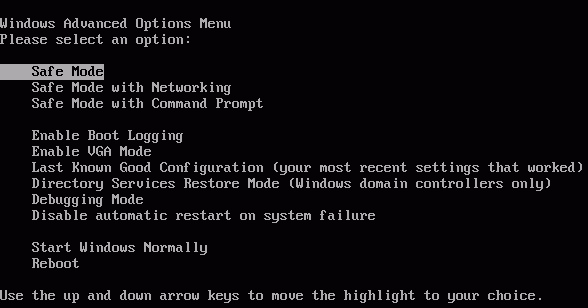
Maybe your computers diff to the norm? In which case try F2, F12 and F10:idea:0 -
I went through the safe mode screen to get to the one I'm on now.
Trying again now and it's asking which operating sytem to start - Windows XP or Windows Recovery Console.
EDCBiggest win: £10,000 from PepsiFavourite win: Handmade jewellery worth £1000ITV Winners Club Member #1Check out the ITV Winners Club in IWIWIWI shall write in ever decreasing circles until I have nothing left to say0 -
Erm
Ive never encountered that through safe mode before
Select XP then (That 'should' boot into safe mode):idea:0

This discussion has been closed.
Confirm your email address to Create Threads and Reply

Categories
- All Categories
- 353.6K Banking & Borrowing
- 254.2K Reduce Debt & Boost Income
- 455.1K Spending & Discounts
- 246.7K Work, Benefits & Business
- 603.1K Mortgages, Homes & Bills
- 178.1K Life & Family
- 260.7K Travel & Transport
- 1.5M Hobbies & Leisure
- 16K Discuss & Feedback
- 37.7K Read-Only Boards