We’d like to remind Forumites to please avoid political debate on the Forum.
This is to keep it a safe and useful space for MoneySaving discussions. Threads that are – or become – political in nature may be removed in line with the Forum’s rules. Thank you for your understanding.
📨 Have you signed up to the Forum's new Email Digest yet? Get a selection of trending threads sent straight to your inbox daily, weekly or monthly!
The Forum now has a brand new text editor, adding a bunch of handy features to use when creating posts. Read more in our how-to guide
Configuring Microsoft outlook and hotmail

nomis21
Posts: 200 Forumite
in Techie Stuff
Hi again,
Iam having problems getting my hotmail account to work in outlook office and installing email on my fone.
I have managed to enter the incoming and outgoing server setting`s and i can now recieve emails on my mobile and in outlook. Problem is when i try to send them...the outgoing mail server (outlook cannot connect your outging smtp server) error message?
smtp server: smtp.live.com (Port 25)
Any tips?
Iam having problems getting my hotmail account to work in outlook office and installing email on my fone.
I have managed to enter the incoming and outgoing server setting`s and i can now recieve emails on my mobile and in outlook. Problem is when i try to send them...the outgoing mail server (outlook cannot connect your outging smtp server) error message?
smtp server: smtp.live.com (Port 25)
Any tips?
 MOVE ALONG........ nothing to see here..! :rolleyes:
0
Comments
-
Does the SMTP Server require authentication?Hi again,
Iam having problems getting my hotmail account to work in outlook office and installing email on my fone.
I have managed to enter the incoming and outgoing server setting`s and i can now recieve emails on my mobile and in outlook. Problem is when i try to send them...the outgoing mail server (outlook cannot connect your outging smtp server) error message?
smtp server: smtp.live.com (Port 25)
Any tips?
See the illustrations below, select 'more settings....' to access the second dialog box.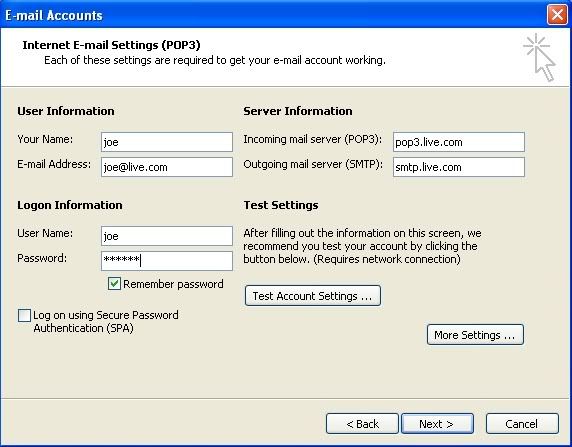
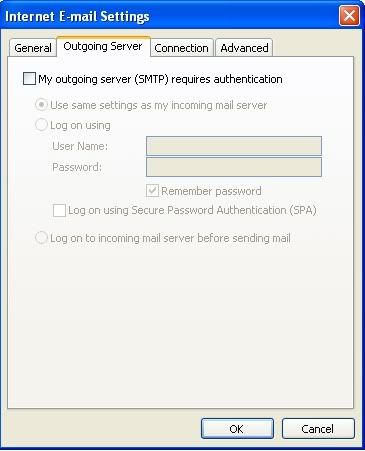 Since when has the world of computer software design been about what people want? This is a simple question of evolution. The day is quickly coming when every knee will bow down to a silicon fist, and you will all beg your binary gods for mercy.0
 -
Hi thanks so much for your reply, i followed these details, yes i have selected authentication for the smtp server.
As of March 12, 2009, POP3 access is now available free to all Hotmail users worldwide.
POP server: pop3.live.com (Port 995)
POP SSL required? Yes
User name: Your Windows Live ID, for example yourname@hotmail.com
Password: The password you usually use to sign in to Hotmail or Windows Live
SMTP server: smtp.live.com (Port 25 or 587)
Authentication required? Yes (this matches your POP username and password)
TLS/SSL required? Yes For more information, visit: http://windowslivewire.spaces.live.com/blog/cns!2F7EB29B42641D59!32413.entry MOVE ALONG........ nothing to see here..! :rolleyes:0 -
Have a look at this link, although it is for Outlook Express the settings are the same for Office Outlook; http://windowslivehelp.com/solutions/settings/archive/2009/02/18/how-to-add-your-e-mail-account-to-microsoft-outlook-express.aspxHi thanks so much for your reply, i followed these details, yes i have selected authentication for the smtp server.
As of March 12, 2009, POP3 access is now available free to all Hotmail users worldwide.
POP server: pop3.live.com (Port 995)
POP SSL required? Yes
User name: Your Windows Live ID, for example [EMAIL="yourname@hotmail.com"]yourname@hotmail.com[/EMAIL]
Password: The password you usually use to sign in to Hotmail or Windows Live
SMTP server: smtp.live.com (Port 25 or 587)
Authentication required? Yes (this matches your POP username and password)
TLS/SSL required? Yes For more information, visit: http://windowslivewire.spaces.live.com/blog/cns!2F7EB29B42641D59!32413.entry
Let us know how you get on.Since when has the world of computer software design been about what people want? This is a simple question of evolution. The day is quickly coming when every knee will bow down to a silicon fist, and you will all beg your binary gods for mercy.0 -
Hi tried again without success following the link ..! For some reason outlook cannot connect to the smtp server? I can recieve mail but cannot send, i have tried port 25 and port 587 on the smtp server, same result..! MOVE ALONG........ nothing to see here..! :rolleyes:0
-
Try this as detailed below;Hi tried again without success following the link ..! For some reason outlook cannot connect to the smtp server? I can recieve mail but cannot send, i have tried port 25 and port 587 on the smtp server, same result..!
Click Start > Run and type in the Run dialog box; telnet
The following window will appear, next to the Telnet command prompt type the following; open smtp.live.com 25 and press Enter.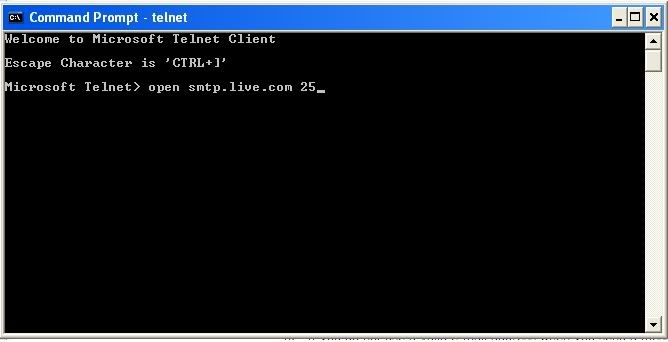
You will be presented with a screen like this;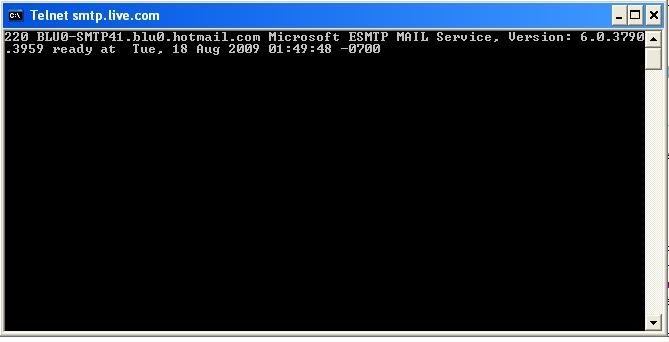
You can now connect to port 25 of the mail server. If not then your ISP may be blocking port 25 on their WAN.Since when has the world of computer software design been about what people want? This is a simple question of evolution. The day is quickly coming when every knee will bow down to a silicon fist, and you will all beg your binary gods for mercy.0 -
Why not try Windows Live Mail http://download.live.com/wlmail which works with IMAP (so no need to open port 25).
Additionally if you had Outlook 2007 - it supports hotmail through IMAP.0 -
Also google for the Outlook connector.Since when has the world of computer software design been about what people want? This is a simple question of evolution. The day is quickly coming when every knee will bow down to a silicon fist, and you will all beg your binary gods for mercy.0
-
I tried the run program entering telnet and i get an error message saying windows cannot find "telnet" dont know if it makes any difference but iam running vista?
I think it might be easier to download the mail program, i would have liked to use outlook but its just no accepting the smtp server (my network provider is 3)
I cannot set it up on my mobile either, same scenario, i can get my mail but i cannot create and send (iam with o2)
Keep the tips and ideas rolling in.
Thanks for the help MOVE ALONG........ nothing to see here..! :rolleyes:0 -
I have successfuly setup Outlook to connect to my live account [EMAIL="proliant@live.co.uk"]proliant@live.co.uk[/EMAIL] and it worked, just make sure that you select SSL for both the Incoming and Outgoing settings and make sure you have not selected SPA (Secure password Authentication) anywhere.Since when has the world of computer software design been about what people want? This is a simple question of evolution. The day is quickly coming when every knee will bow down to a silicon fist, and you will all beg your binary gods for mercy.0
-
Telnet is not installed by default. You need to install it via Control Panel, Programs and Features, Turn Windows Features On or Off. You'll only need the Telnet Client.I tried the run program entering telnet and i get an error message saying windows cannot find "telnet" dont know if it makes any difference but iam running vista?
I think it might be easier to download the mail program, i would have liked to use outlook but its just no accepting the smtp server (my network provider is 3)
I cannot set it up on my mobile either, same scenario, i can get my mail but i cannot create and send (iam with o2)
Keep the tips and ideas rolling in.
Thanks for the help
You need to use the Outlook Connector to set up Hotmail in MS Outlook.The pen is mightier than the sword, and considerably easier to write with.
-- Marty Feldman0



This discussion has been closed.
Confirm your email address to Create Threads and Reply

Categories
- All Categories
- 353.6K Banking & Borrowing
- 254.2K Reduce Debt & Boost Income
- 455.1K Spending & Discounts
- 246.7K Work, Benefits & Business
- 603K Mortgages, Homes & Bills
- 178.1K Life & Family
- 260.7K Travel & Transport
- 1.5M Hobbies & Leisure
- 16K Discuss & Feedback
- 37.7K Read-Only Boards