We’d like to remind Forumites to please avoid political debate on the Forum.
This is to keep it a safe and useful space for MoneySaving discussions. Threads that are – or become – political in nature may be removed in line with the Forum’s rules. Thank you for your understanding.
📨 Have you signed up to the Forum's new Email Digest yet? Get a selection of trending threads sent straight to your inbox daily, weekly or monthly!
The Forum now has a brand new text editor, adding a bunch of handy features to use when creating posts. Read more in our how-to guide
Setting up a Hp wireless print server

sei1925
Posts: 74 Forumite
in Techie Stuff
Does anybody have an idea how i can set up my Toshiba vista laptop to run a hp wireless print server with a hp deskjet f4280. I cant seem able to get my laptop to recognise it and too be honest i'm close to throwing it in the bin i assume it's something stupid on my part but any help would be appreciated.
0
Comments
-
Do you have a HP Jet Direct wireless print server?
If it is have you installed the Jet Direct admin software?
If it isn't any of the above then let us know the model of the print server.
Is it one of these as there may be a problem with it working with Vista.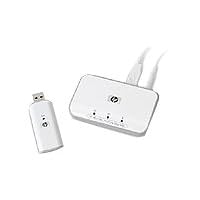 0
0 -
Hi thanks for the reply it's the one from argos they are giving away for free when you buy an hp aio HP Wireless G USB Print Server 2101nw it says it's vista compatible it's giving me a real headache . It may be me being stupid but it's getting very frustrating it took long enough running the allignment utility on the printer.As it is when it prints documents the sentences have the tps and bottoms cut off0
-
Did you follow the instructions word for word?
http://h10025.www1.hp.com/ewfrf/wc/document?docname=c01425297&cc=uk&dlc=en&lc=en&jumpid=reg_R1002_UKEN0 -
Yes word for word it keeps telling me it cant find wireless print server on my machine0
-
You need to go to basics and 'ping' the device. If you know the IP addess of the printer then open a command prompt (Start, Run, CMD them click OK) and type ping (address of printer) where (address of printer) is the IP adress you assinged. I suspect some thing on thwe 192.168.*.* subnet (Address range...)
Looking back at my answer maybe this could be confusing..... PM me and I'll try to help but I dont check here often. To any techie this is a basic installation....0 -
Thanks for your help guys but i think this little device is going to hit the wall soon, it's my own fault i thought it would be the equivalent of buying a hp aio wireless printer thus saving some money. At the end of the day i would have preferred to have spent the extra money with 3 computers the idea to print to one printer in one location is great however i just cant implement it. I think the problem lies within i.p adresses as an earlier poster said but i have tried this now on two laptops one running vista sp2 and another running xp sp3. I was about to buy a samsung netbook so the wife can browse the internet in the sitting room it would have been a great bit of kit.0
-
Plug the cable in to the unit and try to ping the ip or mac address to see if it can be seen. Don't allow a small bit of plastic with a few electonics inside to beat you.0
-
Thanks a silly question how do i know what the ip address of my print server is0
-
Thanks for everybodys help but this will not work i have found its ip address but it still says unable to find print server on my network i think it will just be thrown in the bin shortly i have spent more time on this little box then when i do a full laptop reformat. it is a shame because what it offers is so simple an idea, but in reality it is just problematic i cant think of anything else to do i have even uninstalled all hp software.0
This discussion has been closed.
Confirm your email address to Create Threads and Reply

Categories
- All Categories
- 353.5K Banking & Borrowing
- 254.1K Reduce Debt & Boost Income
- 455K Spending & Discounts
- 246.6K Work, Benefits & Business
- 602.9K Mortgages, Homes & Bills
- 178.1K Life & Family
- 260.6K Travel & Transport
- 1.5M Hobbies & Leisure
- 16K Discuss & Feedback
- 37.7K Read-Only Boards