We’d like to remind Forumites to please avoid political debate on the Forum.
This is to keep it a safe and useful space for MoneySaving discussions. Threads that are – or become – political in nature may be removed in line with the Forum’s rules. Thank you for your understanding.
📨 Have you signed up to the Forum's new Email Digest yet? Get a selection of trending threads sent straight to your inbox daily, weekly or monthly!
The Forum now has a brand new text editor, adding a bunch of handy features to use when creating posts. Read more in our how-to guide
Open Office Spreadsheet
Comments
-
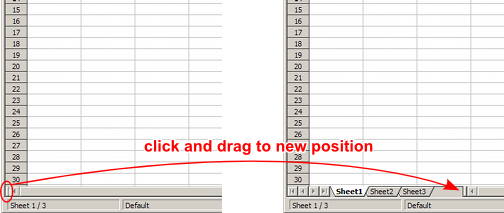
It could be turned off. Go to Tools → Options... → OpenOffice.org Calc → View → Window → Sheet tabs. This option needs to be ticked on. Alternatively, it could have got resized to ‘nothing’.
Clicked on Tools, then Options, there are 3 tabs. General, View and Data Entry. None of these have an OpenOffice.org calc option. A cloudy day is no match for a sunny disposition~ William Arthur Ward ~0
 -
Have you tried the "Click and Drag" option in the picture above??
If you go to "Insert" there should be an option for "Sheet"Laters
Sol
"Have you found the secrets of the universe? Asked Zebade "I'm sure I left them here somewhere"0 -
Have you tried the "Click and Drag" option in the picture above??
If you go to "Insert" there should be an option for "Sheet"
I have tried the click and drag but nothing happens and when I click on Insert, it gives me these options:
Insert
Page Break
Row
Column
Function
Range Name
I am getting so frustrated. A cloudy day is no match for a sunny disposition~ William Arthur Ward ~0
 -
Strange as it may sound, you’re describing Microsoft Works. This doesn’t have the ability to handle spreadsheets containing more than one worksheet, so there are never any tabs at the bottom of the window. For example, here’s the drop-down Insert menu as it appears in OpenOffice.org Calc versions 2 and 3. (Version 1 is very slightly different.)…when I click on Insert, it gives me these options:
Insert
Page Break
Row
Column
Function
Range Name
I am getting so frustrated.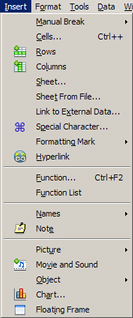
Below is the Sheet tabs option that Lord_Gardener and I were referring to.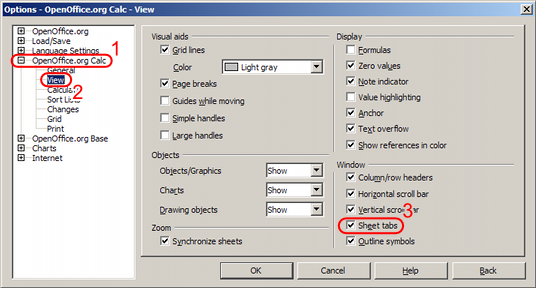
- Open up the OpenOffice.org Calc branch by either clicking on the + or double clicking on the name. If you’re still using OpenOffice.org version 1, this branch is called Spreadsheet. In OpenOffice.org versions 2 and 3, you must bring up the Options window from Calc. Opening the Options window from, say, Writer will show only those branches relevant to Writer.
- Select the View leaf.
- Make sure the Sheet tabs option is ticked, then click OK.
古池や蛙飛込む水の音0 -
Let's hope the above works for you! If not, can you paste an image of what you see and full details of the Openoffice you have.I'm mad!!!! :rotfl::jand celebrating everyday every year!!!0
-
Aaaah yes, thank you! OH opened it in Microsoft Works. I had no idea, thought he had used OpenOffice....
We will start a new one at the weekend, not that much to copy over. At least I can see the tabs at the bottom of the OpenOffice one. Thought I was going mad!
Thanks to everyone for all your help. A cloudy day is no match for a sunny disposition~ William Arthur Ward ~0
 -
If you saved it as a default Microsoft Works Spreadsheet file from Works 6 or later (.xlr), it’ll load straight into OpenOffice.org. If you have trouble with that, load the file back into Works and re-save it as a Microsoft Excel file. Choose the type of file for the newest version of Excel that your version of Works will save as.We will start a new one at the weekend, not that much to copy over.古池や蛙飛込む水の音0





This discussion has been closed.
Confirm your email address to Create Threads and Reply

Categories
- All Categories
- 353.5K Banking & Borrowing
- 254.1K Reduce Debt & Boost Income
- 455K Spending & Discounts
- 246.6K Work, Benefits & Business
- 602.9K Mortgages, Homes & Bills
- 178.1K Life & Family
- 260.6K Travel & Transport
- 1.5M Hobbies & Leisure
- 16K Discuss & Feedback
- 37.7K Read-Only Boards