Ready, steady… save!
You don’t need a chart to join in. Here are 2 ways to record your savings:
1. Cross it off
Pop a chart into your first post. Saved an amount? Cross it out! Read more »
£0.01 £0.02 £0.03
2. Write it down
Skip the chart and add updates to your first post. Read more »
“Another +£3 saved today. Go me!”
Use +£ before each new saving so it counts towards your total.
We’d like to remind Forumites to please avoid political debate on the Forum.
This is to keep it a safe and useful space for MoneySaving discussions. Threads that are – or become – political in nature may be removed in line with the Forum’s rules. Thank you for your understanding.
BT Voyager router

parcival
Posts: 949


 Forumite
in Techie Stuff
My mother has a BT Voyager 220v router from BT for use with her BT Broadband.
The power light has suddenly gone from green to red. Turning it off and turning it on has had no effect. I have tried resetting it with no effect.
After unplugging it and then plugging back in the power light is off and will not come back on. The only light on is the ethernet light but I assume that is powered from the laptop.
I am coming to the conclusion that it has died a natural death.
Can anyone advise if I should just replace it - thanks
0
Comments
-
Not sure that makes sense. Why would the power light be out, but an ethernet light on? Unless the LED has broke.
Are you absolutely sure it was the power light that went from green to red??? It sounds more like an Internet connection light that would do this.
Btw, you say you've done a reset. Many people do this with their home routers, only to discover that the reset button should actually say FACTORY RESET - it's very misleading. If that's the case, then the config has been wiped, and you'll need to re-configure.
Home routers (most of them) can only be reset by doing a power cycle.0 -
Installed the BT Home hub that had been sitting in a cupboard. Voyager has gone and all is working so I think it was the voyager.0
-
Not sure that makes sense. Why would the power light be out, but an ethernet light on? Unless the LED has broke.
Are you absolutely sure it was the power light that went from green to red??? It sounds more like an Internet connection light that would do this.
Btw, you say you've done a reset. Many people do this with their home routers, only to discover that the reset button should actually say FACTORY RESET - it's very misleading. If that's the case, then the config has been wiped, and you'll need to re-configure.
Home routers (most of them) can only be reset by doing a power cycle.
You are correct, the power light is either on or off, there is no standby on BT routers (to my knowledge anyway)
If the internet light was red it most likely means the username or password was wrong for the login details (firstname.lastname@btbroadband.com - pw bt)Owner of andrewhope.co.uk, hate cars and love them
Working towards DFD
HSBC Credit Card - £2700 / £7500
AA Loans - (cleared £9700)0 -
i had a voyager 220v a while ago, it worked perfectly and it does sound like yours had died a death, though lan lights are usually powered by the device on which they reside, they dont pull power through ethernet (not unless you use power over ethernet but the 220v didnt iirc)
the home hub wouldnt be the white one would it? seriously recommend investing in a newer black (v2) home hub, much better0 -
Which v2 are you referring to. V3 is the curved model. I've got the v2 and it's a POSbob_man_uk wrote: »i had a voyager 220v a while ago, it worked perfectly and it does sound like yours had died a death, though lan lights are usually powered by the device on which they reside, they dont pull power through ethernet (not unless you use power over ethernet but the 220v didnt iirc)
the home hub wouldnt be the white one would it? seriously recommend investing in a newer black (v2) home hub, much better Owner of andrewhope.co.uk, hate cars and love them
Working towards DFD
HSBC Credit Card - £2700 / £7500
AA Loans - (cleared £9700)0 -
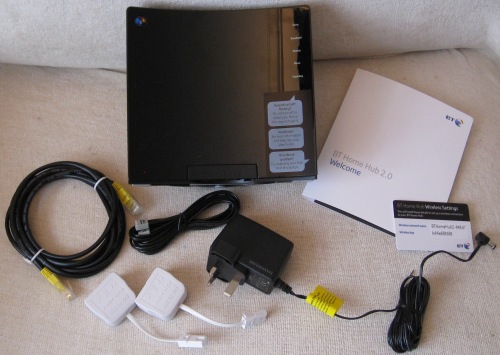
V2, i used it, set up power saver NEVER had a problem with it, and i had the internet phone set up with it too, which i know a lot of people had a problem with.
i didnt know there was a v3, heck i cant even find a V3 and i just googled it 0
-
0
-
1.0 is white with square corners...1.5 is white with rounded corners.... 2.0 is black and curved...there is not yet a 3.0...0
-
Sorry for confusion, I think the version I'm thinking of is the 1.0 however mine is black. Not sure if that's a different revision or they simply ran out
I originally started on the ones which looked like netgear routers (piles of !!!!!), got told it was out of date, got the black one. Tried wangling a new curved one and they still haven't sent it, although they sent me a phone for the wrong model lol
EDIT..... I was correct, mine was a limited model :P
Versions 1.0 and 1.5 were also available in black for a limited time and a matching black Hub Phone was available.Owner of andrewhope.co.uk, hate cars and love them
Working towards DFD
HSBC Credit Card - £2700 / £7500
AA Loans - (cleared £9700)0


This discussion has been closed.
Categories
- All Categories
- 356K Banking & Borrowing
- 255K Reduce Debt & Boost Income
- 456.3K Spending & Discounts
- 248.5K Work, Benefits & Business
- 606.3K Mortgages, Homes & Bills
- 179.1K Life & Family
- 264.1K Travel & Transport
- 1.6M Hobbies & Leisure
- 16.2K Discuss & Feedback
- 37.7K Read-Only Boards