We’d like to remind Forumites to please avoid political debate on the Forum.
This is to keep it a safe and useful space for MoneySaving discussions. Threads that are – or become – political in nature may be removed in line with the Forum’s rules. Thank you for your understanding.
📨 Have you signed up to the Forum's new Email Digest yet? Get a selection of trending threads sent straight to your inbox daily, weekly or monthly!
The Forum now has a brand new text editor, adding a bunch of handy features to use when creating posts. Read more in our how-to guide
Ipod Help...

NJO_3
Posts: 444 Forumite
in Techie Stuff
Hi i cant find or play any podcast i download to my ipod, any1 know how to get them on?
Also i ran out of space so i tunes decided to whipe my playlist clean to free up space and removed playlists like 'most recent added' and 'most played' playlists, which i used to use a lot and now cannot :eek:
Any help would be great thanks
NJO.
Also i ran out of space so i tunes decided to whipe my playlist clean to free up space and removed playlists like 'most recent added' and 'most played' playlists, which i used to use a lot and now cannot :eek:
Any help would be great thanks
NJO.
0
Comments
-
Easy enough to fix...
Once you plug your ipod in, click on file/new smart playlist.
For "recently added" click on "date added" in the first box, "is in the last" for the second box and then however many days/weeks you want it to display e.g. 1 week.
For "Most played" do the same, and put "play count" "is greater than" then put a number, e.g. 10 would probably do it. Then click the next check box, and put it to
Limit to "100" "items" selected by "most often played"
I'll upload screenshots to show what I mean. And if you give me a minute, I'll show you how to find your podcasts...I need to go upstairs to find my ipod first.
Most played playlist: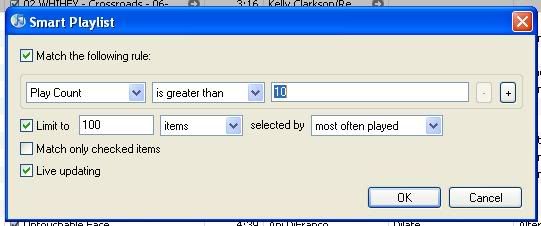
Recently Added: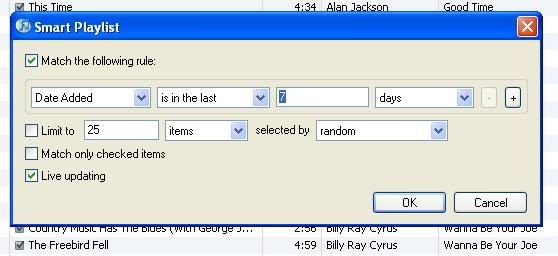
Remember these are only a rough guide, you can put however many tracks you want on your most played playlist and go back as far as you want for the recently added playlist."Beautiful young people are accidents of nature, But beautiful old people are works of art."
-- Eleanor Roosevelt0 -
OK, part 2: finding podcasts on your ipod. Idk what ipod you have, but I think they're generally much the same.
On your ipod click on "settings, then click on "main menu" and it'll show you a list of everything you can put on your main menu. The one marked "podcasts" will be marked as "off". Click on it to change it to "on" and it should be on your main menu now, and you can find your podcasts easily!"Beautiful young people are accidents of nature, But beautiful old people are works of art."
-- Eleanor Roosevelt0 -
Has the OP come back or did I do all that for nowt?"Beautiful young people are accidents of nature, But beautiful old people are works of art."
-- Eleanor Roosevelt0 -
just got to go work now thanks for the replys i will try 1st thing im up tommorow and check sure it will many thanks :T :T :T0
-
Glad to be of help. Any other questions, don't hesitate to PM me."Beautiful young people are accidents of nature, But beautiful old people are works of art."
-- Eleanor Roosevelt0 -
I also need advice.My daughter has given her ipod mini to her brother.The tunes on it were from apple mac.He apparently needs to format it to download tunes from pc .How does he do this please?0
-
The site here: http://www.askdavetaylor.com/how_do_i_pair_my_pc_ipod_with_my_new_mac.html
Has some handy hints (that's mac to PC, but it should be pretty much the same), I don't have a mac, so I didn't know if there was anything more complicated than that, but really all you have to do is restore the ipod to factory settings and it hopefully should work. There will be nothing on it when you restore it, so your son is free to
add whatever music he wishes onto it."Beautiful young people are accidents of nature, But beautiful old people are works of art."
-- Eleanor Roosevelt0 -
cheers eyelinerprincess vbmenu_register("postmenu_11475399", true); got the playlists sorted but the podcasts still dont appear in that section i turned on???
Thanks much appreciated.
NJO.0 -
PM'ed you. Try deleting and then updating the podcasts again. And in your podcasts tab in itunes, make sure the box is unticked to sync your podcasts."Beautiful young people are accidents of nature, But beautiful old people are works of art."
-- Eleanor Roosevelt0



This discussion has been closed.
Confirm your email address to Create Threads and Reply

Categories
- All Categories
- 353.5K Banking & Borrowing
- 254.1K Reduce Debt & Boost Income
- 455K Spending & Discounts
- 246.6K Work, Benefits & Business
- 602.9K Mortgages, Homes & Bills
- 178.1K Life & Family
- 260.6K Travel & Transport
- 1.5M Hobbies & Leisure
- 16K Discuss & Feedback
- 37.7K Read-Only Boards