We’d like to remind Forumites to please avoid political debate on the Forum.
This is to keep it a safe and useful space for MoneySaving discussions. Threads that are – or become – political in nature may be removed in line with the Forum’s rules. Thank you for your understanding.
📨 Have you signed up to the Forum's new Email Digest yet? Get a selection of trending threads sent straight to your inbox daily, weekly or monthly!
The Forum now has a brand new text editor, adding a bunch of handy features to use when creating posts. Read more in our how-to guide
Want to become a Forum Ambassador? Visit the Community Noticeboard for details on how to apply
Dell Inspiron 510m - wireless?
Comments
-
...and there still a problem.
I cannot connect to my wireless network. I phoned Netgear and they tried to connect it manually and automatically and it's not working. They said there is a problem with my laptop's adaptor and I should call Dell Support.
Any ideas? I thinkg it's weird though as it connects to unsecured networks...
Regards
Katerina:mad:0 -
what security do you have on the router? Have you got service pack 2 on the pc yet?Ever get the feeling you are wasting your time? :rolleyes:0
-
The security was done by Netgear, so i don't really know. Other laptops are able to connect if i put the password. Yes I've got service pack 2.
When i try to connect to my wireless network it doesn't even bring the pop up window asking for the password.
Thanks
katerina0 -
You can check security by going to www.routerlogin.com then wireless. Maybe you have set the laptop to remember the (wrong) password or encryption type.Ever get the feeling you are wasting your time? :rolleyes:0
-
I'm sorry I didn't understand what to do at www.routerlogin.com.
When i click on my wireless network i get the following message:
'Windows is unable to connect to the selected network. The network may no longer be in range. Please refresh the list of available networks, and try to connect again'
It doesn't give me the opportunity to enter my password.
:mad:0 -
http://www.routerlogin.com/setup.cgi?next_file=wire_sel.htm&todo=cfg_init
admin
password
WEP (Wired Equivalent Privacy)
or
WPA-PSK (Wi-Fi Protected Access Pre-Shared Key)
preferably wpa
Network Key (8 ~ 63 characters) put in a password
apply
on the pc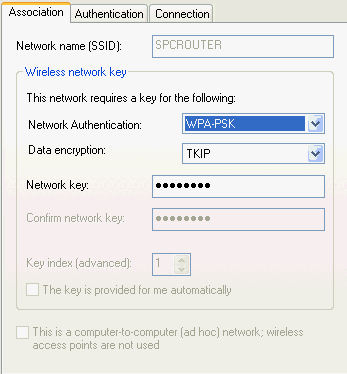
put in the same password, this screen can be found using wireless properties, under networks in control panel, or clicking on the icon bottom right, then properties, wireless networks Ever get the feeling you are wasting your time? :rolleyes:0

This discussion has been closed.
Confirm your email address to Create Threads and Reply

Categories
- All Categories
- 353.9K Banking & Borrowing
- 254.3K Reduce Debt & Boost Income
- 455.2K Spending & Discounts
- 246.9K Work, Benefits & Business
- 603.5K Mortgages, Homes & Bills
- 178.3K Life & Family
- 261K Travel & Transport
- 1.5M Hobbies & Leisure
- 16.1K Discuss & Feedback
- 37.7K Read-Only Boards