We’d like to remind Forumites to please avoid political debate on the Forum.
This is to keep it a safe and useful space for MoneySaving discussions. Threads that are – or become – political in nature may be removed in line with the Forum’s rules. Thank you for your understanding.
📨 Have you signed up to the Forum's new Email Digest yet? Get a selection of trending threads sent straight to your inbox daily, weekly or monthly!
The Forum now has a brand new text editor, adding a bunch of handy features to use when creating posts. Read more in our how-to guide
Computer Hard drive

sahun
Posts: 303 Forumite
in Techie Stuff
Is there anyway of seeing how the computer Cdrive space is being used throughout my computer?
As I have about 100GB of space being used, but I don't know what for!
Going onto add/remove programs doesn't help as the space is used by 'installed' programs.
As I have about 100GB of space being used, but I don't know what for!
Going onto add/remove programs doesn't help as the space is used by 'installed' programs.
Never knock on death's door, ring the doorbell and run away ..... he hates that :mad:
0
Comments
-
I quite like windirstat.
http://windirstat.info/
It shows you both in the folder tree and graphically, exactly where and what is using you hard disk space.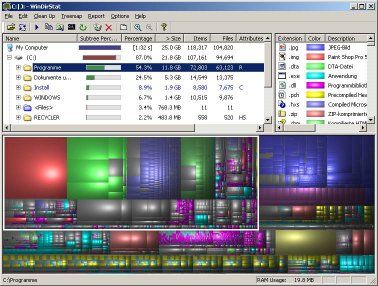 Free/impartial debt advice: National Debtline | StepChange Debt Charity | Find your local CAB
IVA & fee charging DMP companies: Profits from misery, motivated ONLY by greed0 -
cheers, ill take a lookNever knock on death's door, ring the doorbell and run away ..... he hates that :mad:0
-
can't think of a quick way off the top of my head but try this. For Windows XP.
Start, Run,
Type "Command"
on the DOS prompt type cd\
should now read c:\
now type
dir /a/s/os > files.txt
this will create a file called "files.txt" in the root of you hdd.
The files will be listed in directory order, with the files in each directory listed in size order. (smallest first)
HTH.0 -
the last post popped up whilst I was typing,
so as above then really.0 -
The Disk Usage Analysis tool that is available as part of many of the Debian-based distros is superb - concentric rings show each of the main directories, with rings further out showing subfolders, with files in the outermost rings. The bigger the file, the bigger the segment, and mousing over each ones gives location and size. Excellent!0
-
thanx ploddy, im running vista thoughNever knock on death's door, ring the doorbell and run away ..... he hates that :mad:0
-
The Disk Usage Analysis tool that is available as part of many of the Debian-based distros is superb - concentric rings show each of the main directories, with rings further out showing subfolders, with files in the outermost rings. The bigger the file, the bigger the segment, and mousing over each ones gives location and size. Excellent!
Got a name for that? I'm not on a debian based one, but it sounds a bit nicer than using 'fsview' under this distro (Mandriva).Free/impartial debt advice: National Debtline | StepChange Debt Charity | Find your local CAB
IVA & fee charging DMP companies: Profits from misery, motivated ONLY by greed0 -
just used the windirstat, and it has accounted for 170gb of the 250gb hard-drive, but 'my computer' says i have 23gb free, not the the 60oddGB i should have.Never knock on death's door, ring the doorbell and run away ..... he hates that :mad:0
-
fermi - I didn't realise that it's actually called Baobab and it's by Fabio Marzocca, and as you'd expected it's under GNU public licence.
There's also GdMap, which looks rather like the windirstat pointed to above, but I find that harder to read than Baobab.0 -
just used the windirstat, and it has accounted for 170gb of the 250gb hard-drive, but 'my computer' says i have 23gb free, not the the 60oddGB i should have.
Not sure, but I know XP was/is bad enough at hiding huge quantities of data for it's backup/restore functions. I can only presume that Vista hogs and hides even more space for this.Free/impartial debt advice: National Debtline | StepChange Debt Charity | Find your local CAB
IVA & fee charging DMP companies: Profits from misery, motivated ONLY by greed0






This discussion has been closed.
Confirm your email address to Create Threads and Reply

Categories
- All Categories
- 353.5K Banking & Borrowing
- 254.2K Reduce Debt & Boost Income
- 455K Spending & Discounts
- 246.6K Work, Benefits & Business
- 602.9K Mortgages, Homes & Bills
- 178.1K Life & Family
- 260.6K Travel & Transport
- 1.5M Hobbies & Leisure
- 16K Discuss & Feedback
- 37.7K Read-Only Boards