We’d like to remind Forumites to please avoid political debate on the Forum.
This is to keep it a safe and useful space for MoneySaving discussions. Threads that are – or become – political in nature may be removed in line with the Forum’s rules. Thank you for your understanding.
📨 Have you signed up to the Forum's new Email Digest yet? Get a selection of trending threads sent straight to your inbox daily, weekly or monthly!
The Forum now has a brand new text editor, adding a bunch of handy features to use when creating posts. Read more in our how-to guide
Can I use a wii console on my pc monitor or Pc?

maisy-mai
Posts: 160 Forumite
in Techie Stuff
Hi having managed to find a wii console which comes this week .:T
I'm wondering if there is a way to use it on my 21" monitor .?
I'm running xp media centre 2005 edition .
has anyone done this or know of a way or what cables/ gadget I need to do it ?
or how to go about it ?
thanks ever so much if you can help
I'm wondering if there is a way to use it on my 21" monitor .?
I'm running xp media centre 2005 edition .
has anyone done this or know of a way or what cables/ gadget I need to do it ?
or how to go about it ?
thanks ever so much if you can help
If you like what I wrote
please click the thankyou box :T
please click the thankyou box :T
0
Comments
-
-
I'm afraid you would need a converter box like http://www.js-technology.com/product_info.php?cPath=22&products_id=57&osCsid=8b82661cb610af93c477c6058eb77da5
Component to VGA won't work unless the VGA signal can accept a component signal, which is unlikely on a PC monitor. VGA connections on flat screen TV's and projectors sometimes have VGA inputs that can do this but that's more a space issue. As component is an analogue connection, to use a monitor DVI-D connection again would require a conversion to digital. I have used JS products and they work fine and the guy that runs the company is well respected in the world of AV.0 -
just looked at monitor has a vga input connection only found that as it says it !!.
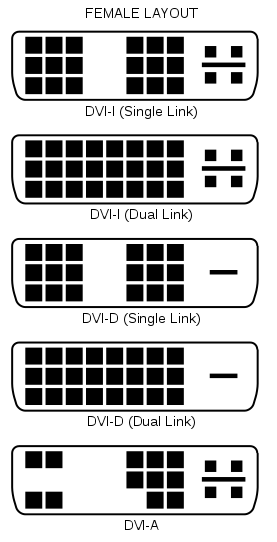
dvi conection in use already with pc base .
totally green with what I need thanks for helping .
so the cables all I need thats quite easy !!do I need to just turn the monitor on or the computer as well to use ??If you like what I wrote
please click the thankyou box :T0 -
*If* it works (see gnatschuffed's post) remember your going to need speakers too.0
-
I already have tv on the pc through media centre if that helps its an hp 21" flat screen monitor if that makes a difference have a dvi also currently going to pc but could disconnnect this on monitor
think I've lost the plot now if anyone can still help !!!If you like what I wrote
please click the thankyou box :T0 -
No - the video cable does not carry sound - you need a sound output.
It might just be easier to connect it to a TV like 99% of people do 0
0 -
update
just looked at the tower and have the red yellow white phone inputs on it like this
I
sdo does this mean if I plug wii into this it will work ???? cant be that easy ????????
I am getting freeview tv through windows media centre so thats digital????
just found in book quote "if your using a video games console device hp recommends that you connect it directly to your desplay device using video signal switching hardwear .
Is this this box???
and also found this
Nintendo home consoles are designed for use through home televisions and VCRs, using standard A/V, or RF connectors. Computer monitors typically do not have these connections. There are however two ways a hookup to a computer monitor could be accomplished:
With a PC TV Card:
A TV card inserted into your PC may allow you to connect your system if the card has the proper connections (such as RF, A/V, or Coaxial). However, we have found that the image quality is not as clear as it is on a TV, in most cases.
With a Direct Connection (RGB or DVI Cables):
Nintendo does not manufacture any cables to make an RGB or DVI connection. While other companies may manufacture wires that can make this possible, we are not able to recommend them, as they are not licensed by Nintendo.
was hoping to make use of the 21" flat screen monitor thought it would be simple as we watch freeview tv on it through the media centre. !!If you like what I wrote
please click the thankyou box :T0 -
Connecting via a PC will give you a washed out picture. It is always best to connect directly. If you want to maximise picture quality by outputting at 480p using the component (YpBpR) red-blue-green (not RGB!!) connection, you will need something like the JS-Tech converter box in my earlier post to convert the signal from component to VGA. Using composite video (yellow=video, red/white= audio) will give you a poorer image and would only worsen if ran through a TV card. Freeview might be digital but it's hardly the best example of picture quality.
It's up to you though!0 -
I've looked into connecting a wii to a monitor too and concluded it's not worth the hassle. Unless your monitor has a component input then like gnat said you need a converter which can be pretty expensive to get. Also the picture quality isn't great and the tv card causes games to lag.0
-
thanks for all the help .
Well think its now been taken out of my hands the wii arrived today jammed about an hour ago made this terrible screening sound in the middle of a game neally woke my daughter up and has packed up !!! wont even turn on now argos out of stock !!! didnt even get to try it on the comp!!!!!If you like what I wrote
please click the thankyou box :T0




This discussion has been closed.
Confirm your email address to Create Threads and Reply

Categories
- All Categories
- 354.5K Banking & Borrowing
- 254.4K Reduce Debt & Boost Income
- 455.4K Spending & Discounts
- 247.4K Work, Benefits & Business
- 604.2K Mortgages, Homes & Bills
- 178.5K Life & Family
- 261.7K Travel & Transport
- 1.5M Hobbies & Leisure
- 16.1K Discuss & Feedback
- 37.7K Read-Only Boards