We’d like to remind Forumites to please avoid political debate on the Forum.
This is to keep it a safe and useful space for MoneySaving discussions. Threads that are – or become – political in nature may be removed in line with the Forum’s rules. Thank you for your understanding.
📨 Have you signed up to the Forum's new Email Digest yet? Get a selection of trending threads sent straight to your inbox daily, weekly or monthly!
High frequecny noise from back of computer?

martin57
Posts: 774 Forumite
in Techie Stuff
H everybody,
I have an older mesh computer bought 2000 and it had developed a lot of noise which seemed to be coming from power supply unit at back. I replaced the psu x-power 400 watt from maplin and though it is better there is sill a kinda high pitched frequency coming from back of computer which varies a bit in intensity. I have cleaned out and changed the fan on the heatsink on the athlon 700 cpu and also cleaned any dust from the graphics card fan, but still the noise is there. Am I right in thinking that it may not be the psu atall (even though the noise seems to be coming from there) that it may be in fact one of the following, cpu heatsink fan, graphics card fan or hard disk drives. What is the best way to determine exactly where the sound is coming from and to fix it?
regards
martin57
I have an older mesh computer bought 2000 and it had developed a lot of noise which seemed to be coming from power supply unit at back. I replaced the psu x-power 400 watt from maplin and though it is better there is sill a kinda high pitched frequency coming from back of computer which varies a bit in intensity. I have cleaned out and changed the fan on the heatsink on the athlon 700 cpu and also cleaned any dust from the graphics card fan, but still the noise is there. Am I right in thinking that it may not be the psu atall (even though the noise seems to be coming from there) that it may be in fact one of the following, cpu heatsink fan, graphics card fan or hard disk drives. What is the best way to determine exactly where the sound is coming from and to fix it?
regards
martin57
0
Comments
-
Hi Martin
Well the psu control voltages are generated from within the unit, high frequencies are used to generate the power requirments, so that is indeed what you are hearing, perhaps.
Each fan in the pc is spinning and you can stall each one for a few seconds with your finger to determine which is the noisy one. Then you can replace the fan with a fanless solution, replace the fan or drop some fine oil onto the internal bearings by removing a small label. Old fans had plastic bearings, so consider a replacement fan with ball bearings.0 -
Also try unplugging power to the hard disk(s) to see if that is the source .. sometimes they can get noisey over time
ivanI don't care about your first world problems; I have enough of my own!0 -
high pitch like a jet engine starting up? normally indidates a faulty hard drive. so unplug the power to the hard drive and switch the pc on. it wont boot but will tell you the source of the problem.
If that isnt the problem then you start looking elsewhere. other hard drives maybe cd/dvd drives case fans, a lot of graphics cards now have fans on them too, just remove the power and switch the pc onto see if the noise is there or not. Do them one at a time so you can trace the fault. if you don't find it then your fault proberbly lies with the cpu cooler again you can remove the power to this fan but you need to only do it for a short time or risk dammageing the cpu. if you do try the cpu fan leave the pc off for a while to let the heatsink and everything cool down then remove the power switch on and then switch off as soon as you realise it is or isnt that do not let it boot in to windows. pull the power if you need a quick way of switching it off.0 -
get a thin wooden dowell/stick, and you can use it like a stethoscope.
it will/can indicate the noise to that device. we used this method on car engines.
dont use a pencil! the lead is a great conductor!
take care.Get some gorm.0 -
Hi again,
Thanks for all replies, well I have tried to isolate the noise and it seems to be coming from the fan on the nvidia graphics 5200. Its a 40mm fan and though it spins easily enough when I put it in the noise starts, without the card the psu seems to be running ok.
I have looked at replacement 40mm fans for the nividia card on the maplin site at
http://www.maplin.co.uk/Search.aspx?criteria=fan&source=15&menu=-2&WorldSearch=Y&SD=Y
as there is a maplins near me would any of the 40mm ones do or is there a particular one I should go for? By the way the spec on the old fan says
dc fan, 12c010a
thanks
Martin570 -
It depends.
Most grapics coolers are not just a standard square fan, they are integrated in to the heatsink also and you may find that it is the heatsink that is mounted to the graphics card.
you may need to buy somthing like this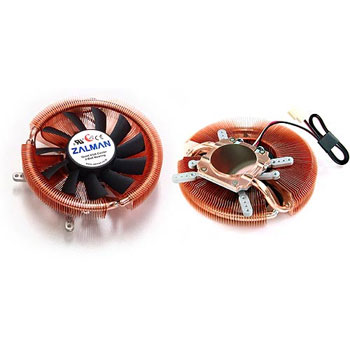
or maybe this, that does specify the nvidia 5200 in its list that it fits.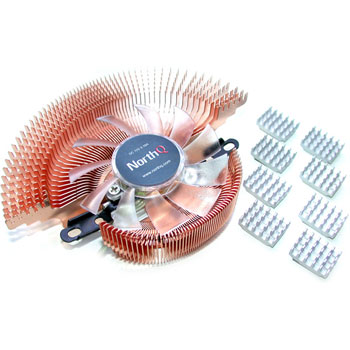
It may be an option to look at replaceing your graphics card you can get nvidia 8500 chip cards for about £25 now0 -
i would certainly replace the card. you can get a better card for not much more money than repairing the existing one.
you might even get summat back for yours on ebay?Get some gorm.0 -
Hi again,
As its an older computer with I belive the older type of slot for the graphics card (agp slot or whatever you call it) would the nvidia 8500 fit a motherbaord ga 71xe?
thanks
martin570 -
i dont mean to hijack this thread but i also have the same problem. my old mesh pc has an asus a7a266-e motherboard with a sick NVIDIA GeForce3 Ti 200.which nvida card can i replace it with ?
the motherboard has AGP pro slot!!! if that is any help.
thanks for any help:hello: :j0




This discussion has been closed.
Confirm your email address to Create Threads and Reply

Categories
- All Categories
- 355.5K Banking & Borrowing
- 254.8K Reduce Debt & Boost Income
- 456.1K Spending & Discounts
- 248.1K Work, Benefits & Business
- 605.6K Mortgages, Homes & Bills
- 179K Life & Family
- 263.4K Travel & Transport
- 1.5M Hobbies & Leisure
- 16.1K Discuss & Feedback
- 37.7K Read-Only Boards