Ready, steady… save!
You don’t need a chart to join in. Here are 2 ways to record your savings:
1. Cross it off
Pop a chart into your first post. Saved an amount? Cross it out! Read more »
£0.01 £0.02 £0.03
2. Write it down
Skip the chart and add updates to your first post. Read more »
“Another +£3 saved today. Go me!”
Use +£ before each new saving so it counts towards your total.
📨 Have you signed up to the Forum's new Email Digest yet? Get a selection of trending threads sent straight to your inbox daily, weekly or monthly!
Santander - amending Standing Orders





Has anyone managed to successfully amend a standing order with Santander recently?
Every time I have tried recently, I get an error message.
Santander have also updated how they display the list of standing orders and removed the very helpful "mandate number" reference from the list..
Comments
-
i was about to make the same comment about the annoying removal of the mandate numbers from the list.
I have several SOs going out to Regular Savers which are tricky to identify as the Building Societies don’t allow me to use an easy to recognise reference.
1 -
I have just changed 2 SOs today, without any issues (apart from having to do it online rather than in the app).
I hadn't noticed they removed the mandate number as I never used it for anything. I (ab-)use the payee name to easily identify / distinguish between my own accounts. For example, if my account 12345678 is with Lloyds, the payee name is "FL Lloyds 5678".
Payees can only be set up like this in the app, not online. It obviously fails CoP, but that's not an issue for me as I set up the payee in these steps:- "Add new payee" with the actual account name and do the CoP check
- when CoP confirmed, press "Change" next to the payee details
- then "Add new payee" again, and change the real account name to something meaningful, such as "FL Lloyds 5678" in my example above
I have been using this for years with hundreds of payees and never had a single issue with it. None of the receiving banks / Building Societies ever raised an issue and all my SOs execute without problems.
1 -
I have been using this for years with hundreds of payees and never had a single issue with it. None of the receiving banks / Building Societies ever raised an issue and all my SOs execute without problems.
Surely the receiving institutions wouldn't be any the wiser about your choice of payee name anyway, i.e. there's never been any sort of real time CoP processed by the recipient and it's just the sort code and account number that are used to identify the destination account?
1 -
Yes sure - it's just that some of the companies give deposit instructions that make it sound as if the actual account name must be used as the payee name. In reality, it is as you say - all that counts is sort code, account number, and reference for those accounts which are identified by reference number.
0 -
This is an example of strongly worded instructions given by a Building Society. We can happily ignore these, and use a payee name that suits us. I also always select ‘personal account’ for payments to my own accounts
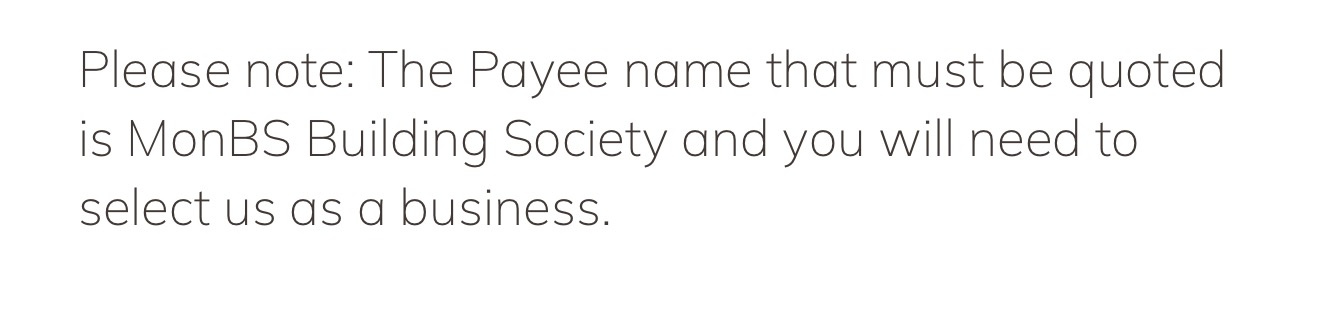
EDIT: the above instruction is displayed once you completed an application for a MonBS account. They then also send you a letter by email, in which they give you different instructions for the payee name (which can also be ignored)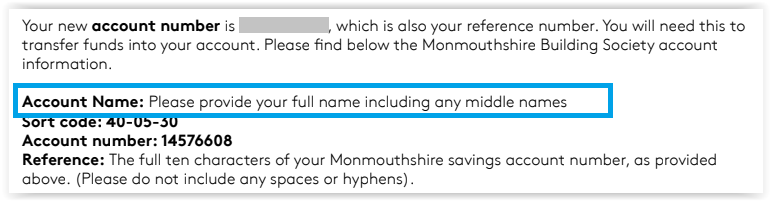 0
-
Having a problem myself.
I can see the SO in the app, but not amend them.
When I click on the SO tab in the browser/online, I just get an error
Something went wrong
Please try again. If you continue to have problems, contact us
If I try to transfer money from the current account to the Regular saver, in the App, I get an error:
That didn't work
Something went wrong
If I try to do the transfer online, I get a different error, and a cat picture:
There's an issue with our server
Please try again later. If you continue to have problems, please contact us
Utter garbage.
If I actually manage to get the switching in bonus, I will be switching away asap.
0 -
The title of this discussion thread reminded me of the long-lasting* problem with Santander standing orders: there are elements in Santander standing order instructions that cannot be changed eg the reference data. Even though the Santander system allows you to change the data and the changes subsequently appear in the standing order details, the computer system which actually despatches the funds from Santander to the receiving bank sends the ORIGINAL data accompanying the funds - the backend system is not changed by your amendments!
I learnt that to amend an existing Santander standing order, the safest way is to cancel the original and to create a new standing order incorporating the changes.
* Back in 2015, I posted the evidence for this problem; there were posts from others about the fault going back to 2013 and it still hadn't been fixed a couple of years later. I came to the conclusion that Santander had decided that the cost of making the necessary changes to the the software deep inside their banking system outweighed the cost of paying compensation. The fault may have been fixed in the last ten years, but I'm not inclined to retry the testing.
0








Confirm your email address to Create Threads and Reply

Categories
- All Categories
- 355.9K Banking & Borrowing
- 254.9K Reduce Debt & Boost Income
- 456.2K Spending & Discounts
- 248.4K Work, Benefits & Business
- 606.1K Mortgages, Homes & Bills
- 179K Life & Family
- 263.9K Travel & Transport
- 1.5M Hobbies & Leisure
- 16.2K Discuss & Feedback
- 37.7K Read-Only Boards