We’d like to remind Forumites to please avoid political debate on the Forum.
This is to keep it a safe and useful space for MoneySaving discussions. Threads that are – or become – political in nature may be removed in line with the Forum’s rules. Thank you for your understanding.
Alphabetising 200GB plus of classical music arranged in composer order
Comments
-
Tried the script in powershell, entered source and destination but did not copy.
0 -
The backtick line continuations used in the example in the comment block could be problematic, depending on how the script was transferred from the forum. They must be immediately followed by a newline without any whitespace sneaking in. Could apply to the example usage, the two Write-Progress calls, and the recursive call.
It might be worth taking us through exactly how you are creating and executing the script, and exactly the output. It should prompt you for the two mandatory parameters if they are missing due to a space creeping in after the backtick. You could also deliberately omit them to check you have reconstituted the script correctly and are running it correctly.
On a separate safety note - it is worth bearing in mind that running scripts you don't have a basic understanding of is risky. In this case, it looks ok, but such things can harbour something malicious.
2 -
I get the warning about scripts from my malware program every time.
I copied exactly as written just without the number in front of the lines (which does not copy) into a ps1 file. Powershell also gave a script warning answered yes to all. Source and destination were asked and answered, a flash of red text, window immediately closes and nothing happened.
0 -
Quoting the above post over here to keep the S&I thread clean.
There's no shame in not being able to get these scripts to work, or in me suspecting you would struggle to get them implemented on your system. It is simply too technical a solution for most people.
The feedback you provided in your other post illustrates the issue perfectly. The fact you were prompted for missing arguments speaks directly to the point I was making earlier. When you see a "flash of red text" before the window immediately closes, that happens because the script was launched via a transient process rather than inside a persistent PowerShell window, making it impossible to read the error output. You are faced with navigating execution policies, path formatting, the possibility of copy/paste formatting errors, and anti-malware interference.
Coming back to your summary, you seem to be fixated on the AI aspect rather than the broader technical reality. As highlighted earlier in the thread, any PowerShell or batch script running natively under Windows must go through standard file system APIs. That means any script solution will inherently require re-copying all 200 GB+ of data, which fails your need for a fast, in-place sort.
The fact that conventional searching, AI prompts, and forum members all point toward either slow file-rewrites or buggy third-party utilities isn't a personal failing. Ask a group of humans or an AI chatbot for an off-the-shelf solution to a problem this obscure, and you'll get a collection of unusable answers in either case.
3 -
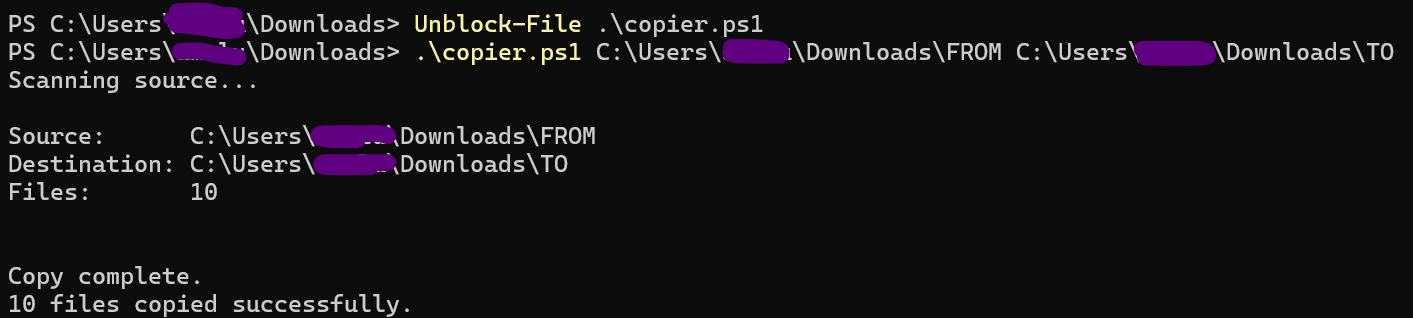
The script works fine from a command shell, you may need to allow Windows to execute the script. The destination folder MUST be empty.
 2
2 -
Fast is not a priority, correct result is. I just think copying that much data and then reordering it all by copying again to temp folders, deleting contents, and back to originals is not an elegant solution and there must be a better way for a single copy.
I went through the text line by line and found a bracket missing. The script now runs. I have finished the main job by CopyInOrder so setup a test of 1400 mp3 files only 2 folders deep rather than 3 and ran the script to another card. For some reason it stops at copy 487 and closes. Run again and it does not continue. Repeated from scratch 3 times with the same result.
0 -
The elegant solution that doesn't involve a hardware upgrade is using the right OS for the job (i.e. booting into a Linux Live CD and using fatsort). If you don't find that palatable, the one-by-one file copy is all you have left.
So the transcription error was found and fixed, and now it is choking on a specific file. Obvious things to check are path length and the presence of any special characters in this specific filename that could be causing issues. A bit of trial and error is inevitable when developing something like this from scratch.
2 -
Can't see anything wrong with filenames, there's a virtually identical filename already copied several times. Did the same test in CopyInOrder and it did the lot ok, also in command line with the bat file created from the program and that did the lot ok too. Solution is good enough for the few times I will need it for the occasional song or playlist update.
0







Confirm your email address to Create Threads and Reply

Categories
- All Categories
- 355.7K Banking & Borrowing
- 254.9K Reduce Debt & Boost Income
- 456.1K Spending & Discounts
- 248.3K Work, Benefits & Business
- 605.9K Mortgages, Homes & Bills
- 179K Life & Family
- 263.7K Travel & Transport
- 1.5M Hobbies & Leisure
- 16.2K Discuss & Feedback
- 37.7K Read-Only Boards