We’d like to remind Forumites to please avoid political debate on the Forum.
This is to keep it a safe and useful space for MoneySaving discussions. Threads that are – or become – political in nature may be removed in line with the Forum’s rules. Thank you for your understanding.
Change text from lower to uppercase in word FIXED




So I have made a mistake which I did google but can't fix.
I have written speech in a long document in a mix of styles e.g
She said , “of course."
And
She said , “Of course."
Now I think the second is correct so how do I change all
"lower to "upper
I could do a search for every letter - but I am hoping there's a more elegant way.
Thank you all in advance.
BTW if this is
She said , “of course." please let me know.
Comments
-
I can't see any clever way to automate this in a word processor (from the sounds of it, it's not the same sentence that needs changing, and it's not as simple as 'all quotes should start with a capital letter' as quoting part of a sentence would start lower case) - however I suspect this is something a LLM would excel at (of course, be concise with the prompt and check the output).
My suggestion is to throw this challenge to ChatGPT or Gemini or something (and let us know how you get on!).
Know what you don't3 -
The second version is correct, assuming the quoted words form a complete spoken sentence:
She said, “Of course.”
There should be no space before the comma, and the full stop belongs inside the closing quotation mark because it ends the spoken sentence.
Lower case would be correct only where the quotation is a fragment incorporated into the surrounding sentence, for example:
She described the answer as “of course entirely predictable”.
2 -
either can be correct, the former would be a complete quote, the later would be a fragment of a quote.
With Word options are limited, use Find, use the More Options and select Use Wildcards and search for[""“'‘][a-z]
Eyeball each one and correct as appropriate
2 -
My initial idea was to use find and replace in MS Word and find "of course" and replace with "Of course".
As someone else said, chatGPT might well do it in 2 minutes but I imagine you'd have to write a fairly specific prompt such as "find any instance where "of course" is typed and replace it was "Of course".
Maybe you could feed back what worked
0 -
What might be even more interesting is to ask chatgpt to spell and grammar check the document and see what comes up.
specify UK English.
0 -
Our interpretations are different - I interpret the OP that they haven't capitalised any of their quotes, and they were asking for methods to do so. The 'She said , “of course."' I presumed was just an example, else if it's the exact same specific sentence throughout it would be a 5 second job in Word with CTRL+H. You could well be right.
The prompt doesn't have to be convoluted - I'd imagine just "Correct the capitalisation and punctuation of this text based on UK English: " would do it. They could also add spelling and grammar if they want though I'd definitely proofread the output.
Know what you don't1 -
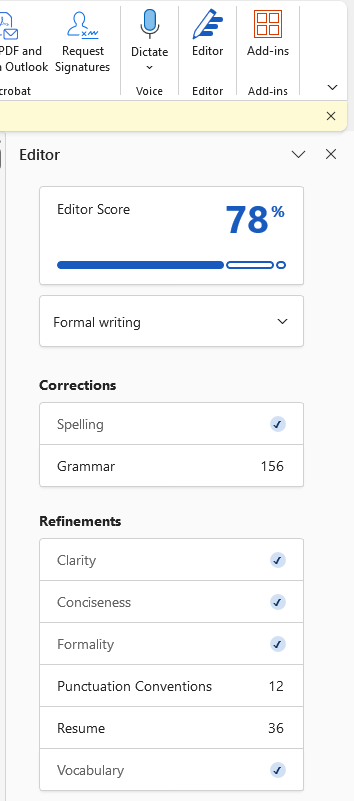
Could just load the Editor add-in to Word and have it look for grammar and punctuation errors.
 2
2 -
Has the OP said which word processor he is using?
No reliance should be placed on the above! Absolutely none, do you hear?1 -
Nope! That is pertinent to getting the right answer, is it not? It could be just text in Notepad or other....
2 -
If we're talking about MS Word, then it also supports VBA macros.
Google offered to write an app script for Google Docs, and it came up with this. It looks plausible, but I haven't tested it.
function capitalizeAfterQuotes() {
  const doc = DocumentApp.getActiveDocument();
  const body = doc.getBody();

  // Matches straight or curly opening quotes followed by a lowercase letter
  // Group 1 captures the quote, Group 2 captures the letter
  const regex = "([\"'“‘])([a-z])";

  let found = body.findText(regex);

  while (found !== null) {
    const textElement = found.getElement().asText();
    const start = found.getStartOffset();

    // Get the lowercase letter (the second character of the match)
    const lowerLetter = textElement.getText().substring(start + 1, start + 2);
    const upperLetter = lowerLetter.toUpperCase();

    // Replace the lowercase letter with its uppercase version
    textElement.deleteText(start + 1, start + 1);
    textElement.insertText(start + 1, upperLetter);

    // Find the next occurrence from the start of the document
    found = body.findText(regex, found);
  }
}
1












Confirm your email address to Create Threads and Reply

Categories
- All Categories
- 355.7K Banking & Borrowing
- 254.9K Reduce Debt & Boost Income
- 456.1K Spending & Discounts
- 248.3K Work, Benefits & Business
- 605.9K Mortgages, Homes & Bills
- 179K Life & Family
- 263.7K Travel & Transport
- 1.5M Hobbies & Leisure
- 16.2K Discuss & Feedback
- 37.7K Read-Only Boards