We’d like to remind Forumites to please avoid political debate on the Forum.
This is to keep it a safe and useful space for MoneySaving discussions. Threads that are – or become – political in nature may be removed in line with the Forum’s rules. Thank you for your understanding.
Compromised hotmail account





My mother has a Hotmail account. Mid-morning today I got a scam email from her. The Reply To field had a letter different from her usual email address (e.g. … ick … became … icck …).
I also got a notification (I am her recovery email) that:
Newsletter Software SuperMailer connected to the Microsoft account XXXX |
|---|
If you didn't grant this access, please remove the app(s) from your account. |
I logged onto her Microscort account, changed the password, and changed the app to Block access. Thought that would sort it out but no.
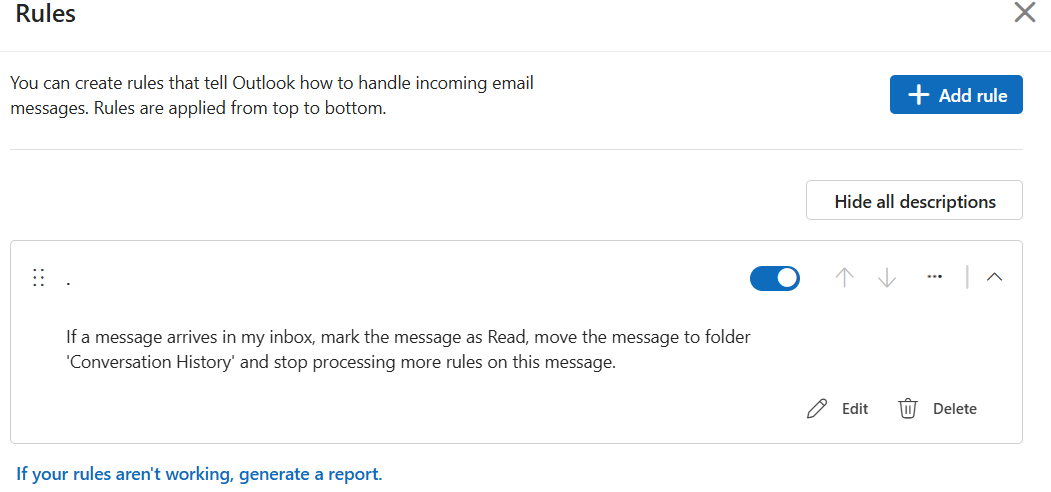
Since then, I have been keeping an eye on her Hotmail account via the web. I can see the account being used to draft emails in response to people who have answered the original scam email. I can also see in Conversation History some emails which then are deleted into the Deleted items folder, and then Deleted from there. So it appears that someone, or something, still has access to her account somehow.
Nothing can be sent from the account at present as the original scam emails seem to have used up her daily email limit.
I'm stuck at what to suggest next. She is miles away and cannot deal with anything technical on her iPad / iPhone.
Any suggestions of what I can do next, in words of less than one syllable, would really be appreciated.
Comments
-
Set up 2FA if you haven't already done so. If you get into it with a password only its about as secure as Swiss Cheese.
2FA = authenticate log-on via an app like this:
https://www.microsoft.com/en-gb/security/mobile-authenticator-app
You can then remove the password and sign it without it - it sounds counterintuitive but if there is no password to compromise the only way to log in is via app approval
https://support.microsoft.com/en-us/accounts-billing/security/how-to-go-passwordless-with-your-microsoft-account2 -
Thanks N_J.
Mum is 84 and will not cope with 2FA unfortunately.
I have been looking into the Microsoft account When and where you used your account. There's a session from 9 hours ago, which it says is my current session. It looks legit. There's one from 28/06 with an iOS and Safari details. I suspect that's Mum.
However, 11 hours ago (so at about 8am) is one which is from a Windows device, London area and with the 'Account alias' of Mum's email address. I'm not convinced by that. The IP address is, according to Google, "Associated with UK Dedicated Servers Limited and has been flagged for potentially high fraud risk due to its web traffic."
There is a link to 'Secure your account' if it looks unfamiliar next to the entry for the sign in. Would it be a good idea to click that?
0 -
After you changed the password, did you log out all existing sessions (otherwise existing sessions e.g. a compromised one, may stay connected until they expire).
Instructions
Also, have you shared the new password with your mother, and if so how?
1 -
Forgot to add:
Are there any App Specific passwords setup (should be shown on the page linked above), as they can persist after a main password change
1 -
After you changed the password, did you log out all existing sessions (otherwise existing sessions e.g. a compromised one, may stay connected until they expire).
Instructions
Also, have you shared the new password with your mother, and if so how?
Ah, no. Will do that - done
I texted her the new password, not email.
0 -
Are there any App Specific passwords setup (should be shown on the page linked above), as they can persist after a main password change
I didn't spot any, and suspect that she is not techy enough to have that set up.
0 -
But someone else may have created one try and survive a password change.
1 -
I can't find anything there - have rummaged but not sure what I'm looking for. I certainly didn't receive any notifications of any passwords set up (other than the change I made myself).
Have done the Sign everyone out - but that says it may take up to 24 hours. I guess I'll only know it has worked when Mum says she can't log in?
0


Confirm your email address to Create Threads and Reply

Categories
- All Categories
- 355.8K Banking & Borrowing
- 254.9K Reduce Debt & Boost Income
- 456.1K Spending & Discounts
- 248.3K Work, Benefits & Business
- 605.9K Mortgages, Homes & Bills
- 179K Life & Family
- 263.7K Travel & Transport
- 1.5M Hobbies & Leisure
- 16.2K Discuss & Feedback
- 37.7K Read-Only Boards