We’d like to remind Forumites to please avoid political debate on the Forum.
This is to keep it a safe and useful space for MoneySaving discussions. Threads that are – or become – political in nature may be removed in line with the Forum’s rules. Thank you for your understanding.
Stop red ! on onedrive icon on taskbar





My Onedrive is 82% full so they've decided to put a red ! on top of the 'colud' icon in the 'notification area'
Is there a way of getting rid of said "!"
I don't want/need extra storage! W10 PC
Comments
-
That's not due to it being full or likely it even being 82% full.
I suggest that you run a search online to find the solution to fit your case, as there are a few possible scenarios.
0 -
Does W10 have the OneDrive Cloud icon on the Taskbar/Notification area? If so, click it, should give some reasons for the alert.
0 -
I clicked it yesterday and one of the reasons was something to do with "Personal Vault.ink" which I deleted but now the only other issue now is "you're running low on storage"
I did uninstall MS 365 and reinstall and think that is what's upset it. 🤷♂️
0 -
I think I've seen that before, when my girlfriend signed into my Office program. Something to do with being signed into another account. There's OneDrive that comes with Windows 10 with perhaps 5GB and then the 1TB that comes with your 365 account. Perhaps syncing to the wrong one.
TBH, I removed all traces of OneDrive from the PC that I am using, so I cannot replicate your issue.
1 -
Here's one possible solution: https://learn.microsoft.com/en-gb/answers/questions/5760408/notification-says-onedrive-is-full-but-its-not
1 -
Just looking back at this again ….
When I click on settings in one drive, I get this
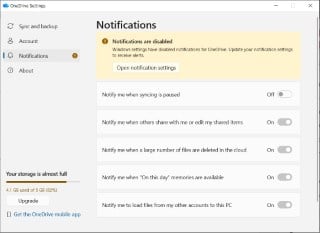
but when I click on open notification settings, I get this
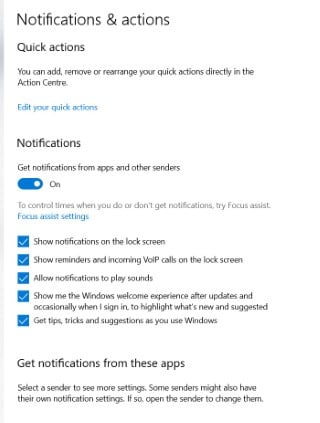
with no mention of one drive (if I scroll down!)
Is it just stressing as I've used 82% capacity or is there something else?
0 -
Yes, it's just telling you that you are reaching the capacity of the free 5GB that comes with Windows. If you wish to utilise the 1TB, you need to toggle some settings. Problem with that is what happens if the 1TB storage disappears…
2





Confirm your email address to Create Threads and Reply

Categories
- All Categories
- 355.8K Banking & Borrowing
- 254.9K Reduce Debt & Boost Income
- 456.1K Spending & Discounts
- 248.3K Work, Benefits & Business
- 605.9K Mortgages, Homes & Bills
- 179K Life & Family
- 263.7K Travel & Transport
- 1.5M Hobbies & Leisure
- 16.2K Discuss & Feedback
- 37.7K Read-Only Boards