We’d like to remind Forumites to please avoid political debate on the Forum.
This is to keep it a safe and useful space for MoneySaving discussions. Threads that are – or become – political in nature may be removed in line with the Forum’s rules. Thank you for your understanding.
Google Chrome blocking apps?





I've had problems opening up an desktop based application for about a week, although after trying several times I eventually get it to open and work. Strangely enough once I get it opened, I can exit and open in without problems; that is until the next morning, then the problem starts again. I've been using this app for about 9 months but only had problems for the last week.
Today, when trying to open it I saw a popup in the corner which abruptly disappeared, but I think it said Google Chrome was blocking that application because it didn't have permissions, but I'm not sure. Bear in mind I'm not opening the application through Chrome, it's a stand alone application on my computer, although there's a web based version I don't use.
Has Google updated Chrome lately causing these problems? How can it if I'm not accessing it through Chrome? Can I check what Chrome is blocking?
Comments
-
Assume a Windows machine?
Might help if you say what the app is.
Chrome is regularly updated, seems to be around monthly, but as you say it seems unlikely that Chrome (an app) is stopping your other app from running. Any message/error indicated?
1 -
Chrome is unlikely to be blocking a normal desktop app directly. More likely it’s Windows Security/SmartScreen, Defender, or the app using an embedded Chromium/WebView component, which makes the message look Chrome-related.
I’d check Windows Security > Protection history, and also whether the app has updated recently. If it only fails first thing, then works after a few goes, it may be doing a licence, update or cloud login check.
Best test: note the exact pop-up wording next time.
1 -
It's a foreign brokers software so not a well known application. When I contact their help desk, they are all off on a US holiday, be back on Monday!
Unfortunately, the Google message only stays on for seconds, I'll try to screenshot it next time. Unfortunately nothing is consistent.
I had protection turned off temporarily, but have switched it on again. The app started up OK in seconds with the protection on just now. I bet it doesn't tomorrow though!
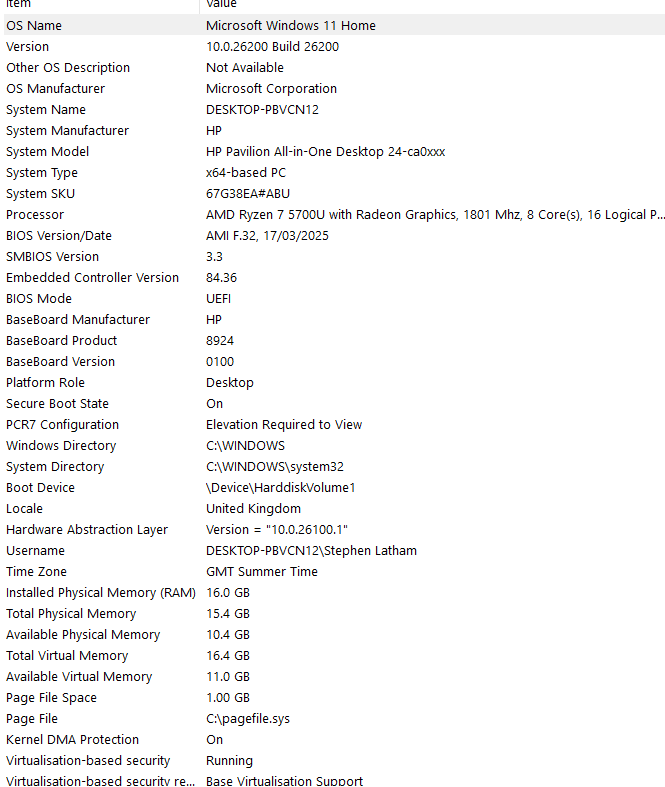
System here
 0
0





Confirm your email address to Create Threads and Reply

Categories
- All Categories
- 355.8K Banking & Borrowing
- 254.9K Reduce Debt & Boost Income
- 456.1K Spending & Discounts
- 248.3K Work, Benefits & Business
- 605.9K Mortgages, Homes & Bills
- 179K Life & Family
- 263.7K Travel & Transport
- 1.5M Hobbies & Leisure
- 16.2K Discuss & Feedback
- 37.7K Read-Only Boards