We’d like to remind Forumites to please avoid political debate on the Forum.
This is to keep it a safe and useful space for MoneySaving discussions. Threads that are – or become – political in nature may be removed in line with the Forum’s rules. Thank you for your understanding.
📨 Have you signed up to the Forum's new Email Digest yet? Get a selection of trending threads sent straight to your inbox daily, weekly or monthly!
How can i move my google screen right or left

Richard8927
Posts: 40

 Forumite
in Techie Stuff
On my laptop my google screen is suddenly out of line and needs moving right How can I do this please
1
Comments
-
A picture would help…
0 -
This is a bit of a wild guess… (and I don't know your skill level, so I hope I'm not patronising you) but do you mean…
- you have a windows laptop
- you normally have Google Chrome in full screen mode (so it fills the whole of your laptop screen),
- but now Google Chrome is in a floating window, and the floating window is partially off the left hand side side of screen.
Maybe a bit like this:
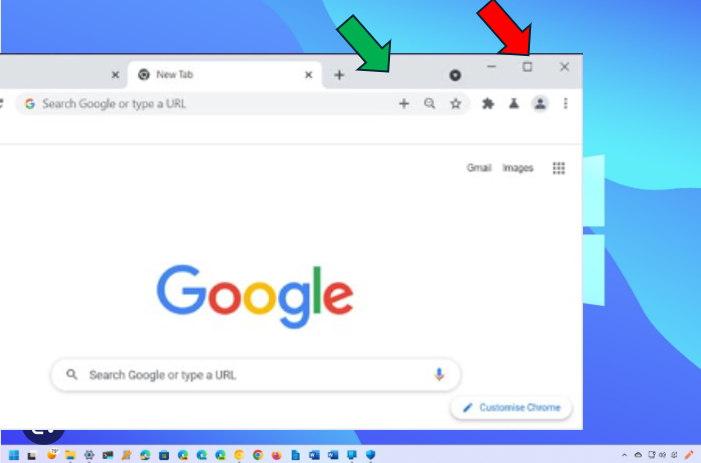
If so, you can move (or drag) the Google chrome floating window to the right by doing this:
- putting your mouse pointer where the green arrow is
- holding down the left mouse button
- moving your mouse to the right
But you might prefer to click the small square where the red arrow is, to put Google Chrome back into full screen mode
3





Confirm your email address to Create Threads and Reply

Categories
- All Categories
- 355.8K Banking & Borrowing
- 254.9K Reduce Debt & Boost Income
- 456.1K Spending & Discounts
- 248.3K Work, Benefits & Business
- 605.9K Mortgages, Homes & Bills
- 179K Life & Family
- 263.7K Travel & Transport
- 1.5M Hobbies & Leisure
- 16.2K Discuss & Feedback
- 37.7K Read-Only Boards