We’d like to remind Forumites to please avoid political debate on the Forum.
This is to keep it a safe and useful space for MoneySaving discussions. Threads that are – or become – political in nature may be removed in line with the Forum’s rules. Thank you for your understanding.
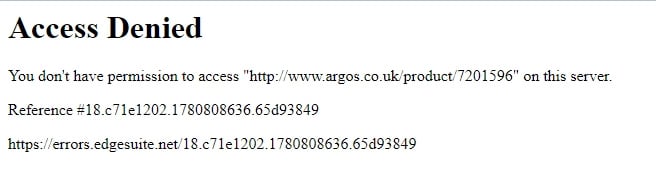
Access Denied: Argos amongst others.





about a week ago this started happening, can get on to home page but then anything i click gives me this. noticed on the odd other site too.
Opera up to date. Windows PC hard wired to the net. Plusnet BB.
no issues via my mobile over wireless.
Comments
-
The last URL belongs to Akamai firewall, it could be that your connection appears like a bot to those systems using it (Google says Argos uses it)? Are you trying to connect via a VPN?
First thing I would try is to use an edge browser since that's the default browser in windows, if that fails, I'd try it's incognito (private) mode in the browser to check if I've got session issues, if it works fine there, you'd probably want to clear everything in your browser history.
I'm FTB, not an expert, all my comments are from personal experience and not a professional advice.Mortgage debt start date 11/2024 = 175k (5.19%)... Q1/2026 = PAID (3.94%)1 -
i have Opera and Firefox, all cookies etc cleared. neither have VPN activated. i have tried with each in "private" mode. same issue with each.
0 -
Try Chrome.
1 -
Or DuckDuckgo
1 -
Strange that your mobile is fine but your PC isn't when they're both using the same IP address. It does sounds as if there's some kind of VPN or something Akamai doesn't like activating only on your PC.
What happens when you go here? https://www.akamai.com/us/en/clientrep-lookup/
I get "The IP Address x.x.x.x did not receive a bad risk score."2 -
same as you. yep, mobile on wireless is fine.
where could there be a VPN? i'm assuming this must be something beyond me switching a VPN on/off myself?
0 -
i'll try an additional browser later but already have the issue with 2 and it did only start doing this about a week ago.
0 -
I've had an issue like that when connecting over my VPN; I just shop elsewhere.
My VPN is part of my security system and I don't want some merchant telling me to switch it off.
1 -
i'm not connecting over a VPN.
0 -
Gemini says (and it makes sense to me too)
If you are experiencing issues accessing specific websites or services on Plusnet broadband and receiving anAkamai firewall error(such as an "Access Denied" reference code), your connection is likely being blocked byAkamai’s Edge firewall. [1, 2] This typically happens becausePlusnet recycles dynamic IP addresses, meaning you may have been assigned an IP address that was previously flag-tagged by Akamai for suspicious behaviour (such as a DDoS attack, botting, or a virus on a previous user's device). [3, 4, 5] Here is how to resolve the conflict between your Plusnet connection and Akamai's security rules:1. Cycle Your Plusnet IP Address
Since the restriction is tied to your temporary IP address, forcing yourPlusnet Hubto pull a new one usually resolves the issue instantly. [6]- Turn off your Plusnet router completely.
- Leave it unplugged for at least 15 to 30 minutes. A quick reboot might just reclaim the exact same bad IP address.
- Turn it back on and check your IP on a site like
whatsmyip.org. If the address has changed, try reloading the blocked website. [7]
2. Disable Plusnet Web Security Systems
Sometimes, overlapping security filters between the ISP and Akamai's content delivery network cause a routing loop or block. [8]- Turn off Plusnet SafeGuard: Log into your Plusnet Members' Centre, look for SafeGuard, and switch the toggle to OFF. Reboot your router afterward. [9]
- Check the Broadband Firewall: Plusnet has largely retired their old network-level "Broadband Firewall," but if you are an older user, ensure this legacy feature is turned off or set to "Low" in your online account portal. [10, 11]
3. Change Your DNS Servers
Plusnet's default DNS servers can occasionally misroute traffic intended for Akamai's global edge servers. Switching to a neutral public DNS provider helps clean up your route. [6, 12]- Log into your router's gateway configuration page (typically http://192.168.1.254). [13]
- Navigate to Advanced Settings > Internet. [13]
- Change your primary and secondary DNS settings to either:
- Google DNS:
8.8.8.8and8.8.4.4 - Cloudflare DNS:
1.1.1.1and1.0.0.1[6]
- Google DNS:
4. Switch Off Built-In Browser VPNs / "Private Relay"
If you are using Apple devices,iCloud Private Relayacts as a proxy that routes traffic through third-party servers. Similarly, features like "Secure DNS" or built-in VPNs in browsers like Opera can trigger Akamai's anti-bot firewall rules. Try disabling these functions or testing the website via your mobile phone data (disconnected from Wi-Fi) to isolate whether the block is device-specific or network-wide. [1, 4, 6, 12]5. Clear the Akamai Block Manually
If your IP address stays blocked even after a long router power cycle, you can check your network reputation directly with Akamai.- Visit the Akamai Client Reputation Lookup page.
- Submit your current public IP address to see if it is flagged.
- If it shows a poor reputation score due to "Web Scraper" or "Scanning" activity, you can submit an automated whitelist request directly through their portal to have the address unblocked. [14]
To narrow down the cause, could you sharethe exact error message or reference codeyou see? It would also help to knowif this happens on multiple devicesor just one.
[1] https://community.plus.net[2] https://techdocs.akamai.com[3] https://forums.thinkbroadband.com[4] https://community.plus.net[5] https://whatismyipaddress.com[6] https://community.plus.net[7] https://www.plus.net[8] https://community.plus.net[9] https://www.plus.net[10] https://community.plus.net[11] https://www.plus.net[12] https://forums.thinkbroadband.com[13] https://www.plus.net[14] https://whatismyipaddress.com1








Confirm your email address to Create Threads and Reply

Categories
- All Categories
- 355.8K Banking & Borrowing
- 254.9K Reduce Debt & Boost Income
- 456.1K Spending & Discounts
- 248.3K Work, Benefits & Business
- 605.9K Mortgages, Homes & Bills
- 179K Life & Family
- 263.7K Travel & Transport
- 1.5M Hobbies & Leisure
- 16.2K Discuss & Feedback
- 37.7K Read-Only Boards