We’d like to remind Forumites to please avoid political debate on the Forum.
This is to keep it a safe and useful space for MoneySaving discussions. Threads that are – or become – political in nature may be removed in line with the Forum’s rules. Thank you for your understanding.
Can I safely delete an old backup file from a USB HDD?





About 18 months ago I bought a replacement PC after my old one died. I had kept it backed up to a 750 GB USB HDD and the firm I bought the replacement from used the backup file to set it up. They didn't delete the backup from the USB HDD. I set up the new PC to backup to the same HDD and it now appears to be almost full.
Is there any risk involved in deleting the old backup file from the USB HDD?
Comments
-
Are you backing up to cloud as well?
Personally I never delete stuff from old HDDs, my collection goes back decades.
Unless there are financial constraints (daft phrase) and given that the HDD is a few years old I'd be buying a new 1TB drive.
0 -
No I'm not backing up to the cloud. I didn't think of a new HDD 😬
I think you're probably right. Any recommendations?
0 -
Not bought an external (or any other) drive for years, have to defer to someone with recent experience.
1 -
There's only really three manufacturers of (mechanical) hard drives these days - Seagate, Western Digital and Toshiba. The "brands" you see for external drives are typically one of the above in new packaging (Maxtor and Lacie are owned by Seagate so you'll see Seagate inside them). Reliability is as good as each other.
more choice for SSDs as every man and his dog is making them but best known brand is something like Kingston. You can use SSDs as external drives with a 2.5" caddy (traditionally) or a suitable holder for newer technologies.
2 -
From a price point of view it is properly okay to get an old-fashioned spinning HDD as you don't particularly want performance - all you are doing is copying backup files to it and stashing it in a cupboard
1 -
Thanks for the replies. It would annoy me to spend £50+ if it wasn't necessary. I've looked at the backup file on the external HDD and compared it to the copy on the C drive of my current PC and they're identical.
My plan was to delete the old backup file from the external HDD, allowing me to continue to use the drive as backup to my current PC.
If this sounds problematic I'll get a new drive but I'd prefer to avoid wasting money if it wasn't absolutely necessary.
0 -
Your back-up is only as good as the last one that works. Full hard drives and back-ups don't really work and you don't always get told the back-up failed because the drive is full.
2 -
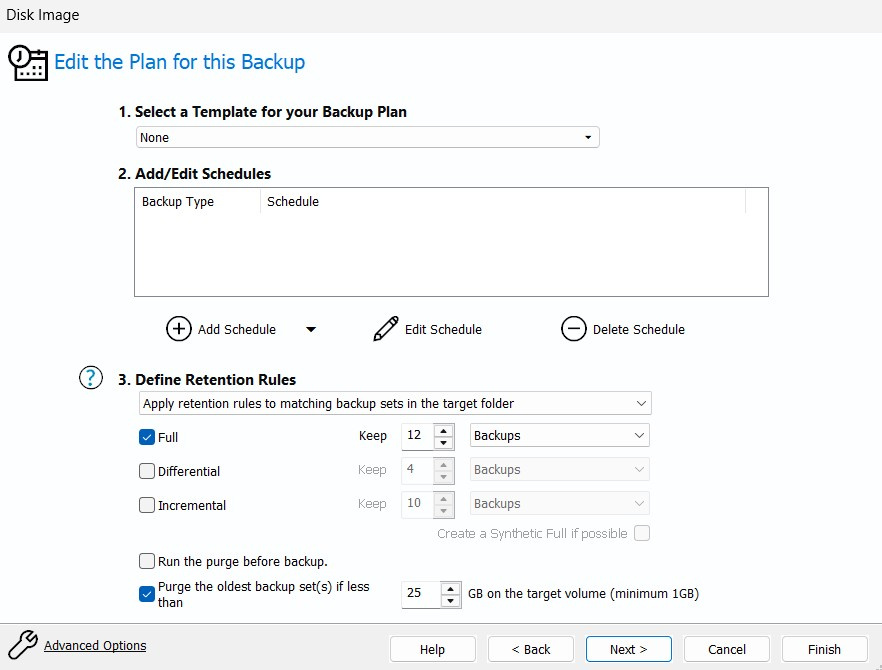
If you use something like Macrium Reflect to make full system image backups then you can set it to only keep the last 'so many' backups and it deletes the oldest when you make a new one. (I have mine set to keep 12).
That way you still have various backups to choose from but the drive doesn't get filled up.
Alternatively/as well as, you can set it to check the remaining drive space when making a new backup and if there won't be enough space delete the oldest backup(s) until there is room for the new one.
I also manually back up the contents of my Desktop, Documents, and Pictures by copy/pasting them to a second drive that is kept in a different place to the main backup.
(I don't really trust the cloud to store my personal stuff).Like many others I prefer to use HDDs for my backups, to me they are just more reliable than external SSDs for longer term storage.
Plus if you are connecting your backup drive by USB then the read/write speed is dictated by that connection and so there is no real advantage to using an external SSD for speed.0 -
In theory USB 3.2 (later generations) or USB4 should be able to be as fast as an internal NVME drive speed wise.
An external SSD you can drop on to the floor (by accident or otherwise) and it will almost certainly survive. Same can't always be said for mechanical drives.
0 -
I have several drives removed from older laptops when I have junked them = whilst all the data is out of date there are some files I refer to from time to time. They are all in a drawer.
I found them handy when I wrote a book as there were various photos I used.
0








Confirm your email address to Create Threads and Reply

Categories
- All Categories
- 355.8K Banking & Borrowing
- 254.9K Reduce Debt & Boost Income
- 456.1K Spending & Discounts
- 248.3K Work, Benefits & Business
- 605.9K Mortgages, Homes & Bills
- 179K Life & Family
- 263.7K Travel & Transport
- 1.5M Hobbies & Leisure
- 16.2K Discuss & Feedback
- 37.7K Read-Only Boards