We’d like to remind Forumites to please avoid political debate on the Forum.
This is to keep it a safe and useful space for MoneySaving discussions. Threads that are – or become – political in nature may be removed in line with the Forum’s rules. Thank you for your understanding.
Sound is gone after computer sleeps. Windows 11 pro 25H2





Windows 11 pro 25H2
Processor Intel(R) Core(TM) i3-8100 CPU @3 .60GHz (3.60 GHz)
Installed RAM 8.00 GB
Graphics card NVIDIA GeForce GT 710 (2 GB)
Storage 778 GB of 1.39 TB used
After my computer goes to sleep and it awakens the sound drivers vanish and I have to then reboot the computer.
I don't know when it started to do this as I used to just turn off the computer but something changed and it started to sleep by it's self probably after an update.
before it goes to sleep the device manager looks like this
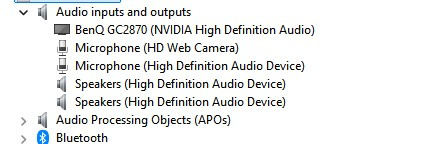
but when it wakes up the device manager looks like this

Scanning for hardware changes does not replace the missing drivers.
and I have to reboot to get the sound back.
Comments
-
If you right click on the driver in that list is there a power management tab? if there is make sure that it is not allowed to turn it off
You could also check that there is not an updated audio driver out there
0 -
You have an incorrect sound setup, as the first image shows 2 x microphones and 2 x speakers, ie duplicates. You might have to delete the drivers and let Windows scan and re-install them.
Have you installed something new in the way of a program, or plugged something into a USB socket that uses sound? For example, if I plug in an external USB device that includes a sound card, the internal sound vanishes and re-appears when I un-plug the external device.
It's easy to blame Windows updates, but not everyone suffers from sound or ports changing with Windows updates. Here I am using Window 11 Pro on my desktop and the sound system and ports are all the same as they were prior to any Windows updates in recent days.
0 -
There is not a power management tab and the driver is as up to date as I can get it.
0 -
I’d install the motherboard maker’s chipset and audio drivers, rather than relying on the generic “High Definition Audio Device”, and roll back any recently updated audio driver if the option is available. Also check BIOS/firmware updates, because devices disappearing after wake is often ACPI/chipset/firmware related.
0 -
The Realtek drivers were originally installed, a Windows update must have removed them, I never realised that had happened, that's what being old does to you.
The sound works OK now, doesn't disappear when the computer sleeps.
I wonder what other drivers Windows updates have removed?
0







Confirm your email address to Create Threads and Reply

Categories
- All Categories
- 355.8K Banking & Borrowing
- 254.9K Reduce Debt & Boost Income
- 456.1K Spending & Discounts
- 248.3K Work, Benefits & Business
- 605.9K Mortgages, Homes & Bills
- 179K Life & Family
- 263.7K Travel & Transport
- 1.5M Hobbies & Leisure
- 16.2K Discuss & Feedback
- 37.7K Read-Only Boards