We’d like to remind Forumites to please avoid political debate on the Forum.
This is to keep it a safe and useful space for MoneySaving discussions. Threads that are – or become – political in nature may be removed in line with the Forum’s rules. Thank you for your understanding.
📨 Have you signed up to the Forum's new Email Digest yet? Get a selection of trending threads sent straight to your inbox daily, weekly or monthly!
unable to log in to Outlook





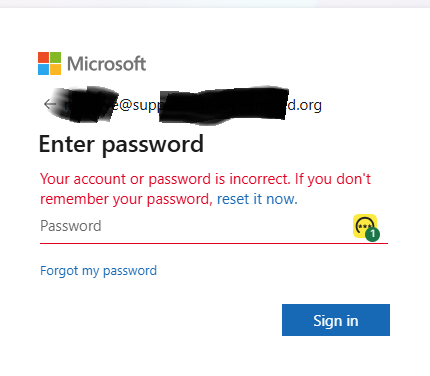
Hi My Outlook e mail for work works fine on my desktop with the Outlook app but when i try to log in on my phones or on the website login.microsoftonline . com/common/login
I get " Your account or password is incorrect"
Yet its the same e mail and password that i used to log in to my account on the desktop outlook app and that works fine.
It is a business account and a new e mail account and one of my phones i have done a hard reset so its clean with nothing on it.
I have downloaded Outlook and M365 Copilot and tried both of them but still the same error messages.
Once one of the apps fail i delete it and download the other app to try.
Hel and advice please.
Thanks one very frustrated person :)
Comments
-
That
login.microsoftonline . com/common/login
link looks to me like a corporate system login path maybe using MS Teams?
What happens when you use outlook.live.com with your userid/password?
Why have you mentioned a new email account?
1 -
Hi
The account is a business account for a charity.
Trying your link takes me to the app and still gives the same error message.
It is a new e mail address because my old email was corrupt because I could send emails but not receive them.
When I set up the new account with a new email address and password on the Outlook app on my desktop it wouldn't accept the new password I was given to use and a message saying I had to make a new password up.
I used the password i was given for the old password and then enter a new one underneath, which is also the one i use to try and log in on the app on the mobile.
I have tried both passwords but still get the error message.
The password for the old corrupt email account and for the new email account are the same.
Would that make a difference?
Thanks.
Spending my time reading how to fix PC's,instead of looking at Facebook.0 -
Try signing in at office.com for business accounts. Outlook.com tends to be for personal accounts.
1 -
I just get the same error message.
But when I had to make a new password up for the desktop Outlook app because the new password i was given to use the app said i had to make a new password.
So I entered the password i was given to use in as the old password and then made up a new password.
Old password was Abcd1234
New password Abcd1234fg
I don't understand why when I set up the desktop app it wouldn't accept the password I was given to use as it was a new email address and account so no reason to reject the password.
I have tried both passwords on the phone apps But just get the same error message.
II have Just found out that the password hasn't been changed by the person who sets up the email accounts so i am thinking this could be the problem.
I will find out tomorrow but worried it could lock me out of the desktop app and start the cycle again.
Time will tell i guess.
Thanks
Spending my time reading how to fix PC's,instead of looking at Facebook.0 -
HI Everyone,
The problem has been fixed finally.
It was the person setting up the new e mail account had the request a new password box ticked and they unticked it and everything works fine now.
Thank you so much for all your help. :)
Spending my time reading how to fix PC's,instead of looking at Facebook.1




Confirm your email address to Create Threads and Reply

Categories
- All Categories
- 355.8K Banking & Borrowing
- 254.9K Reduce Debt & Boost Income
- 456.2K Spending & Discounts
- 248.3K Work, Benefits & Business
- 605.9K Mortgages, Homes & Bills
- 179K Life & Family
- 263.8K Travel & Transport
- 1.5M Hobbies & Leisure
- 16.2K Discuss & Feedback
- 37.7K Read-Only Boards