We’d like to remind Forumites to please avoid political debate on the Forum.
This is to keep it a safe and useful space for MoneySaving discussions. Threads that are – or become – political in nature may be removed in line with the Forum’s rules. Thank you for your understanding.
📨 Have you signed up to the Forum's new Email Digest yet? Get a selection of trending threads sent straight to your inbox daily, weekly or monthly!
Converting partition from exFAT to NTFS





Hello,
I've got a 4TB Seagate Desktop Expansion USB3 hard drive that was shipped formatted as exFAT and I would like to convert/change it to use NTFS in line with my other hard drives. The Windows Disk Manager window looks like this:
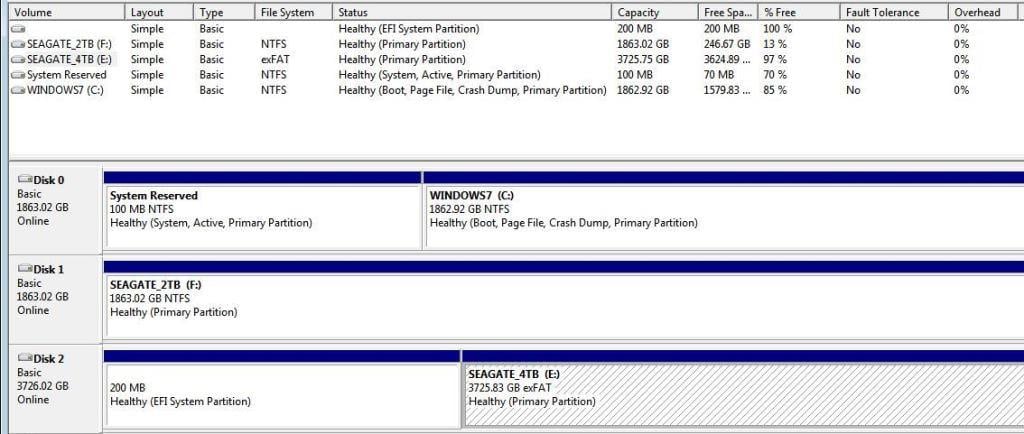
Disk 0 is mySeagate Barracuda 2TB SATA3 internal drive, Disk 1 is my Seagate Desktop Expansion 2TB USB3 hard drive, and Disk 2 is the drive I want to convert/change the filesystem on.
I've backed up and moved all of the files I need to preserve to Disk 1 and/or Disk 0, and I can convert Disk 2: can someone advise what the best process is please?
I've read on one site that I should reduce the existing exFAT partition by 50%, create a new NTFS partition, move files across, then delete the exFAT partition before resizing the NTFS to fill the drive but that doesn't mention whether to delete the 200MB EFI System Partition).
The other option is to delete the 2 partitions completely and then create the new NTFS one, but do I need to have a 400MB EFI System Partition there as well? My 2TB external Seagate NTFS drive doesn't have an EFI System Partition at all, so does the 4TB not need a 400MB one as well?
It's rather confusing for me, as you can probably tell 😃
Comments
-
>do I need to have a 400MB EFI System Partition there as well?< Not on a non-bootable drive. Just delete the two partitions then allocate all the space to NTFS
3 -
I expect theres some sort of bloatware shipped by the manufacturer on the extra partition. If you know there's nothing important on that drive, then delete all the partitions and create a new NTFS one, allocating all the space. No need to faff about resizing partitions unless you don't have enough free space to offload everything to a spare drive whilst you do the reformatting.
1 -
You will need a third party disk manager as Windows Disk Management doesn't like deleting those drives.
EDIT expanded answer.
Let's Be Careful Out There1 -
Diskpart will blow away pretty much anything
1 -
No bloat ware. An EFI partition is a required partition on a GPT disk. Nothing to do with the manufacturer adding things.
3 -
how about opening a command prompt then
format E: /fs:NTFS
or rt-click the drive and choose 'format'
1 -
Thank you to everyone who replied: I'll use diskpart as @Vitor suggested at the weekend to do this so I can make sure I've got everything off the drive that I need.
If I can just confirm what I need to do with diskpart after running it in an Administrator cmd.exe instance:
select disk 2cleancreate partition primaryformat fs=ntfs quickexit(I'm assuming disk 2 is my 4TB external drive, but I'll double check that first when opening it for real).
I can run diskpart on my system this evening, then use the
list diskcommand, grab a screenshot of what it says and update the thread with that if it will help.0 -
I've GPT partitioned devices without one. What's the point if you don't want to boot from the device?
0 -
It's not always necessary but the normal methods that most users will employ ( E.G. disk manager) will automatically create one
Linux also uses it for the grub loader
TBH it's default size is only 200MB. I wouldn't even bother using diskpart or a 3rd party partition manager to get around it's creation.
1 -
Okay, so I've been into diskpart in an Administrator command prompt and this is what it shows me for the list of disks:
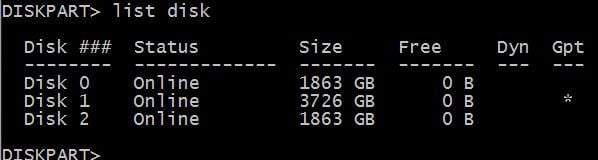
I can determine the following from this:
- Disk 0 is my C: drive (2TB Seagate SATA3 internal)
- Disk 1 is therefore my E: drive (4TB Seagate USB3 external)
- Disk 2 is therefore my F: drive (2TB Seagate USB3 external)
So, going back to my earlier steps, am I right to assume that I need to do the following?
select disk 1cleancreate partition primaryformat fs=ntfs quickexitOr should I use
clean allinstead to wipe everything because, as I understand it,cleanwill delete all partitions and partition data from the volume?0










Confirm your email address to Create Threads and Reply

Categories
- All Categories
- 355.8K Banking & Borrowing
- 254.9K Reduce Debt & Boost Income
- 456.2K Spending & Discounts
- 248.3K Work, Benefits & Business
- 605.9K Mortgages, Homes & Bills
- 179K Life & Family
- 263.7K Travel & Transport
- 1.5M Hobbies & Leisure
- 16.2K Discuss & Feedback
- 37.7K Read-Only Boards