We’d like to remind Forumites to please avoid political debate on the Forum.
This is to keep it a safe and useful space for MoneySaving discussions. Threads that are – or become – political in nature may be removed in line with the Forum’s rules. Thank you for your understanding.
Lloyds Bank online log in query





Hi, I went to log in to my Lloyds account earlier today online (don't have the App) and it was saying that they had made logging in easier - password no longer required, just your ID name and some other details.
I put the ID name in and got the usual 2FA verification code from Lloyds but decided not to proceed, in light of the recent issues, thinking that they should be tightening account security, not making it easier to access.
Unfortunately I did not take a screenshot of it at the time.
I tried googling and checking this forum to see if there was any mention of it but couldn't see anything.
I have just checked again and it is now showing the normal log in page, asking for ID name and password, so I thought it best to come on here to check if anyone else has seen this 'new' log-in page or whether I should report it?
Thanks :)
Comments
-
Not much help but I logged on to my Lloyd's account today through the website and the system was exactly as usual.
I'd call them to check if I were you.
1 -
I saw that too, but it looks like they rolled back the change after a day.
1 -
I had that message when I logged in on Friday March 20th. I didn’t have to put my password in, just the characters from my memorable information and the passcode they sent me.
I can’t see the point of this change. It doesn’t make it any easier for me to log in this way because I can always remember my password. It’s working out the right characters from my rather complicated memorable information that foxes me - I have to count them off on my fingers!4 -
Looks like this is still happening randomly. I got the same message when I logged in on 3rd April but on subsequent occasions have had to use password.
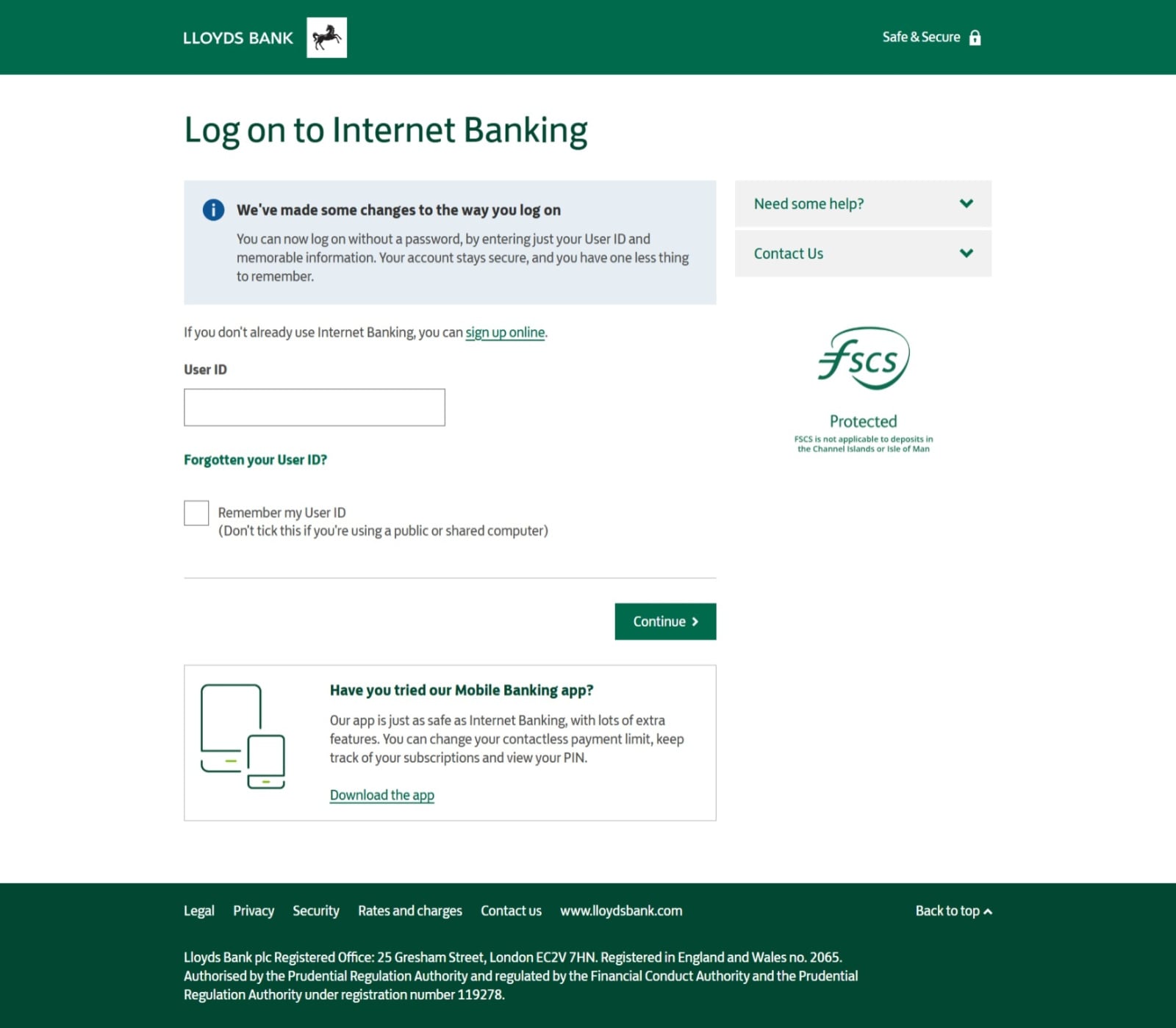
Makes you feel uncomfortable about Lloyds security. Anyone got an idea how to send this screenshot to Lloyds for investigation?
1 -
I just logged in and got the above (username and characters from memorable term). I then opened an incognito browser and tried again, and there it asked for my username and password, as well as a OTP via text message.
It might well be that Lloyds is recognising your browser and giving you the simpler option, but presenting more thorough authentication when they don't recognise your browser.
It's in Lloyds' interest to implement robust security - so does this bother me? No, it doesn't. They're unlikely to comment on what's going on too, since it would be wise for any organisation to keep their security measures private.
Also, 99% of the time I'm using the app for banking which will be by far the most secure way of doing it.2 -
Thanks for that Booneruk.
0 -
sorry for not replying sooner, thanks to everyone for the input.
It has gone back to the normal version since but @booneruk may have found the answer - I had been logging in normally as the live chat (bot) feature I needed to use wouldn't work otherwise.
I have since gone back to incognito mode and am being asked for my password, and getting a OTP again
0








Confirm your email address to Create Threads and Reply

Categories
- All Categories
- 355.6K Banking & Borrowing
- 254.8K Reduce Debt & Boost Income
- 456.1K Spending & Discounts
- 248.2K Work, Benefits & Business
- 605.8K Mortgages, Homes & Bills
- 179K Life & Family
- 263.6K Travel & Transport
- 1.5M Hobbies & Leisure
- 16.1K Discuss & Feedback
- 37.7K Read-Only Boards