We’d like to remind Forumites to please avoid political debate on the Forum.
This is to keep it a safe and useful space for MoneySaving discussions. Threads that are – or become – political in nature may be removed in line with the Forum’s rules. Thank you for your understanding.
New Business Start Up - Questions





Hi there 👋
Been re-directed here from the small business forum as some of the questions I had were more technology related. Hoping someone more tech-savvy might have some advice.
I'm setting up a consultancy business (sole trader) as a bit of a side hustle alongside my part-time job. Much of the work will be creating written reports, advising clients, occasionally attending virtual meetings etc. In my everyday job I've always used Microsoft Office, so it's what I'm used to. At home I use Google for emails and browser, but have an individual MS Office subscription for Word, Excel etc.
First question - my MS Office subscription ran out recently so I looked at the various packages and decided to take out the standard business subscription as it wasn't hugely more expensive than the individual one and said it provided company email, which I thought I needed as I want my email as xxxx@newbusinessname.co.uk rather than @gmail or @outlook etc. I've taken out a one month free trial. Anyway, on signing up I ended up with xxxx@newbusinessname.onmicrosoft.com, which was annoying. Consulted the Google oracle and managed to sort this out by connecting the domain I'd purchased through Ionos, and changing the active user. At least, I think that's what I've done (email now seems to send and receive through the address I want). At this point you're probably thinking I obviously have no clue about any of this stuff, and you'd be right. But that's now made me wonder - did I even need the MS business account to do this? Or could I have done this via an individual account? Future-wise, even if I go full-time with my business, I don't ever foresee wanting to take on employees, so it will always just be me. I'm also using Ionos to codge together a basic website, but I've seen you can pay an additional fee for business email. Is that a better way of doing it? Or, as I need the MS software anyway, am I better sticking with that? Do I cancel the business subscription before I start paying for it? Am I using completely the wrong packages entirely? I've seen people recommend Google Workspace but honestly not sure I have the capacity to try and learn anything new right now, which is why I've stuck with MS.
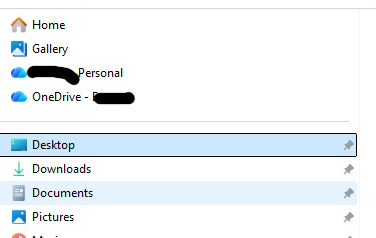
Second question - storage. I currently have a laptop where I keep everything, backed up via OneDrive personal subscription (100GB), of which I use about 75GB (mostly phone photos). I do have an external hard drive where I periodically back up, but know I probably need to buy something with more storage. The business subscription comes with 1TB of OneDrive storage. My issue is knowing how to keep business and personal separate. What's the best way of doing this? If I keep both personal and business OneDrive, you can supposedly choose what to back up to the different drives, but it seems OneDrive only backs up the basic Pictures, Documents and Desktop folders, and that's too general (i.e. I have both personal and work photos, personal and work documents etc.). I've seen you can force it to read "created" folders, but the methods on how to do this go a bit beyond my tech capabilities. So my question would be, bearing all the above in mind, what would be the best way of ensuring I try and keep work and home separate but that everything is suitably backed up moving forwards? I don't really want to be paying for multiple subscriptions or have multiple copies of my files all over the place. Do I just need to bite the bullet and keep everything in one place i.e. under the business OneDrive.
Please help this clueless newbie!
Comments
-
Ionos have multiple email options so have a look at their range, you arent technically tied to them but it may be easier to have mail and web with the same company (there are arguments its good to separate these things too).
You need to separate the server which actually sends and receives the email and the client that you use on your phone or computer to interact with the server. The client can be an application or it can be a webpage.
Almost all mail servers work with almost all mail clients, that said some web based clients are intentionally locked down by the site running them to prevent you from doing this. In some cases there can be modest benefits from having a matched pair (ie Apple Mail with iCloud Mail or Outlook app with Exchange Server) but there will be many more using non-matched services just fine.
The real driver is going to be if you prefer using an app or a website to get your email? Cheap email services tend to have not nice webmail options like CubeMail which are painful to use. Im not a fan of the web version of Outlook or Gmail but they are big improvements over CubeMail. I however never use webmail as I use Outlook app for work and Apple Mail for personal email so dont care what my hosts web client is like.
On the storage front would consider what benefit you are getting from OneDrive over another storage option? One thing is autosaving Office docs as MS stopped being able to do that when things arent saved in OneDrive. Dropbox gives 2gb of storage in its free option, if you are already an Amazon Prime subscriber they include unlimited photo and 5gb of video storage as standard.
Personally I use different services for different purposes, I use Dropbox for my business docs, my clients often use OneDrive for theirs but some use Google or Citrix and I use iCloud for my personal stuff as Im an Apple user. It's also why I use two different email clients to help keep life separated though could use "profiles" in some clients to achieve the same.
1 -
One extra comment as a few questions:
If you are writing reports for clients,
and you need to share them ( say at draft stage)? Or just produce a file such as a pdf.
Will you be having collaborative things such as meetings online such as with Teams, shared storage areas.
Do you need to encrypt communication
Do you need to consider protecting ( security) your output.
Answers to these such, as needing compatibility with clients systems, and meeting your own and their needs could influence your choice of software/apps, facilities etc.
I cannot answer how you would deal with all those but if you answer positively think about those issues at the outset.
1 -
I'm assuming you're on Microsoft 365 Business Standard (same as I have) which is a very extensive package of services which will take some time to fully master. No doubt you've had a look around to see what's what.
It's certainly possible to operate OneDrive and OneDrive for Business together on the same PC. As well at the 1TB space, Business gives you file versions with rollback, a 74day two-stage recycle bin if you delete something by mistake and anti-ransomware protection.
I wouldn’t move all your personal files into the business OneDrive though. I’d keep personal and business separate: personal photos/docs in your personal OneDrive, and all new client work saved straight into a dedicated folder structure inside the business OneDrive. That is much simpler than trying to make Desktop/Documents/Pictures do double duty for both. Do take time to understand OneDrive, it's a synchronisation tool not a backup in the traditional sense which confuses many posters on this forum who unfortunately dismiss it as 'too difficult'.
If you feel you need a true backup service with retention up to 12 months with snapshots every 10 minutes, Microsoft offer Overview of Microsoft 365 Backup | Microsoft Learn.
Microsoft 365 Business is not really a website builder for a normal public business website. It is fine for your business email on your own domain, Office apps, OneDrive and Teams, but you would normally keep the website with IONOS or another web host/builder such as SquareSpace. In other words, Microsoft 365 for the business back-office, another provider for the website. (NB Strictly speaking Microsoft can host a website if you start using Azure, but that is a separate cloud hosting platform rather than a standard Microsoft 365 Business feature and far more sophisticated than most sole traders need).
 1
1



Confirm your email address to Create Threads and Reply

Categories
- All Categories
- 354.6K Banking & Borrowing
- 254.5K Reduce Debt & Boost Income
- 455.5K Spending & Discounts
- 247.5K Work, Benefits & Business
- 604.4K Mortgages, Homes & Bills
- 178.6K Life & Family
- 261.9K Travel & Transport
- 1.5M Hobbies & Leisure
- 16.1K Discuss & Feedback
- 37.7K Read-Only Boards