We’d like to remind Forumites to please avoid political debate on the Forum.
This is to keep it a safe and useful space for MoneySaving discussions. Threads that are – or become – political in nature may be removed in line with the Forum’s rules. Thank you for your understanding.
Bright app, Glowmarkt download and export data





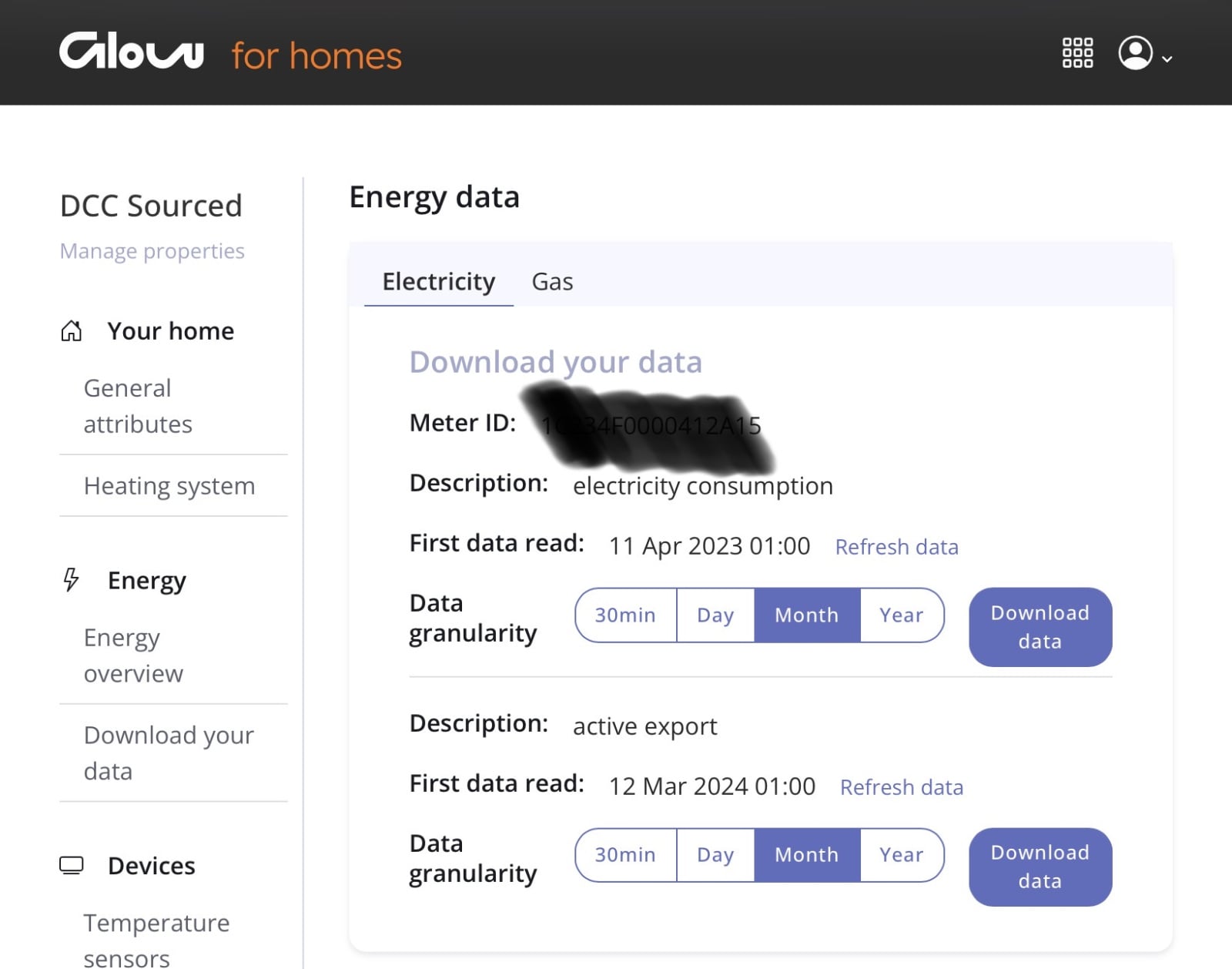
My smart meter measures both my electricity usage (import) and the export from my solar panels. When I look on the Bright app it will show me half-hourly data of both import and export. The same company responsible for the Bright app (Hildebrand) also lets me download my usage data from the Glowmarkt website. But the downloaded data does not include my export. Is there anything I can do to change that, so I can also keep a record of my export with half-hourly resolution?
Comments
-
Go to glowmarkt.com , sign in with bright credentials , then energy download
https://glowmarkt.com/pages/property/energy-data
4.8kWp 12x400W Longhi 9.6 kWh battery Giv-hy 5.0 Inverter, WSW facing Essex . Aint no sunshine ☀️ Octopus gas fixed 5.07 + Octopus Intelligent Flux leccy
CEC Email energyclub@moneysavingexpert.com0 -
Thanks @debitcardmayhem but that's what I have always done. What I get is my import but not my export data. Do you get both?
Reed0 -
I can't quite remember, but isn't a Bright account linked to a specific MPAN? And don't you have a separate export MPAN, different from the one for import?
I'm not being lazy ... I'm just in energy-saving mode.
If you're asked to post a photo of your meter Meter Configuration Tables v2.0.xlsx0 -
I get import and export data, my account on glow only shows 1 MPAN , but I think it must be using the meter ID. Note my meter was installed (new) in march 24 , so no data from old meter unlike the import which I originally had , perhaps it is down to the type of meter ? , although I see your app reports it !.I can't remember when the app started showing export but I remember being surprised when it did, I think it was last year??
I had never download from there until I saw your thread so i went and looked, thanks for that, have you tried their forum/support? sorry I can't explain.🤷🏻
 4.8kWp 12x400W Longhi 9.6 kWh battery Giv-hy 5.0 Inverter, WSW facing Essex . Aint no sunshine ☀️ Octopus gas fixed 5.07 + Octopus Intelligent Flux leccy
CEC Email energyclub@moneysavingexpert.com0 -
That is correct. I have never told Bright my export MPAN and it's not shown anywhere in the settings but Bright know my meter ID. I'll contact Bright's support as @debitcardmayhem can clearly do what I cannot.
Reed0 -
Well, after an email to Tech Support I got a prompt response and my problem was fixed. With hindsight I should have done that in the first place but thanks to @debitcardmayhem for first confirming that what I wanted to do was a feasibility. Given that I am not a paid customer of Hildebrand/Glowmarkt/Bright, their tech support is first rate.
Reed0 -
I get import and export data, my account on glow only shows 1 MPAN , but I think it must be using the meter ID.
I'm confused. What is the meter ID here? I have a smart meter and I have Bright and it only shows me consumption. I have a generation meter and get deemed export FiT, and don't want to do anything to disturb that. But I can see the -A reading on the meter, so I'd be interested to see that in the Bright app or website. What do I need to do to see it, if that's possible?
0 -
It's probably not possible, @squirrelpie . I have had a smart meter for over two years but until last December I could not see my export data. What changed was that I applied to be paid for metered export rather than deemed export. This prompted my supplier to apply for an export MPAN for my meter. This took about six months but since it has been in place I can see a record of my export data, as from that time (as can my supplier).
The Meter ID is a 16 digit hexadecimal number written on your meter. Presumably this is something that Bright can access from the DCC. It is shown on the Glowmarkt web interface but I can't find it in the Bright app.
Reed1 -
My Bright app showed export data until today. Now it only shows import, and even last week's export info I viewed yesterday has gone. The meter mpan subscribed says import and export still. Something has changed and I'm not impressed.
0 -
Working fine for me, ( iPados), are you using the android version? As far as being not impressed it's free, cut them some slack they may have had a glitch.
4.8kWp 12x400W Longhi 9.6 kWh battery Giv-hy 5.0 Inverter, WSW facing Essex . Aint no sunshine ☀️ Octopus gas fixed 5.07 + Octopus Intelligent Flux leccy
CEC Email energyclub@moneysavingexpert.com0








Confirm your email address to Create Threads and Reply

Categories
- All Categories
- 355.7K Banking & Borrowing
- 254.9K Reduce Debt & Boost Income
- 456.1K Spending & Discounts
- 248.3K Work, Benefits & Business
- 605.8K Mortgages, Homes & Bills
- 179K Life & Family
- 263.6K Travel & Transport
- 1.5M Hobbies & Leisure
- 16.2K Discuss & Feedback
- 37.7K Read-Only Boards