We’d like to remind Forumites to please avoid political debate on the Forum.
This is to keep it a safe and useful space for MoneySaving discussions. Threads that are – or become – political in nature may be removed in line with the Forum’s rules. Thank you for your understanding.
Text Editor: Extra text being added when copying/pasting from excel into the forum




What I did:
Copied the below section from an Excel spreadsheet into the forum.
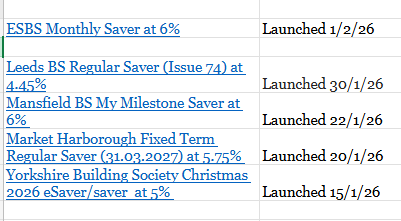
What Should happen:
It should paste directly into the forum and look like this:
Launched 1/2/26 | |
Launched 30/1/26 | |
Launched 22/1/26 | |
Market Harborough Fixed Term Regular Saver (31.03.2027) at 5.75% | Launched 20/1/26 |
Yorkshire Building Society Christmas 2026 eSaver/saver at 5% | Launched 15/1/26 |
What happened:
It pastes the below with a whole host of other text at the beginning:
table{mso-displayed-decimal-separator:"\.";mso-displayed-thousand-separator:"\,";}tr{mso-height-source:auto;}col{mso-width-source:auto;}td{padding-top:1px;padding-right:1px;padding-left:1px;mso-ignore:padding;color:black;font-size:11.0pt;font-weight:400;font-style:normal;text-decoration:none;font-family:Calibri, sans-serif;mso-font-charset:0;text-align:general;vertical-align:bottom;border:none;white-space:nowrap;mso-rotate:0;}.xl31{font-family:Georgia;mso-generic-font-family:auto;mso-font-charset:0;}.xl1034{color:#0563C1;text-decoration:underline;text-underline-style:single;font-family:Georgia;mso-generic-font-family:auto;mso-font-charset:0;white-space:normal;}.xl1035{color:#242424;font-family:Georgia;mso-generic-font-family:auto;mso-font-charset:0;}
Launched 1/2/26 | |
Launched 30/1/26 | |
Launched 22/1/26 | |
Market Harborough Fixed Term Regular Saver (31.03.2027) at 5.75% | Launched 20/1/26 |
Yorkshire Building Society Christmas 2026 eSaver/saver at 5% | Launched 15/1/26 |
Why it matters:
Whenever you paste a table directly from excel into the forum you have to manually remove a lot of other text, which is irritating and adds time to the running of The Top Regular Savers Discussion Thread.
Device/Browser:
Windows 11 laptop, applicable on both Edge and Chrome
Comments
-
Hi
This wasn't happening until recently. So it seems to be a new bug that has crept in.
I've reported the issue to our provider.
Join the MSE Forum
Get the Free MoneySavingExpert Money Tips E-mail
To report inappropriate posts: click the report button
Flag a news story: news@moneysavingexpert.com2 -
Just for further info if it helps I first noticed the issue when I was testing the option of moving my regular savers lists to a spreadsheet and pasting them to the forum as I do now on Wed 28/1/26.
I took the decision when testing that it was an inconvenience to have to manually delete the extra text each time but a minor one as it never takes long to remove. I'm yet to encounter an instance where the extra text doesn't appear when I copying/paste tables from excel into the forum.
1 -
Hi everyone
This has been confirmed as a bug.
For now, I've been told that using 'Paste and Match Style' / 'Paste as Plain text', and their keyboard shortcuts is a workaround.
Join the MSE Forum
Get the Free MoneySavingExpert Money Tips E-mail
To report inappropriate posts: click the report button
Flag a news story: news@moneysavingexpert.com1 -
Thanks for the update and for raising it.
I'm afraid pasting as plaintext wouldn't work well for the regular savers thread as it would remove all the hyperlinks so it's quicker just to paste as normal and remove the extra text.
1 -
@MSE_Stephen issue resolved
0



Confirm your email address to Create Threads and Reply

Categories
- All Categories
- 355.6K Banking & Borrowing
- 254.8K Reduce Debt & Boost Income
- 456.1K Spending & Discounts
- 248.2K Work, Benefits & Business
- 605.7K Mortgages, Homes & Bills
- 179K Life & Family
- 263.5K Travel & Transport
- 1.5M Hobbies & Leisure
- 16.1K Discuss & Feedback
- 37.7K Read-Only Boards