We’d like to remind Forumites to please avoid political debate on the Forum.
This is to keep it a safe and useful space for MoneySaving discussions. Threads that are – or become – political in nature may be removed in line with the Forum’s rules. Thank you for your understanding.
Text Editor: Can't expand quote to show all text (Down-arrow missing/unclickable)





When loading a thread, long quotes show only the first few lines. The arrow button to expand the quote is missing. Sometimes the arrow will appear after a reload of the page.
What I did:
Open a thread (Happens across the forum on many pages)
What Should happen:
A down-arrow lets you view the whole quote
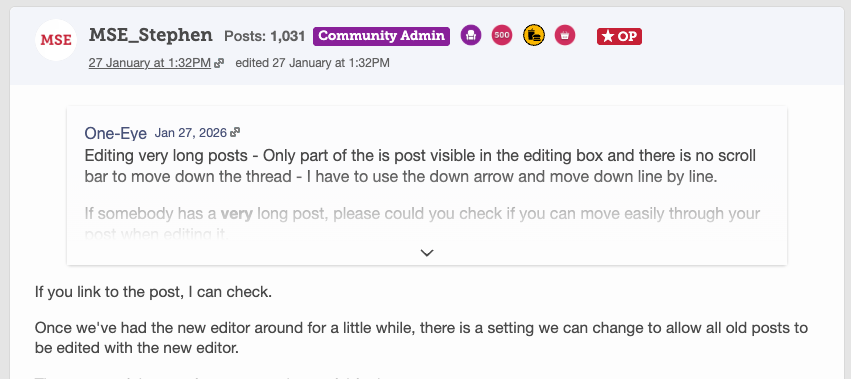
What happened:
No down-arrow appears.
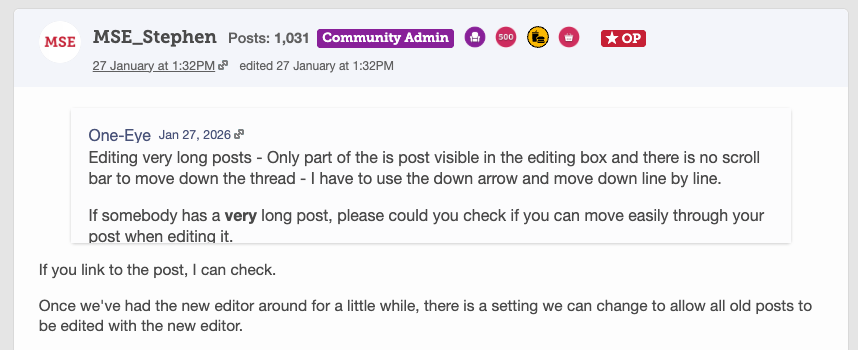
Why it matters:
Being able to see the whole quote is very important
Device/Browser
All Devices. I've replicated on Mac/Chrome and Iphone/Safari
Get the Free MoneySavingExpert Money Tips E-mail
To report inappropriate posts: click the report button
Flag a news story: news@moneysavingexpert.com
Comments
-
What I did:
Open a thread (Happens across the forum on many pages)
What Should happen:
When I click the arrow to expand the quote, the full quote should show
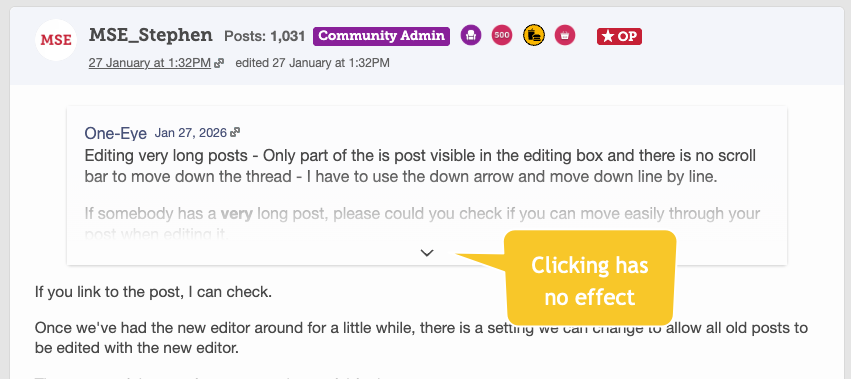
What happened:
Clicking the arrow has no effect. the quote section does not expand
Why it matters:
Being able to see the whole quote is very important
Device/Browser:
Answer
Join the MSE Forum
Get the Free MoneySavingExpert Money Tips E-mail
To report inappropriate posts: click the report button
Flag a news story: news@moneysavingexpert.com0 -
What I did:
Open a thread (Happens across the forum on many pages)
What Should happen:
When I click the arrow to expand the quote, the full quote should show
What happened:
Clicking the arrow has no effect. the quote section does not expand
Why it matters:
Being able to see the whole quote is very important
Device/Browser:
Answer
Join the MSE Forum
Get the Free MoneySavingExpert Money Tips E-mail
To report inappropriate posts: click the report button
Flag a news story: news@moneysavingexpert.com0 -
We've heard back that this is related to a caching issue that's recently been affecting out site - Rather than a specific issue with the Rich Editor.
Our forum provider is working on the issue.
Join the MSE Forum
Get the Free MoneySavingExpert Money Tips E-mail
To report inappropriate posts: click the report button
Flag a news story: news@moneysavingexpert.com0 -
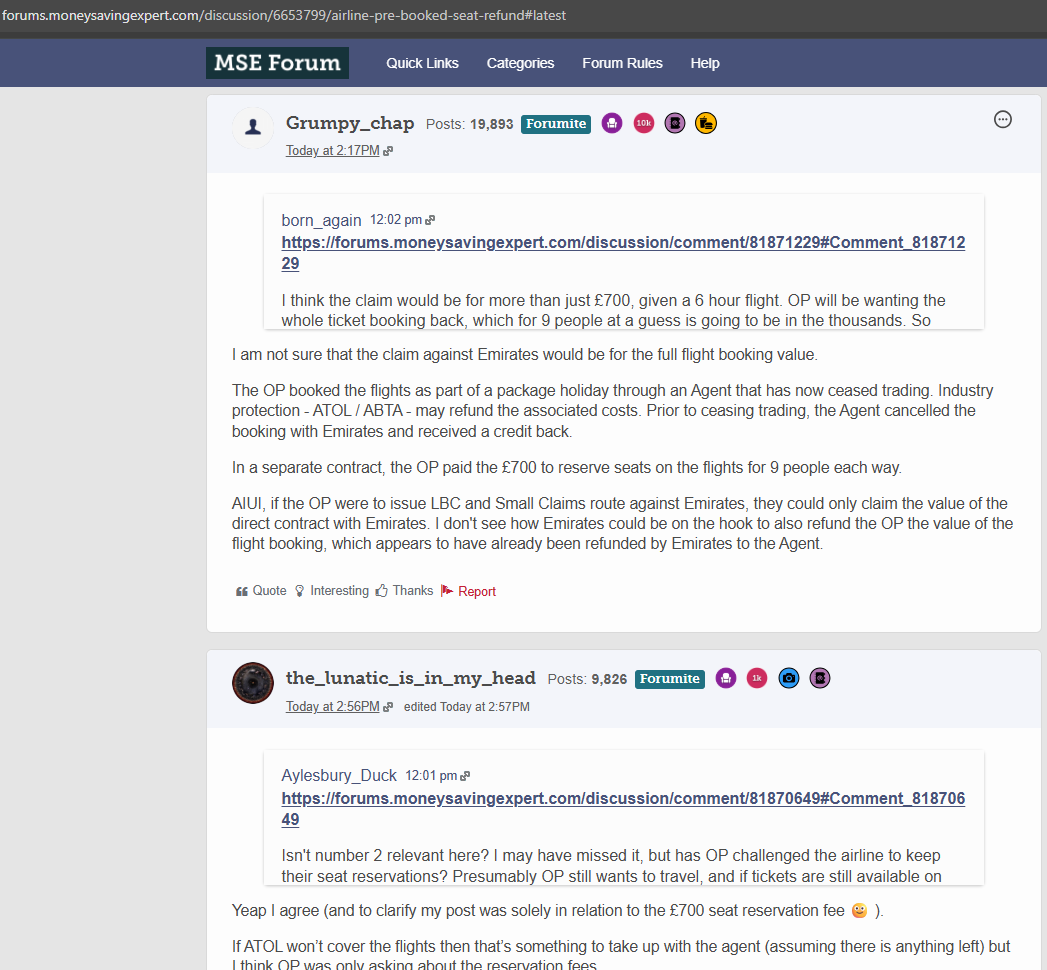
In the examples upthread, there is an arrow showing that is not functioning.
Sometimes, there is no arrow at all. See picture below for an example.
Either way, inability to easily read the linked post is unhelpful. Even better would be a way to edit a quoted post - either to highlight a specific element or to "respond in line" if the question was long and in sections.
 0
0 -
Came here to see if anyone had posted about it, so now just mentioning that I'm seeing the glitch too.
0 -
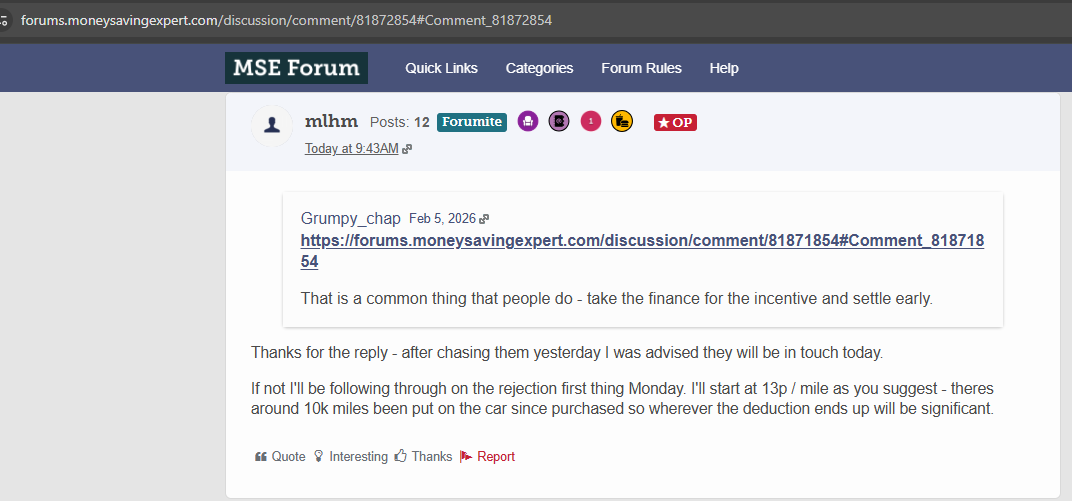
Another example of a quoted post where there is no arrow to click to actually read the quoted post.
Even when it was your own post that was quoted, it is annoying to have to scroll back upthread to refresh your own mind what was originally said.
Especially when scrolling upthread is actually a page (or more) back from the latest posts.
With quotes invisible the response becomes less meaningful.
 0
0 -
Hi @Grumpy_chap
This is all the same caching issue and is being worked on:
We've heard back that this is related to a caching issue that's recently been affecting out site - Rather than a specific issue with the Rich Editor.Our forum provider is working on the issue.Join the MSE Forum
Get the Free MoneySavingExpert Money Tips E-mail
To report inappropriate posts: click the report button
Flag a news story: news@moneysavingexpert.com1 -
I sometimes see the down arrow in the composition window but have never seen it in a committed post
I thought it was by design and just another shortcoming of the RTE
0 -
Quoting continues to be non-functional and inconsistent.
Here is an example to two consecutive quotes in the same thread, one with a down arrow that does not work and one with no down arrow.
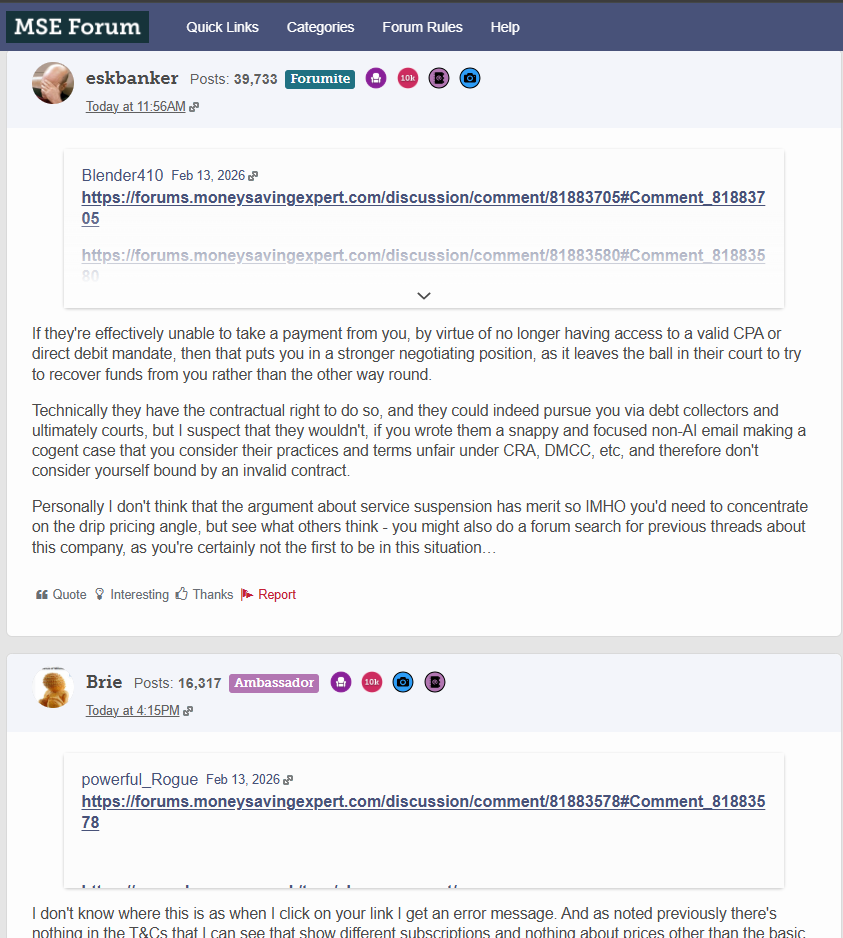
For reference, the source thread is this one:
https://forums.moneysavingexpert.com/discussion/6655260/eharmony-formal-dispute-regarding-6-month-contract#latest
1 -
This seems to have changed:
https://forums.moneysavingexpert.com/discussion/6652370/quoting-posts-changed#latest
0





Confirm your email address to Create Threads and Reply

Categories
- All Categories
- 355.6K Banking & Borrowing
- 254.8K Reduce Debt & Boost Income
- 456.1K Spending & Discounts
- 248.2K Work, Benefits & Business
- 605.6K Mortgages, Homes & Bills
- 179K Life & Family
- 263.4K Travel & Transport
- 1.5M Hobbies & Leisure
- 16.1K Discuss & Feedback
- 37.7K Read-Only Boards