We’d like to remind Forumites to please avoid political debate on the Forum.
This is to keep it a safe and useful space for MoneySaving discussions. Threads that are – or become – political in nature may be removed in line with the Forum’s rules. Thank you for your understanding.
📨 Have you signed up to the Forum's new Email Digest yet? Get a selection of trending threads sent straight to your inbox daily, weekly or monthly!
Can an Android 'Sheet' be backed up to Windows 8.1?





This is what I'm getting for just one of my Android Sheets, a rotating symbol on my phone which isn't fixed with a restart. The info on it is vital for my tax return, so I have all the regular updates also going to an old Android phone when both are online. I am now paranoid about the same thing happening to the old phone, and I would be well and truly stuffed if it did. I would still like to make my amendments by phone, but now require the additional security of a Windows spreadsheet. I know I have the option to 'save as Excel (.xlxs)' but will this retain the Android version, and can I just send it by Bluetooth to my Windows laptop and expect it to get updated regularly?
Comments
-
Leaving aside editing a spreadsheet on a phone (which is just perverse)…
Google Sheets are automatically backed up to Google Drive. Can you open a Chrome browser on your laptop, sign into your Google account (if not already signed in) and open the spreadsheet?
EDIT: just checked, Chrome is available on W8.1 but not surprisingly is not supported (nor is 8.1 for that matter).
2 -
I can see why this is stressful, especially with tax deadlines looming. The good news is your data is almost certainly safe. Assuming OP is actually talking about Google Sheets, these are held in Google Drive, not on the phone, so a spinning icon usually means a local sync issue, not lost data. Exporting to Excel is fine as a snapshot backup, but it won’t stay linked. The master copy of the Sheet stays on the cloud, Android apps and browsers are manipulating that.
Also worth noting that Google Drive itself has a recycle bin and version history, so even accidental deletions or bad edits can usually be rolled back for a period
One extra caution: running very old, unsupported software like Windows 8.1 increases the risk of odd failures and incompatibilities over time. If the phone is running a very old Android version, that alone can explain the behaviour.
2 -
Something odd is happening; I can quote @Vitor 's post but can't edit it.
Exporting to Excel is fine as a snapshot backup, but it won’t stay linked.
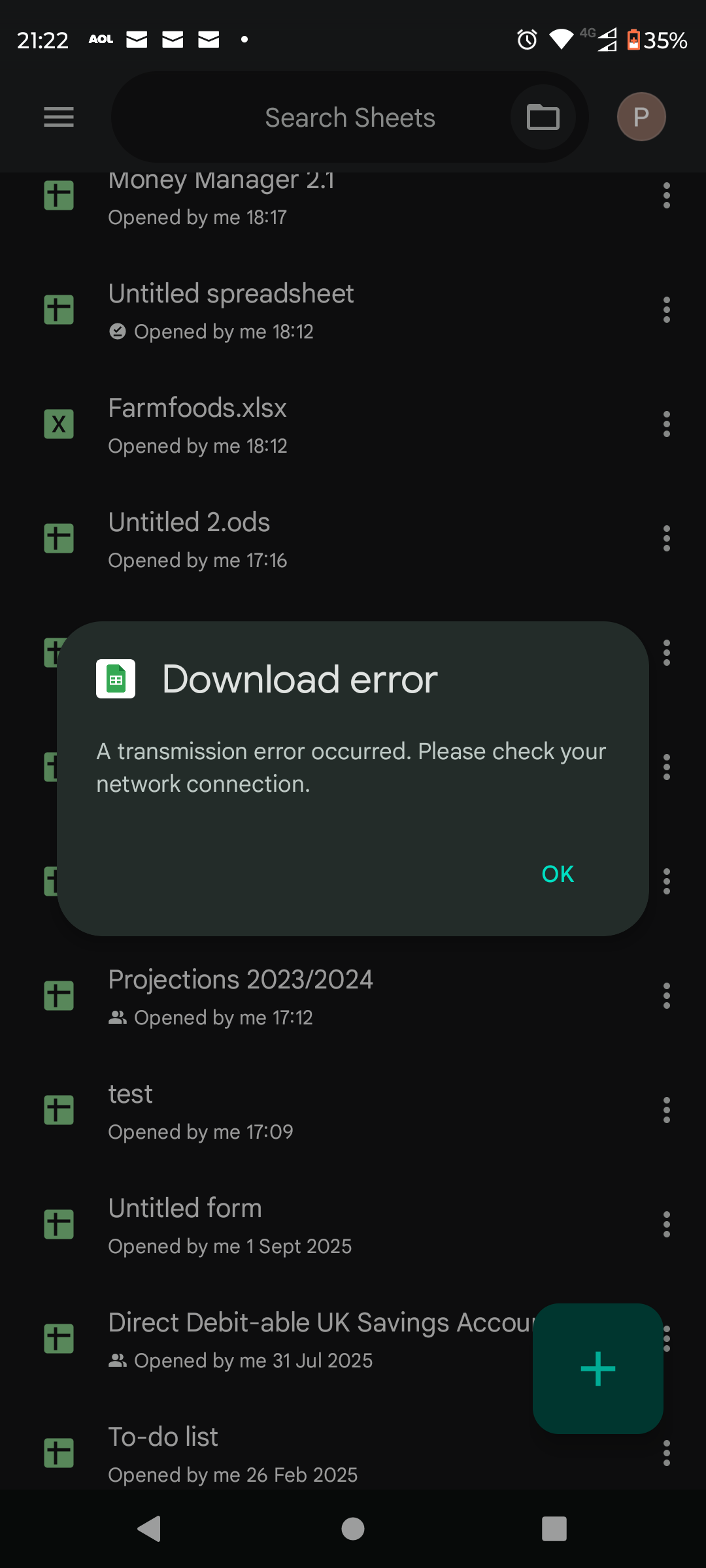
This what I want to do in the short term, so I can still view the information in the event of a calamity. I've saved a different Google Sheet as .xlxs, but when I tap 'send a copy' it comes up with this, even though I've not stated a destination (although from what you tell me, it looks like it has to fetch it from the Cloud first). I have wi-fi and 4g both enabled and working. I'm using Android 13.
 0
0 -
Something odd is happening; I can quote Vitor 's post but can't edit it.
It's not something odd, it's the new normal. MSE have updated the text editor and you now can't edit a quoted post.
N. Hampshire, he/him. Octopus Intelligent Go elec / Fuse gas / Vodafone BB / iD mobile. Kirk Hill Co-op member.Economy 7 cap explainer. Gas vs E7 vs peak elec heating costs, Ecoflow Stream, Best kettle :-)
2.72kWp PV facing SSW installed Jan 2012. 11 x 247w panels, 3.6kw inverter. 37 MWh generated, long-term average 2.6 Os.3 -
Looks like the Sheets app is still having problems connecting for the Google cloud which is where the conversion to .xlsx is done.
On stock or near-stock Android 13 the path try:
Settings → Apps → Google Sheets (and Google Drive) → Mobile data & Wi-Fi
On that screen you should see:
• Allow background data
• Allow data usage while Data Saver is on (this is the “unrestricted” control)If “Allow background data” is off, Drive/Sheets can fail during exports even though foreground use works. If Data Saver is enabled system-wide and the app is not allowed to bypass it, cloud fetches can also fail.
 1
1







Confirm your email address to Create Threads and Reply

Categories
- All Categories
- 355.8K Banking & Borrowing
- 254.9K Reduce Debt & Boost Income
- 456.2K Spending & Discounts
- 248.3K Work, Benefits & Business
- 605.9K Mortgages, Homes & Bills
- 179K Life & Family
- 263.8K Travel & Transport
- 1.5M Hobbies & Leisure
- 16.2K Discuss & Feedback
- 37.7K Read-Only Boards