We’d like to remind Forumites to please avoid political debate on the Forum.
This is to keep it a safe and useful space for MoneySaving discussions. Threads that are – or become – political in nature may be removed in line with the Forum’s rules. Thank you for your understanding.
📨 Have you signed up to the Forum's new Email Digest yet? Get a selection of trending threads sent straight to your inbox daily, weekly or monthly!
Spam and phishing emails

Aristotle67
Posts: 980


 Forumite
Probably not the first to ask this, so apologies right away!
I while ago I started getting loads of spam and phishing emails, many offering me free spins and bonuses. I had been so careful for years and years and yet the rascals have got my email address from somewhere.
I have blocked these without falling into the "unsubscribe" trap so that they are all going into my junk email, but I am fed up looking at that several times a day and finding large numbers of emails in there. Just seeing these gets my goat. I want to stop them coming in completely.
Using the rules feature, I cannot see how to ensure all emails from anyone not on my safe sender or domain list are automatically deleted. I would settle for that if I could arrange it. I read about an "exclusive" option but cannot see it there. I am using classic hotmail/outlook.
I don't want to have to ditch this email address, just stop these unwanted emails arriving in the first place or have them deleted as soon as they hit so I never have to see them. Is there anything I can try?
I while ago I started getting loads of spam and phishing emails, many offering me free spins and bonuses. I had been so careful for years and years and yet the rascals have got my email address from somewhere.
I have blocked these without falling into the "unsubscribe" trap so that they are all going into my junk email, but I am fed up looking at that several times a day and finding large numbers of emails in there. Just seeing these gets my goat. I want to stop them coming in completely.
Using the rules feature, I cannot see how to ensure all emails from anyone not on my safe sender or domain list are automatically deleted. I would settle for that if I could arrange it. I read about an "exclusive" option but cannot see it there. I am using classic hotmail/outlook.
I don't want to have to ditch this email address, just stop these unwanted emails arriving in the first place or have them deleted as soon as they hit so I never have to see them. Is there anything I can try?
0
Comments
-
"Rules Feature" using what app/platform?1
-
The outlook.live.com/mail pageTadleyBaggie said:"Rules Feature" using what app/platform?0 -
Could you not use the same rule to move them to your deleted folder instead of the junk? Or do you mean you want them to disappear?Aristotle67 said:
The outlook.live.com/mail pageTadleyBaggie said:"Rules Feature" using what app/platform?1 -
Have you tried blocking them?
Right click if you are using a laptop, press and hold if using a tablet.
A list of moves you can make comes up, it will stay while you find block.
Click on that and the address is visible and click block again.
Usually it's the same small group sending these under different names and give it a week or two and they'll mostly stop.
If it starts to happen again block straight away and it won't escalate.
I can rise and shine - just not at the same time!
viral kindness .....kindness is contageous pass it on
The only normal people you know are the ones you don’t know very well
1 -
If that is possible, that would do nicely.Woodstok2000 said:
Could you not use the same rule to move them to your deleted folder instead of the junk? Or do you mean you want them to disappear?Aristotle67 said:
The outlook.live.com/mail pageTadleyBaggie said:"Rules Feature" using what app/platform?
To get them into the junk folder, I go into email/junk email/strict (incoming mail handling) and this sends anything from anyone not on my safe senders and domains lists to junk email.
When I go to "rules" I have set up a few rules using certain key words (such as spin, bet, win bonus etc), but I believe that these rules are applicable to the inbox and that it isn't applicable to those going straight to junk. Maybe I need to remove the above setting and give that a try? I can name a rule, set an action (i.e. delete) but I can't see how to set a condition and/or add an exception from the options I am provided with to achieve what I would like.
0 -
Yes, I have but I get bombarded from so many different addresses (many of them quite similar, but of course different) that I gave up.twopenny said:Have you tried blocking them?
Right click if you are using a laptop, press and hold if using a tablet.
A list of moves you can make comes up, it will stay while you find block.
Click on that and the address is visible and click block again.
Usually it's the same small group sending these under different names and give it a week or two and they'll mostly stop.
If it starts to happen again block straight away and it won't escalate.0 -
I had this exact problem suddenly last year. (The only suspect website that I can remember visiting and entering my email address was 'Shein'.) I could find no way of blocking them but after about six months they seem to have stopped. It is so annoying as I have to look through my junk as sometimes legitimate emails end up there.
1 -
There is no supported way in Outlook.com to delete everything not on a safe-sender list before delivery, and any service claiming otherwise is misleading.
• Set the spam filter to High, not default.• Create rules that permanently delete messages containing obvious spam terms like “free spins”, “bonus”, “casino”, etc. Rules run before you ever see the mail.
Blocking individual senders has limited value. Most spam uses throwaway or spoofed addresses, so blocking feels satisfying but doesn’t reduce volume much.1 -
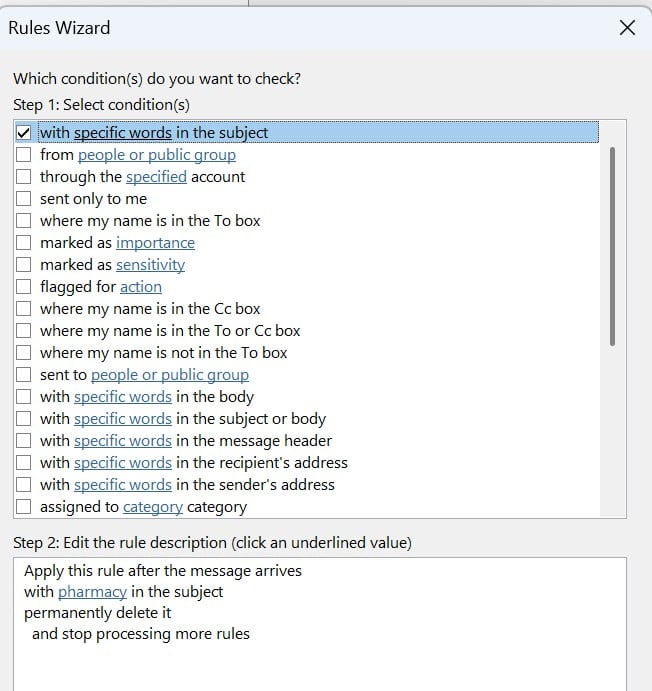
Here's how to block anything with the word PHARMACY in the subject.
If I was half as smart as I think I am - I'd be twice as smart as I REALLY am.2 -
I decide to discontinue using that hotmail address and instead set up an alias for my Microsoft account and made that the primary account. I have kept my legacy emails and One Drive files, etc.
Every time I created rules or blocked spam some of these still found a way to get around this.0









Confirm your email address to Create Threads and Reply

Categories
- All Categories
- 355.8K Banking & Borrowing
- 254.9K Reduce Debt & Boost Income
- 456.2K Spending & Discounts
- 248.3K Work, Benefits & Business
- 605.9K Mortgages, Homes & Bills
- 179K Life & Family
- 263.8K Travel & Transport
- 1.5M Hobbies & Leisure
- 16.2K Discuss & Feedback
- 37.7K Read-Only Boards