We’d like to remind Forumites to please avoid political debate on the Forum.
This is to keep it a safe and useful space for MoneySaving discussions. Threads that are – or become – political in nature may be removed in line with the Forum’s rules. Thank you for your understanding.
📨 Have you signed up to the Forum's new Email Digest yet? Get a selection of trending threads sent straight to your inbox daily, weekly or monthly!
Odd Virus/Spyware Issue




Hey everyone,
My Son's (8) laptop has some kind of virus/spyware going on which I'm unable to get rid of using my usual (rather oldskool) tricks, I'm hoping somebody can help or point me in the right direction?
Essentially he clicked a link for Minecraft Colouring via Google search, in Chrome, however, it was an add. Upon doing so a barage of (quite authentic, although Subscription is spelt wrong!)) McAffee poppups came up, and miscelanous other stuff which freaked him out (and reminded me of the sort of stuff I'd seen two decades ago).
I tried:
1. Malwarebytes - a full scan and a deletion of anything it found (which wasn't much)
2. Bitdefender - new to me, but did a full scan, nothing came up.
3. Looked in Chrome Extensions - no dodgy ones.
4. Tried to look at startup pages - but the settings are not available in a child profile (so not sure how they could be changed, but obvs have by something)
He has his own profile on the laptop (as do I), setup as a child user, so no admin rights. I've just locked the websites he can access via Chrome using the Family Link app, to basically Google Classroom, BBC and nothing else. I just fired up Chrome again to see if it was sorted, alas no. Here's what it looks like on startup of Chrome:
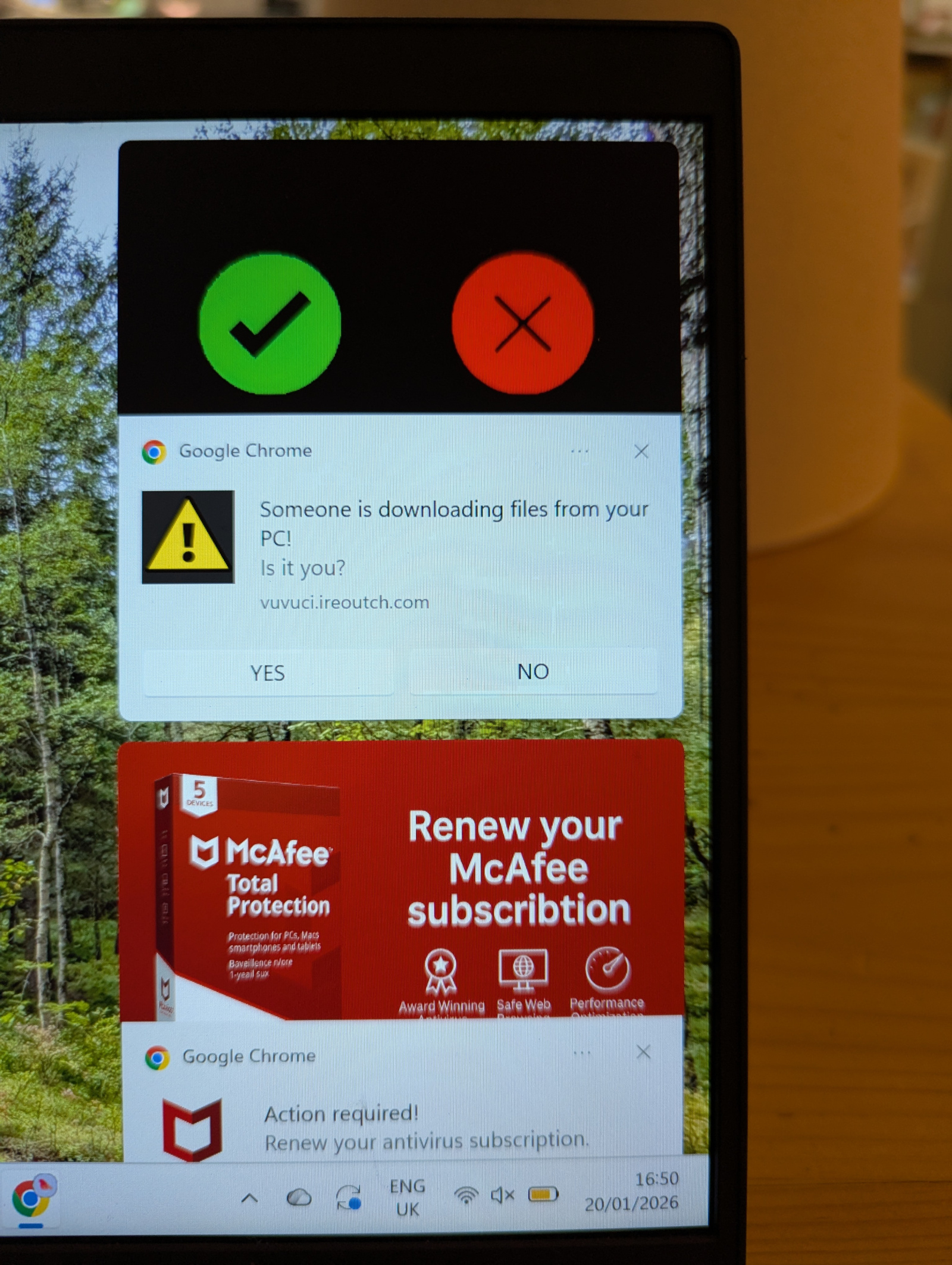
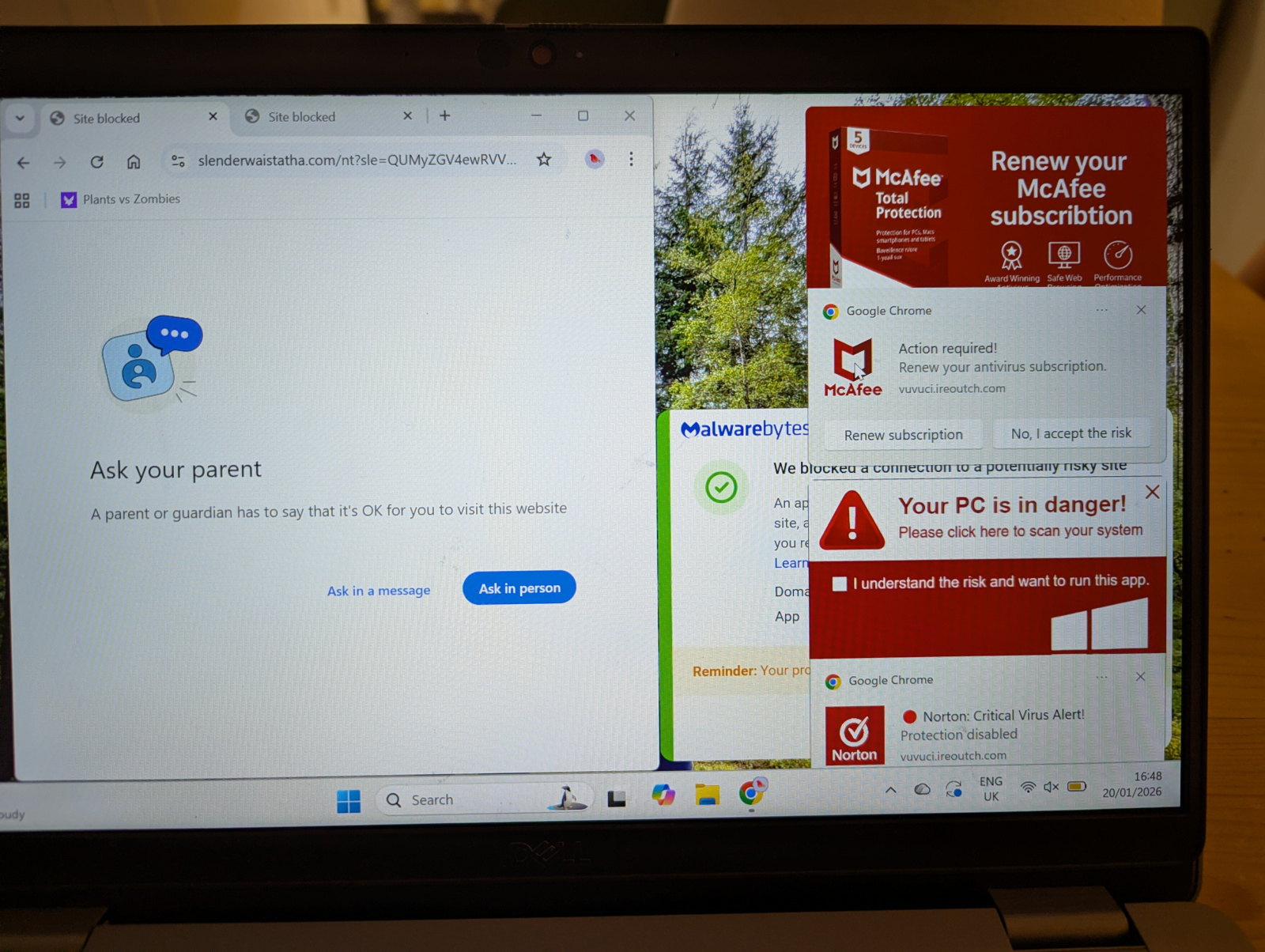
I used to fix this sort of stuff for a living about 20 years ago, in a corporate scenario (where often it was quicker to just reformat the machine and re-image it, admittidly), but I'm very rusty!
Any tips to avoid having to go the nuclear route are much appreciated!
I looked momentarilly into HiJackThis, but it seems this isn't a thing anymore really.
So yeah, any help much appreciated. Thanks 
Comments
-
Is it a jscript in a temp / cache / download folder that reinfect on restart0
-
Not too sure - I managed to open Chrome as an admin on my son's profile and I could see two webites had been added to the startup, as opposed to blank. So removing those has helped, whether it has elminated it or not I don't know.
I put one of the URLs you can see in the picture - Slender.... etc.com into VirusTotal website, which is supposed to tell you if it's dodgy - seemed to come back clean!
So yeah, the behaviour I was seeing has been stopped, but whether the laptop profile is 'clean' or not I'm not too sure.
Incidentally, he has a Chrome profile for Home and one for School - the other profile, School, was completly fine, it only seems to have impacted the one he was browsing on.
Cheers for the idea, I'll look into them.0 -
Try adwarecleaner here https://www.malwarebytes.com/adwcleaner4.8kWp 12x400W Longhi 9.6 kWh battery Giv-hy 5.0 Inverter, WSW facing Essex . Aint no sunshine ☀️ Octopus gas fixed 5.07 + Octopus Intelligent Flux leccy
CEC Email energyclub@moneysavingexpert.com0 -
This is not a virus, but notifications (albeit spam notifications) coming in through Chrome (although can come in any browser).For Specific SitesThis method lets you control individual sites without blocking everything:
- Open Settings: Click the three dots (More) in the top-right corner of Chrome and select Settings.
- Navigate: Go to Privacy and security > Site Settings > Notifications.
- Manage Sites: Under the "Allowed to send notifications" section, find the site you want to stop.
- Block: Click the three dots next to the site and choose Block or Remove to stop notifications from it.
1 -
Thanks, I'll review that and see if there's anything there. Was quite aggressive, killing chrome.exe a th task manager didn't kill the popups, so not sure what process they were.
Reminds me, I wonder if Process Explorer is still a thing, could drag it over a process to find out what it was I seem to recall.
At the moment the laptop is locked down to only allow Educational sites in Edge (which he doesn't really use) and Homework sites in Chrome.
Funny, he'd been playing browser games before on sites like Playgamma, but that didn't cause any issues from what I can see.
Thanks for the help0 -
Cheers, I'd imagine if I installed the 14 day trial business it probably covered that too? I'll double check though.debitcardmayhem said:Try adwarecleaner here https://www.malwarebytes.com/adwcleaner0 -
super anti spyware?0
-
If it's sorted then that's good, but if it was only affecting his 'home' profile, why not just delete that one and create a new one for him. Not that I've ever tried creating a profile on Chrome mind.ChilliBob said:Not too sure - I managed to open Chrome as an admin on my son's profile and I could see two webites had been added to the startup, as opposed to blank. So removing those has helped, whether it has elminated it or not I don't know.
I put one of the URLs you can see in the picture - Slender.... etc.com into VirusTotal website, which is supposed to tell you if it's dodgy - seemed to come back clean!
So yeah, the behaviour I was seeing has been stopped, but whether the laptop profile is 'clean' or not I'm not too sure.
Incidentally, he has a Chrome profile for Home and one for School - the other profile, School, was completly fine, it only seems to have impacted the one he was browsing on.
Cheers for the idea, I'll look into them.1 -
Cheers, yes, that site was there in the notifications. Also, Chrome had picked up it sent shed loads of notifications too.grumpycrab said:This is not a virus, but notifications (albeit spam notifications) coming in through Chrome (although can come in any browser).For Specific SitesThis method lets you control individual sites without blocking everything:- Open Settings: Click the three dots (More) in the top-right corner of Chrome and select Settings.
- Navigate: Go to Privacy and security > Site Settings > Notifications.
- Manage Sites: Under the "Allowed to send notifications" section, find the site you want to stop.
- Block: Click the three dots next to the site and choose Block or Remove to stop notifications from it.
Quite surprised it wasn't flagged as malicious in any way on Virus Tools - whilst admidditly it doesn't appear to have left say a trojan, or altered registry or left spywyare - if I believe MBam, it's clearly dodgy, and I'm sure if one of the popups were clicked on some other kind of nastyness would be unleashed!0 -
Yeah, I mean he doesn't have anything important on either of his profiles - the only difference is one uses a personal Gmail account, the other a school one, so yeah, that would have been a option perhaps. I guess I was, and still am, wondering if anything else is impacted. So, will keep a close eye on it!JSmithy45AD said:
If it's sorted then that's good, but if it was only affecting his 'home' profile, why not just delete that one and create a new one for him. Not that I've ever tried creating a profile on Chrome mind.ChilliBob said:Not too sure - I managed to open Chrome as an admin on my son's profile and I could see two webites had been added to the startup, as opposed to blank. So removing those has helped, whether it has elminated it or not I don't know.
I put one of the URLs you can see in the picture - Slender.... etc.com into VirusTotal website, which is supposed to tell you if it's dodgy - seemed to come back clean!
So yeah, the behaviour I was seeing has been stopped, but whether the laptop profile is 'clean' or not I'm not too sure.
Incidentally, he has a Chrome profile for Home and one for School - the other profile, School, was completly fine, it only seems to have impacted the one he was browsing on.
Cheers for the idea, I'll look into them.0









Confirm your email address to Create Threads and Reply

Categories
- All Categories
- 355.8K Banking & Borrowing
- 254.9K Reduce Debt & Boost Income
- 456.2K Spending & Discounts
- 248.3K Work, Benefits & Business
- 605.9K Mortgages, Homes & Bills
- 179K Life & Family
- 263.8K Travel & Transport
- 1.5M Hobbies & Leisure
- 16.2K Discuss & Feedback
- 37.7K Read-Only Boards