We’d like to remind Forumites to please avoid political debate on the Forum.
This is to keep it a safe and useful space for MoneySaving discussions. Threads that are – or become – political in nature may be removed in line with the Forum’s rules. Thank you for your understanding.
📨 Have you signed up to the Forum's new Email Digest yet? Get a selection of trending threads sent straight to your inbox daily, weekly or monthly!
How do I remove 'All Bookmarks' option from Chrome Bookmarks Bar?




Windows 10 laptop with Chrome browser.
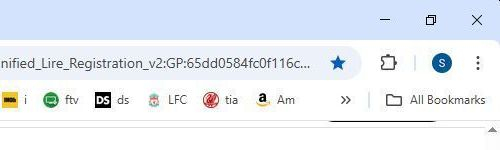
An 'All Bookmarks' option has recently appeared on my bookmarks bar. It is to the right of the double >> chevron on the far right of my bookmarks bar. It does nothing, it takes up space for 1 more bookmarks and I want to get rid of it. I don't want to get rid of any of my Bookmarks, just that option.
The first picture below shows what I see now.
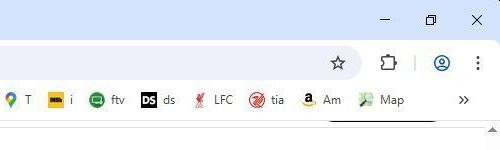
The second picture shows the bookmarks bar as it used to be and how I want it.
Both pictures show just the top right section of my laptop screen.
Thanks
He said to the salesman, “My wife would like to talk to you about the Volkswagen Golf in the showroom window.”
Salesman said, “We haven't got a Volkswagen Golf in the showroom window.”
The man replied, “You have now mate".
Comments
-
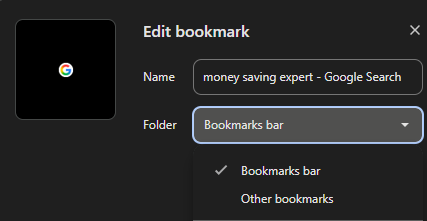
Move the favourites/bookmarks from the "Other bookmarks" section in the Bookmark Manager and it should go away.
 When you bookmark in future you get the option where to put them so you've probably added one to "Other bookmarks" by accident:
 1
1 -
Thank you Neil, that worked.
Other Bookmarks contained one entry called 'New Folder'. I deleted that and 'All Bookmarks' disappeared.
Presumably I accidentally created 'New Folder'.
I appreciate your help. A man walked into a car showroom.
He said to the salesman, “My wife would like to talk to you about the Volkswagen Golf in the showroom window.”
Salesman said, “We haven't got a Volkswagen Golf in the showroom window.”
The man replied, “You have now mate".0 -
You can also just right click on it and delete from there, I think any bookmarks within it get transferred to the main bookmark bar. You usually get that when importing bookmarks.Belenus said:Thank you Neil, that worked.
Other Bookmarks contained one entry called 'New Folder'. I deleted that and 'All Bookmarks' disappeared.
Presumably I accidentally created 'New Folder'.
I appreciate your help.0 -
That was the first thing I tried and it didn't work.JSmithy45AD said:
You can also just right click on it and delete from there, I think any bookmarks within it get transferred to the main bookmark bar. You usually get that when importing bookmarks.Belenus said:Thank you Neil, that worked.
Other Bookmarks contained one entry called 'New Folder'. I deleted that and 'All Bookmarks' disappeared.
Presumably I accidentally created 'New Folder'.
I appreciate your help.A man walked into a car showroom.
He said to the salesman, “My wife would like to talk to you about the Volkswagen Golf in the showroom window.”
Salesman said, “We haven't got a Volkswagen Golf in the showroom window.”
The man replied, “You have now mate".0 -
Odd, I just created a new folder on the bookmark bar, saved this page to it, and then deleted the folder. It actually deleted the bookmark for this page too so I was wrong on that part.Belenus said:
That was the first thing I tried and it didn't work.JSmithy45AD said:
You can also just right click on it and delete from there, I think any bookmarks within it get transferred to the main bookmark bar. You usually get that when importing bookmarks.Belenus said:Thank you Neil, that worked.
Other Bookmarks contained one entry called 'New Folder'. I deleted that and 'All Bookmarks' disappeared.
Presumably I accidentally created 'New Folder'.
I appreciate your help.0


Confirm your email address to Create Threads and Reply

Categories
- All Categories
- 355.8K Banking & Borrowing
- 254.9K Reduce Debt & Boost Income
- 456.2K Spending & Discounts
- 248.3K Work, Benefits & Business
- 605.9K Mortgages, Homes & Bills
- 179K Life & Family
- 263.8K Travel & Transport
- 1.5M Hobbies & Leisure
- 16.2K Discuss & Feedback
- 37.7K Read-Only Boards