We’d like to remind Forumites to please avoid political debate on the Forum.
This is to keep it a safe and useful space for MoneySaving discussions. Threads that are – or become – political in nature may be removed in line with the Forum’s rules. Thank you for your understanding.
📨 Have you signed up to the Forum's new Email Digest yet? Get a selection of trending threads sent straight to your inbox daily, weekly or monthly!
Many accounts
Comments
-
Thanks for all your replies. It’s nice to know I’m not the only one with several. As others have suggested, the key is to keep things
organised. As I’ve said in a different discussion I have been using budgeting tools on my banking apps (Monzo mainly) but having seen a suggestion on here yesterday regarding ace money I have been trying that and it is good. Only thing is I’m currently entering transactions manually which isn’t the end of the world but it can be tedious sometimes as I’ve got two 1p challenges running on Monzo and they obviously need adding on every day. I haven’t figured out any sort of automation yet or even if that’s possible for the banks I use. I’ve heard Microsoft money is good but I’m on a Mac so I’m certain there wont be a version for that.0 -
Smvthephotoman said:Thanks for all your replies. It’s nice to know I’m not the only one with several. As others have suggested, the key is to keep things
organised. As I’ve said in a different discussion I have been using budgeting tools on my banking apps (Monzo mainly) but having seen a suggestion on here yesterday regarding ace money I have been trying that and it is good. Only thing is I’m currently entering transactions manually which isn’t the end of the world but it can be tedious sometimes as I’ve got two 1p challenges running on Monzo and they obviously need adding on every day. I haven’t figured out any sort of automation yet or even if that’s possible for the banks I use. I’ve heard Microsoft money is good but I’m on a Mac so I’m certain there wont be a version for that.
For regular amounts, you can set up a Schedule. If you tick "enter bill automatically", it adds the transaction as an actual transaction on the correct day every time you launch AceMoney. Have a play with it, it's a great functionality for all kinds of things.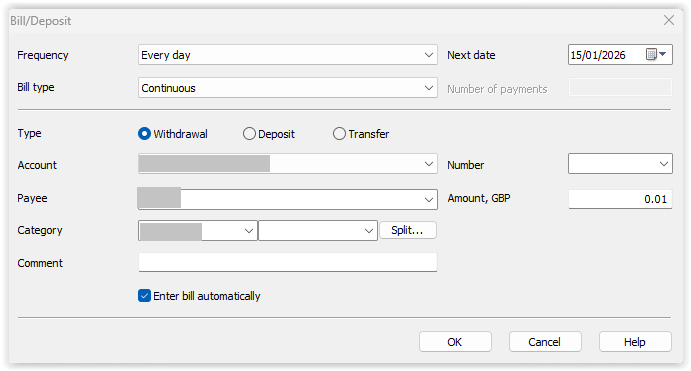
1 -
I us MS Money on a Mac via a Windows 11 virtual machine. I haven't tried but another option might be to run it via Wine/Crossover.Smvthephotoman said:Thanks for all your replies. It’s nice to know I’m not the only one with several. As others have suggested, the key is to keep things
organised. As I’ve said in a different discussion I have been using budgeting tools on my banking apps (Monzo mainly) but having seen a suggestion on here yesterday regarding ace money I have been trying that and it is good. Only thing is I’m currently entering transactions manually which isn’t the end of the world but it can be tedious sometimes as I’ve got two 1p challenges running on Monzo and they obviously need adding on every day. I haven’t figured out any sort of automation yet or even if that’s possible for the banks I use. I’ve heard Microsoft money is good but I’m on a Mac so I’m certain there wont be a version for that.
https://www.codeweavers.com/wine
1 -
Thanks. Turns out the Mac version of AceMoney that I’ve been using works exactly the same way. It uses Crossover. Only thing with that is I didn’t have to do anything. I just ran the installer and it loaded everything in itself to make it work via crossover.1








Confirm your email address to Create Threads and Reply

Categories
- All Categories
- 355.7K Banking & Borrowing
- 254.9K Reduce Debt & Boost Income
- 456.1K Spending & Discounts
- 248.3K Work, Benefits & Business
- 605.8K Mortgages, Homes & Bills
- 179K Life & Family
- 263.6K Travel & Transport
- 1.5M Hobbies & Leisure
- 16.1K Discuss & Feedback
- 37.7K Read-Only Boards