We’d like to remind Forumites to please avoid political debate on the Forum.
This is to keep it a safe and useful space for MoneySaving discussions. Threads that are – or become – political in nature may be removed in line with the Forum’s rules. Thank you for your understanding.
📨 Have you signed up to the Forum's new Email Digest yet? Get a selection of trending threads sent straight to your inbox daily, weekly or monthly!
Best savings accounts for pots
Comments
-
@nl cm 14
Another couple of selling points for the Zopa accounts.
1) Unusually, the current account pays cashback on direct debits, as well as other types of spend.
2) Interest is credited monthly to each separate pot. However, usefully the app displays the total of all pots on a DAILY basis throughout the month, so you have a good idea of what you will earn in the month - not credited, just displayed.I now use Zopa instead of Chase, as their loss leading days seem to be over.1 -
Plus having the current account will give you access to their regular saver where you can pay in up to £300 per calendar month and it pays 7.1% interest on this so you may wish to consider it too.0
-
My Zopa pots are only 2.95% . Had a trial Zopa current account now converted to Biscuit but the offer of 4.45% was only valid for new accounts opened I believenl_cm_14 said:
I have a Zopa savings but not a Zopa current. My Zopa savings has dropped to 2.95% which is less than if I join chase as a new customerKissington said:
Why do you say the Zopa interest rate has dropped massively? Presumably you are an existing customer like myself. I am currently earning 4.45% on my pots, and this has only recently reduced from 4.75% after the bank rate movement. To earn that, there is a requirement to deposit at least £500 a month into the linked Zopa current account, which in itself pays 2%. Are you not able to meet that requirement - it is important as the rate does fall if that requirement is not met?nl_cm_14 said:I currently have a Zopa account because I have around 10 different pots for different things and it helps me to keep track of my savings. Their interest rate has massively dropped lately when compared to the Chase savings for new current account customers but I can't seem to set up pots with a Chase savings account. Is there a savings account with a good interest rate? Or do I need to forfeit a good interest rate in order to have multiple pots with zopa?As far as I am aware, Chase savings pots only pay 2.5% unless you are a new customer on a temporarily boosted rate.I can also recommend the Spring account that someone else mentioned. The rate of 4.11% is slightly less competitive, but it has been very consistent and not as subject to base rate changes as other accounts. It is run by Paragon Bank and works well.
0 -
Ah, could be that the offer has ended for new signups.Growingold said:
My Zopa pots are only 2.95% . Had a trial Zopa current account now converted to Biscuit but the offer of 4.45% was only valid for new accounts opened I believenl_cm_14 said:
I have a Zopa savings but not a Zopa current. My Zopa savings has dropped to 2.95% which is less than if I join chase as a new customerKissington said:
Why do you say the Zopa interest rate has dropped massively? Presumably you are an existing customer like myself. I am currently earning 4.45% on my pots, and this has only recently reduced from 4.75% after the bank rate movement. To earn that, there is a requirement to deposit at least £500 a month into the linked Zopa current account, which in itself pays 2%. Are you not able to meet that requirement - it is important as the rate does fall if that requirement is not met?nl_cm_14 said:I currently have a Zopa account because I have around 10 different pots for different things and it helps me to keep track of my savings. Their interest rate has massively dropped lately when compared to the Chase savings for new current account customers but I can't seem to set up pots with a Chase savings account. Is there a savings account with a good interest rate? Or do I need to forfeit a good interest rate in order to have multiple pots with zopa?As far as I am aware, Chase savings pots only pay 2.5% unless you are a new customer on a temporarily boosted rate.I can also recommend the Spring account that someone else mentioned. The rate of 4.11% is slightly less competitive, but it has been very consistent and not as subject to base rate changes as other accounts. It is run by Paragon Bank and works well.
Edit: I had the Beta version of the current account but was still able to signup to the 4.75% (now 4.45%) offer.1 -
No. I already had Zopa current account for a year when the 4.75% (now 4.45%) offer was introduced, this didn't prevent me from getting boosted rate.Growingold said:
My Zopa pots are only 2.95% . Had a trial Zopa current account now converted to Biscuit but the offer of 4.45% was only valid for new accounts opened I believenl_cm_14 said:
I have a Zopa savings but not a Zopa current. My Zopa savings has dropped to 2.95% which is less than if I join chase as a new customerKissington said:
Why do you say the Zopa interest rate has dropped massively? Presumably you are an existing customer like myself. I am currently earning 4.45% on my pots, and this has only recently reduced from 4.75% after the bank rate movement. To earn that, there is a requirement to deposit at least £500 a month into the linked Zopa current account, which in itself pays 2%. Are you not able to meet that requirement - it is important as the rate does fall if that requirement is not met?nl_cm_14 said:I currently have a Zopa account because I have around 10 different pots for different things and it helps me to keep track of my savings. Their interest rate has massively dropped lately when compared to the Chase savings for new current account customers but I can't seem to set up pots with a Chase savings account. Is there a savings account with a good interest rate? Or do I need to forfeit a good interest rate in order to have multiple pots with zopa?As far as I am aware, Chase savings pots only pay 2.5% unless you are a new customer on a temporarily boosted rate.I can also recommend the Spring account that someone else mentioned. The rate of 4.11% is slightly less competitive, but it has been very consistent and not as subject to base rate changes as other accounts. It is run by Paragon Bank and works well.2 -
Growingold said:
My Zopa pots are only 2.95% . Had a trial Zopa current account now converted to Biscuit but the offer of 4.45% was only valid for new accounts opened I believenl_cm_14 said:
I have a Zopa savings but not a Zopa current. My Zopa savings has dropped to 2.95% which is less than if I join chase as a new customerKissington said:
Why do you say the Zopa interest rate has dropped massively? Presumably you are an existing customer like myself. I am currently earning 4.45% on my pots, and this has only recently reduced from 4.75% after the bank rate movement. To earn that, there is a requirement to deposit at least £500 a month into the linked Zopa current account, which in itself pays 2%. Are you not able to meet that requirement - it is important as the rate does fall if that requirement is not met?nl_cm_14 said:I currently have a Zopa account because I have around 10 different pots for different things and it helps me to keep track of my savings. Their interest rate has massively dropped lately when compared to the Chase savings for new current account customers but I can't seem to set up pots with a Chase savings account. Is there a savings account with a good interest rate? Or do I need to forfeit a good interest rate in order to have multiple pots with zopa?As far as I am aware, Chase savings pots only pay 2.5% unless you are a new customer on a temporarily boosted rate.I can also recommend the Spring account that someone else mentioned. The rate of 4.11% is slightly less competitive, but it has been very consistent and not as subject to base rate changes as other accounts. It is run by Paragon Bank and works well.
It wasn't just for new accounts but the offer got withdrawn very quickly, as is so often the case with good offers nowadays1 -
Thank you so, so much. I'll give this a go and report back! I really appreciate itBooJewels said:
Okay, got something I can post for you. The way I do it is a pretty blunt instrument, but it works well enough for me - there are probably more elegant ways of doing it and maybe more automated.nl_cm_14 said:
If that's ok with you I would find that invaluable. This is all new to me and I'm trying really hard to learn and do it correctly. Thank you so muchBooJewels said:
Nobody here can know how good you are at maths or how adept you are with spreadsheets etc. so can't guess at quite where to pitch their replies.nl_cm_14 said:
I'm someone for whom maths isn't a strong point so it isn't as easy for me as you make it sound unfortunately, sorry! I'm trying!eskbanker said:
All you need to calculate interest is daily balances and gross interest rate applicable (plus any rounding rules, etc) so if you're allocating the overall balance to notional pots then you just use those sub-balances to work it out. You can do it to the penny if you wish to achieve complete accuracy but probably simpler to just subdivide the interest according to the pot balances at the point of interest payment.nl_cm_14 said:
Sorry to be stupid but how do I work out the portion interest on a spreadsheet?friolento said:nl_cm_14 said:Thanks all. I'd rather the interest go to each pot though rather than having it in one account with one interest overall
Your spreadhseet can be set up to aportion the interest according to the amount held in the virtual pot. Not 100% precise if you keep depositing and withdrawing but interest is a minor element, and a reducing one as interest rates reduce further. Over time, you probably lose more in interest by restricting yourself to companies with physical pots, rather than putting your money into highest paying accounts, and moving the money when an account becomes uncompetitive. Your best interest rates are available in Regular Saver accounts, of which some regular forum users have dozens at any point in time.
If you genuinely want to know how I do it, I'll happily show you my spreadsheet section for working out how much interest I allocate to different pots, with the formula etc. I get my interest paid monthly, so just put the amount in one cell and it gives me all the proportionate amounts to then paste into the columns for each pot to give me a revised total for each. Takes less time than it just has to describe it.
I'm not near my spreadsheet just at the moment, but can look at it later for you, if it would help.
In my spreadsheet I have a small block like this off to the side - all I need to do, once it has been set up, is type in the monthly interest in the cell with the outline, cell A2. It then auto-generates the proportion of interest that I want to allocate to each virtual pot - column B - those cells each have a formula in them, see below. Column C is just my note on what is what with their percentages.
I've already been through my account and decided how much of the balance is allocated to a particular purpose and the percentage of the balance that is in that pot - 37% for home improvements in this fictional example.
In the cells in column B is a formula to work out the percentage of the interest payment for that pot. For the home improvement one in B2 for example, the formula is =SUM(0.37*A2) - that works out the content of cell A2 (the interest you typed in) x 0.37 to get 37% of that interest. Cell B6 is =SUM(0.03*A2) - 3% of the contents of cell A2 etc. I use Open Office, but I think most spreadsheets use very similar formula, although the syntax might be slightly different.
If you re-type a different number in cell A2 in this example, it just automatically re-calculates all of the cells in column B in an instant. I also tend to select those cells to see the total, to ensure that it makes the same interest number, as occasionally through rounding or truncating, there's an erroneous penny or two.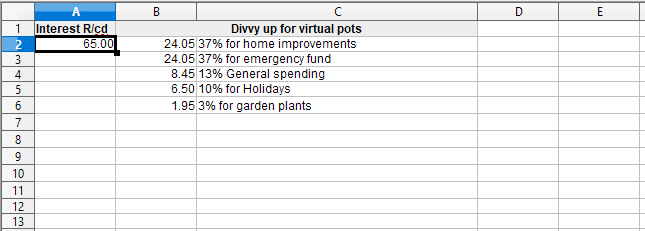
To then transfer these totals to each virtual pot - I have a 3 column area on the same sheet for each pot, something like below. I just type in any transactions - in or out (I always put withdrawals/negative numbers in red) and then a running total in the third column. So to add the interest for December into the General Spending pot, I'd right click and copy from cell B4 above and then right click and 'Paste Special' to get the result of the formula pasted in, rather than the formula itself. I then select cells L4 (interest just added) and M3 (old running total) to get the new total to put in cell M4 as the new running total for that pot, but that could easily be done by a formula too.
Periodically I revisit the proportions of the pots and re-work the table in the top screengrab, especially if there have been any decent sized transactions to change the percentages - but small fluctuations I don't bother with. I round them to the nearest whole percentage - being more generous with the smaller pots - and I check that they do actually add up to 100!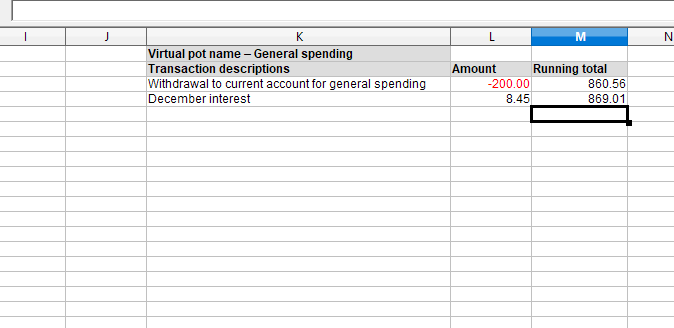
ETA: There was something else niggling at my mind that I wanted to mention and it's now come back to me - I always type 100 in cell A2 when setting up or adjusting a proportion table - that way you can see at a glance that your formula are correct. Because I rely very heavily on my spreadsheets, I tend to do a lot of what I call 'plausibility tests' like this, to ensure that I haven't made any mistakes, as if you do, it's very easy for them to perpetuate through calculations and once they've travelled a bit, can be hard to find and unravel.
I also select to add up the individual totals in the virtual pots to ensure that they come to the same as the actual parent account balance.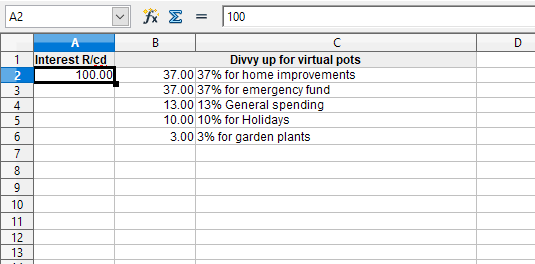 1
1 -
I just googled it and it said that offer has expired?wmb194 said:
Open a Zopa current account and get the boosted rate. You'll need to deposit £500 in the current account per account month to keep that rate but you don't need to keep it there.nl_cm_14 said:
I have a Zopa savings but not a Zopa current. My Zopa savings has dropped to 2.95% which is less than if I join chase as a new customerKissington said:
Why do you say the Zopa interest rate has dropped massively? Presumably you are an existing customer like myself. I am currently earning 4.45% on my pots, and this has only recently reduced from 4.75% after the bank rate movement. To earn that, there is a requirement to deposit at least £500 a month into the linked Zopa current account, which in itself pays 2%. Are you not able to meet that requirement - it is important as the rate does fall if that requirement is not met?nl_cm_14 said:I currently have a Zopa account because I have around 10 different pots for different things and it helps me to keep track of my savings. Their interest rate has massively dropped lately when compared to the Chase savings for new current account customers but I can't seem to set up pots with a Chase savings account. Is there a savings account with a good interest rate? Or do I need to forfeit a good interest rate in order to have multiple pots with zopa?As far as I am aware, Chase savings pots only pay 2.5% unless you are a new customer on a temporarily boosted rate.I can also recommend the Spring account that someone else mentioned. The rate of 4.11% is slightly less competitive, but it has been very consistent and not as subject to base rate changes as other accounts. It is run by Paragon Bank and works well.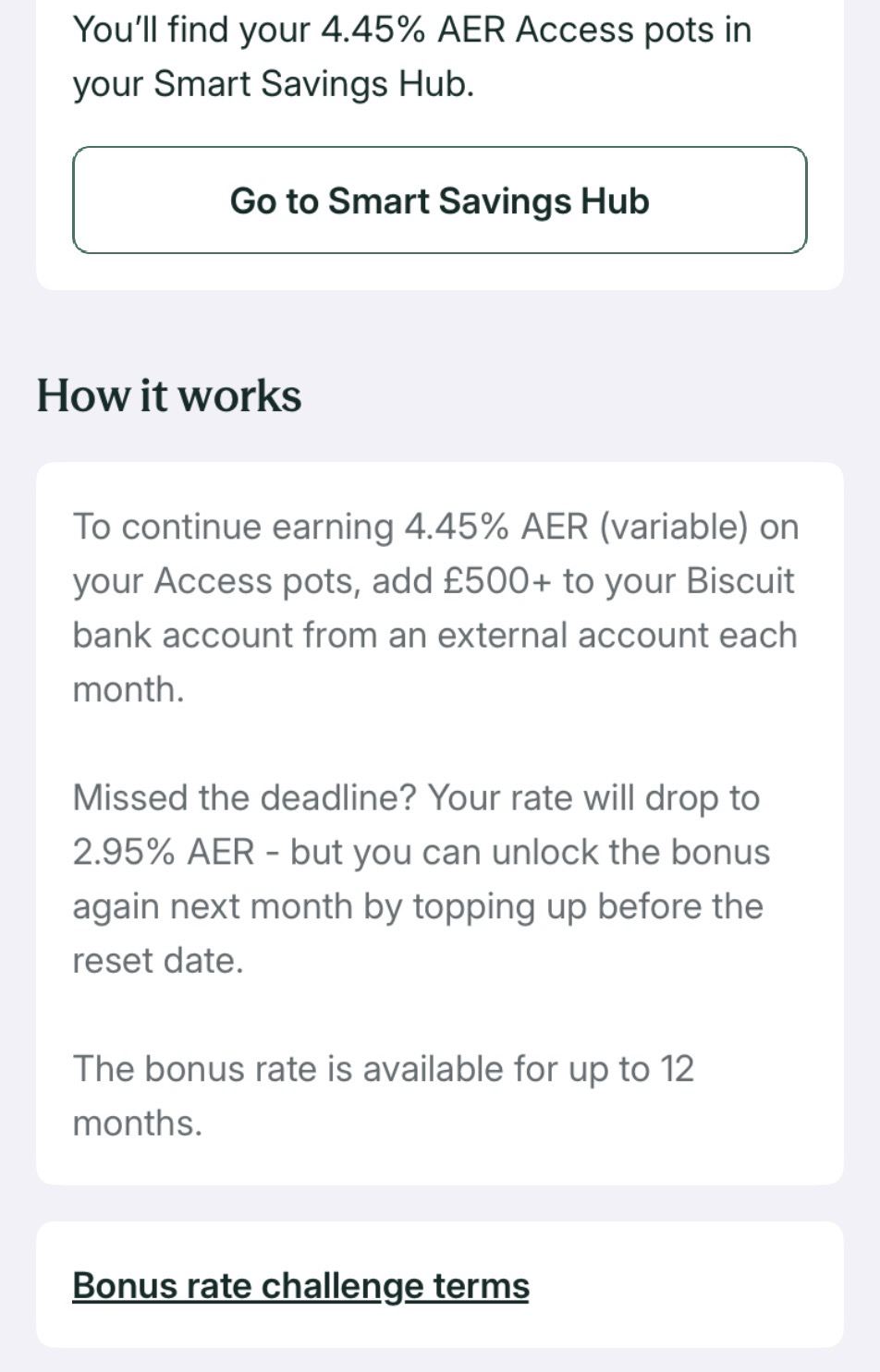 0
0 -
BooJewels said:
In my spreadsheet I have a small block like this off to the side - all I need to do, once it has been set up, is type in the monthly interest in the cell with the outline, cell A2. It then auto-generates the proportion of interest that I want to allocate to each virtual pot - column B - those cells each have a formula in them, see below. Column C is just my note on what is what with their percentages.
I've already been through my account and decided how much of the balance is allocated to a particular purpose and the percentage of the balance that is in that pot - 37% for home improvements in this fictional example.
In the cells in column B is a formula to work out the percentage of the interest payment for that pot. For the home improvement one in B2 for example, the formula is =SUM(0.37*A2) - that works out the content of cell A2 (the interest you typed in) x 0.37 to get 37% of that interest. Cell B6 is =SUM(0.03*A2) - 3% of the contents of cell A2 etc. I use Open Office, but I think most spreadsheets use very similar formula, although the syntax might be slightly different.
If you re-type a different number in cell A2 in this example, it just automatically re-calculates all of the cells in column B in an instant. I also tend to select those cells to see the total, to ensure that it makes the same interest number, as occasionally through rounding or truncating, there's an erroneous penny or two.
To then transfer these totals to each virtual pot - I have a 3 column area on the same sheet for each pot, something like below. I just type in any transactions - in or out (I always put withdrawals/negative numbers in red) and then a running total in the third column. So to add the interest for December into the General Spending pot, I'd right click and copy from cell B4 above and then right click and 'Paste Special' to get the result of the formula pasted in, rather than the formula itself. I then select cells L4 (interest just added) and M3 (old running total) to get the new total to put in cell M4 as the new running total for that pot, but that could easily be done by a formula too.
Periodically I revisit the proportions of the pots and re-work the table in the top screengrab, especially if there have been any decent sized transactions to change the percentages - but small fluctuations I don't bother with. I round them to the nearest whole percentage - being more generous with the smaller pots - and I check that they do actually add up to 100!
ETA: There was something else niggling at my mind that I wanted to mention and it's now come back to me - I always type 100 in cell A2 when setting up or adjusting a proportion table - that way you can see at a glance that your formula are correct. Because I rely very heavily on my spreadsheets, I tend to do a lot of what I call 'plausibility tests' like this, to ensure that I haven't made any mistakes, as if you do, it's very easy for them to perpetuate through calculations and once they've travelled a bit, can be hard to find and unravel.
I also select to add up the individual totals in the virtual pots to ensure that they come to the same as the actual parent account balance.BooJewels, that's a great little tutorial, but may I make a few suggestions about your spreadsheeting technique.=SUM(0.37*A2) could be written more simply as =0.37*A2. You only need SUM() if you are adding two or more numbers, such as =SUM(B2:B6, -A2) in say A4 to check the above calculations - the result should always be zero.You could have further efficiency by using an extra column, allowing you to change the percentage allocations just once instead of twice thus:(showing row numbers, and using | to separate columns)| A | B | C | D | 1| Interest rec'd | divvy | share | Virtual pot | 2| 100.00 | =$A$2*$C2 | 37% | home improvements | 3| | =$A$2*$C3 | 37% | emergency fund | 4| | =$A$2*$C4 | 13% | general spending | 5| | =$A$2*$C5 | 13% | holidays | 6| | =$A$2*$C6 | 10% | garden plants | 7| | =SUM(B2:B6)| | |
where cells B3 to B6 are filled by dragging B2 down (there's a handle in the bottom right corner of the cell if you hover the mouse over it), and B7 (the total divvy) could probably be entered automatically by selecting the cell then clicking the summation sign Σ in the toolbar. The $ signs indicate absolute addressing, so $A$2 doesn't change when copied to another cell, $C2 changes to $C3 when copied to any cell on row 3, and B2:B6 would change to C3:C7 if copied to cell C8. (Copying to C7 to total the shares would make more sense, but I wanted to show the change in both row and column with relative addressing.)For the running total (higher up in your post) I would put in cell M4 =L4+M3 (and just copy it down (Ctrl+D works in Libre Office to copy the cell(s) above) to M5 etc as needed. I'm a great believer in letting the spreadsheet do all the hard work and only entering stuff manually when necessary.The editor messed up my nice formatting, hope it works this time.Eco Miser
Saving money for well over half a century0 -
@Eco_Miser - Good morning, thanks for the lesson. I am aware of the techniques you described (absolute addressing, dragging formula down etc) and do use them, but I was deliberately simplifying it in this instance for the OP. If they try it and find it would be workable for them to manage virtual pots (and it simply might not be a suitable option for them), they can fine tune it going forwards as they learn more about using a spreadsheet and make it their own. Sometimes it's easier to start from something and change it, than it is to try and start from a blank page.
I also notice that you deleted from the quote the bit where I did say it could be done more elegantly and automated more and that this was a bit of a blunt instrument. It will get the job done, but won't gain any style marks.
0

















Confirm your email address to Create Threads and Reply

Categories
- All Categories
- 355.8K Banking & Borrowing
- 254.9K Reduce Debt & Boost Income
- 456.2K Spending & Discounts
- 248.3K Work, Benefits & Business
- 605.9K Mortgages, Homes & Bills
- 179K Life & Family
- 263.8K Travel & Transport
- 1.5M Hobbies & Leisure
- 16.2K Discuss & Feedback
- 37.7K Read-Only Boards