We’d like to remind Forumites to please avoid political debate on the Forum.
This is to keep it a safe and useful space for MoneySaving discussions. Threads that are – or become – political in nature may be removed in line with the Forum’s rules. Thank you for your understanding.
📨 Have you signed up to the Forum's new Email Digest yet? Get a selection of trending threads sent straight to your inbox daily, weekly or monthly!
W11 new install - ended up with two users with the same name!

J_B
Posts: 7,050



 Forumite
in Techie Stuff
As per the title really ..
Set up a new PC for 'our Kid' and tried to use netplwiz to get it to log in without entering a code but now we have two users, both called Our Kid
I've logged him into one with his MS account and it all works fine but when we reboot, it first says "your password is incorrect" without even asking for a P/W
But, now in the bottom left, one Our Kid name has his MS photo next to it, so we know which one to use ... but
A. How do we get rid or the other account
and
B. How can we log in without entering a PIN
0
Comments
-
Would also love to know the answer to B.
its one of my annoyances with W11 that it wants either a pin or password at login0 -
Probably what's happened is this: you now have two separate accounts with the same display name. One is a local account created during setup or by netplwiz, the other is the Microsoft account. Windows tries to auto-log into the wrong one, fails, then drops you at the user picker.1
-
So, can we remove the local account?Vitor said:Probably what's happened is this: you now have two separate accounts with the same display name. One is a local account created during setup or by netplwiz, the other is the Microsoft account. Windows tries to auto-log into the wrong one, fails, then drops you at the user picker.
0 -
J_B said:So, can we remove the local account?Yes. Go the accounts part of the Window Settings.First of all see if you can delete it while logged into the Microsoft account.If that account doesn't have the correct permissions you will have to log in as the administrator (Google to see how to do this) and then delete the account. Make sure the administrator account is hidden again after using it.
1 -
I've done similar myself in the past with Windows 10.Just remove the local account that you created for now, and if you/he want a local account then create another using a slightly different name.However it will still need a password, or PIN, or Windows Hello, etc.The way of using netplwiz to avoid having to login to Windows no longer works with Windows 11.
The tickbox for "Users must enter a user name and password" is no longer there so you can't untick it.
I know because I tried it myself when i was setting up this laptop.Apparently insisting on a login is just Win11 being "more secure".I have yet to find another way of doing it, and believe me I have looked for one.
There are a few suggestions out there, but they seem to be for earlier Win 11, I havent found one that has worked on this 25H2 machine.
So for now I have set this laptop to Hibernate when I close the lid, and it wakes from Hibernation when I open it again. That avoids my having to login to Windows unless I do a Restart.
Of course you won't have that option on a desktop PC, but you could still Hibernate/Sleep rather than shutting down.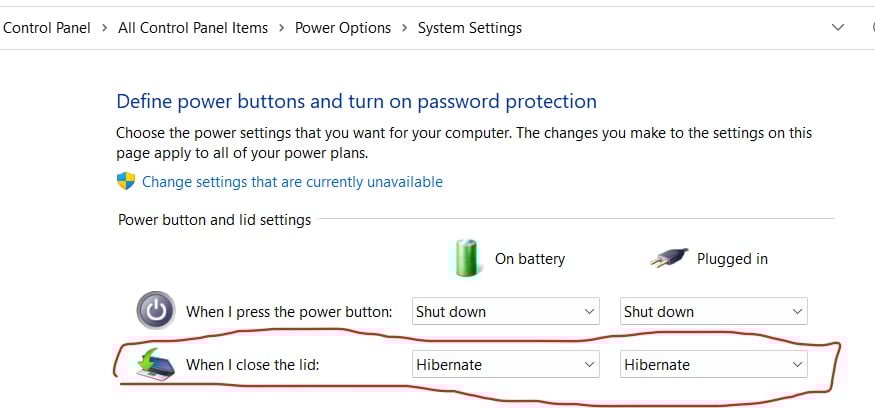
1 -
Not sure how, but we seem to have installed two MS accounts, so have deleted the one and all works fine, apart from still needing a pin to log in.Bizarrely the deleted one seems to be the one linked to onedrive but hey ho, we can hopefully change that at a later date as the festive season is catching up with us.Onwards and upwards and thanks all0
-
My windows v25H2 boots without require password or pin.
It's been a while since I did it but for memory go to settings / accounts and remove the pin, reboot, this means you will be asked to log on with your password on boot up as there is no PIN
Then go to settings / accounts again and change your password. In the new password field put nothing i.e leave it blank. this will change your password to nothing and it should therefore boot straight up1 -
Thanks - will investigate next time I see him ...mta999 said:My windows v25H2 boots without require password or pin.
It's been a while since I did it but for memory go to settings / accounts and remove the pin, reboot, this means you will be asked to log on with your password on boot up as there is no PIN
Then go to settings / accounts again and change your password. In the new password field put nothing i.e leave it blank. this will change your password to nothing and it should therefore boot straight up
0 -
In windows there is a user account as well as a user profile, you probably need to manually delete both the account and profile.
Open up the command prompt (run as Administrator) and type Net User. This will display the actual account names, then you pick the one you want to remove by typing the following:
net user username /delete
Then you can delete the user profile folder and files:
rd /s /q "C:\Users\username"
There is also a method to remove a users PIN and/or password requirement after they've been created.
1






Confirm your email address to Create Threads and Reply

Categories
- All Categories
- 355.8K Banking & Borrowing
- 254.9K Reduce Debt & Boost Income
- 456.2K Spending & Discounts
- 248.3K Work, Benefits & Business
- 605.9K Mortgages, Homes & Bills
- 179K Life & Family
- 263.8K Travel & Transport
- 1.5M Hobbies & Leisure
- 16.2K Discuss & Feedback
- 37.7K Read-Only Boards