We’d like to remind Forumites to please avoid political debate on the Forum.
This is to keep it a safe and useful space for MoneySaving discussions. Threads that are – or become – political in nature may be removed in line with the Forum’s rules. Thank you for your understanding.
📨 Have you signed up to the Forum's new Email Digest yet? Get a selection of trending threads sent straight to your inbox daily, weekly or monthly!
Sound has stopped working on Laptop

faringdon
Posts: 256

 Forumite
in Techie Stuff
Hi,
I have a Huawei Matebook D laptop running windows 11. I've had this for several years. Recently, when i plugged headphones in, it only played sound out of one earpiece...i changed headphones and it was the same...so i went hunting around in Device Manager etc, and the Settings->Sound area, and i clicked a few things...and now i have no sound at all from the laptop.
It says it is using the "Nahimic mirroring device" to play sound, and i can see that in the Device manager, and have gone "update drivers" but to no avail.
I seem to remember it used to use "Realtek Audio" to play sound...but i cant see Realtek Audio in the Device Manager any more.
Strangely, if i connect up a monitor via the HDMI port, and plug headphones into that, then i can hear sound. But not otherwise.
Very grateful for any ideas?
I have a Huawei Matebook D laptop running windows 11. I've had this for several years. Recently, when i plugged headphones in, it only played sound out of one earpiece...i changed headphones and it was the same...so i went hunting around in Device Manager etc, and the Settings->Sound area, and i clicked a few things...and now i have no sound at all from the laptop.
It says it is using the "Nahimic mirroring device" to play sound, and i can see that in the Device manager, and have gone "update drivers" but to no avail.
I seem to remember it used to use "Realtek Audio" to play sound...but i cant see Realtek Audio in the Device Manager any more.
Strangely, if i connect up a monitor via the HDMI port, and plug headphones into that, then i can hear sound. But not otherwise.
Very grateful for any ideas?
0
Comments
-
Probably a faulty headphone socket on the laptop.0
-
Almost certainly so. The clue is the fact that you temporarily had only one channel. This is much more likely to be a hardware fault (in the socket) than a software problem.TadleyBaggie said:Probably a faulty headphone socket on the laptop.
0 -
Agree, probably dodgy socket. Can you try Bluetooth headphones? If they work it would confirm iffy hardware.
Could try Googling the various ways of cleaning out your socket just in case it's just GP crap in there, often happens when the laptop is used on soft furnishings.0 -
Thanks...but the laptop's own speakers are not working. This is the main problem.
The attached is the Device Manager. I have clicked "update driver" for all those but to no avail.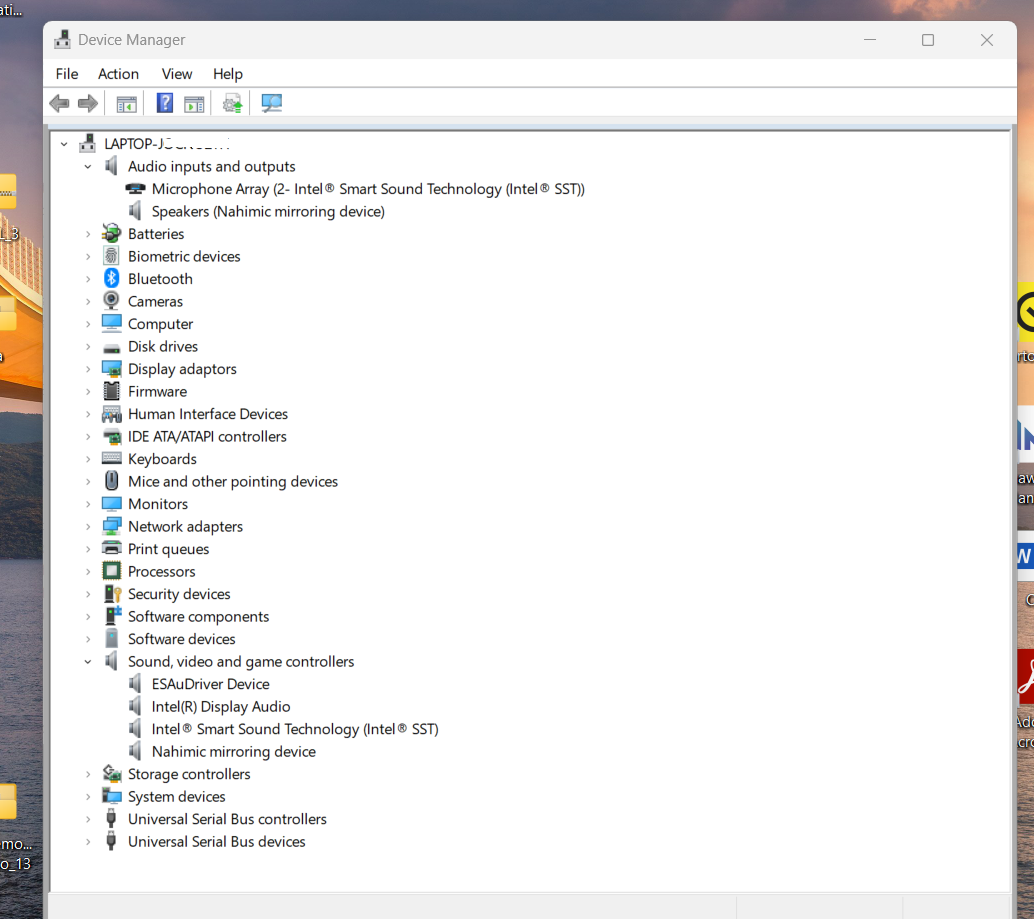 0
0 -
Right click the speaker icon on the taskbar, take the 'Troubleshoot sound problems' option.
0 -
Nahimic is audio enhancement software. It installs a “mirroring device” which is not meant to be your primary output. When Windows decides that this ghost device is “the best choice”, audio goes nowhere. Try disabling Hahimic and rebooting0
-
"Right click the speaker icon on the taskbar, take the 'Troubleshoot sound problems' option." ..Thanks, done that, it doesnt help unfortunately.0
-
I also disabled the "Nahimic mirroring device" but again, i still have no sound0
-
Have a read of this see if will assist you.
No sound comes from my computer speakers or external speakers | HUAWEI Support Global0 -
If it is a doggy socket, you could spend £5 for a usb to 3.5mm jack audio adaptor0











Confirm your email address to Create Threads and Reply

Categories
- All Categories
- 355.8K Banking & Borrowing
- 254.9K Reduce Debt & Boost Income
- 456.2K Spending & Discounts
- 248.3K Work, Benefits & Business
- 606K Mortgages, Homes & Bills
- 179K Life & Family
- 263.8K Travel & Transport
- 1.5M Hobbies & Leisure
- 16.2K Discuss & Feedback
- 37.7K Read-Only Boards