We’d like to remind Forumites to please avoid political debate on the Forum.
This is to keep it a safe and useful space for MoneySaving discussions. Threads that are – or become – political in nature may be removed in line with the Forum’s rules. Thank you for your understanding.
📨 Have you signed up to the Forum's new Email Digest yet? Get a selection of trending threads sent straight to your inbox daily, weekly or monthly!
The app Itsme

Mariolanza
Posts: 82


 Forumite
I have been able to access my Belgian pension online for the last 10 years using an identification key.
They have written to inform me that it is being replaced.
Quite frankly, it's like being in a maze where the exit is invisible.
From their various options I chose the app Itsme.
I managed to scan my passport but have come to something called NFC to scan the code on my passport. What do I need to do to get this NFC thing? Thank you
They have written to inform me that it is being replaced.
Quite frankly, it's like being in a maze where the exit is invisible.
From their various options I chose the app Itsme.
I managed to scan my passport but have come to something called NFC to scan the code on my passport. What do I need to do to get this NFC thing? Thank you
0
Comments
-
Usually the NFC chip is embedded in the back cover, I think? Just put your phone onto the passport and it should read it.This assumes you have a phone that does NFC and that you can use for contactless payments etc.N. Hampshire, he/him. Octopus Intelligent Go elec / Fuse gas / Vodafone BB / iD mobile. Kirk Hill Co-op member.Economy 7 cap explainer. Gas vs E7 vs peak elec heating costs, Ecoflow Stream, Best kettle :-)
2.72kWp PV facing SSW installed Jan 2012. 11 x 247w panels, 3.6kw inverter. 37 MWh generated, long-term average 2.6 Os.0 -
Thank you Qriz. Maybe my bank will be able to tell me more about this NFC? 😵💫0
-
Does your smartphone have Near Field Communication (NFC)? The thing is used for contactless payments but can also be used to read the data in your passport if it has the chip embedded in the cover, It will have this symbol on the front if it does
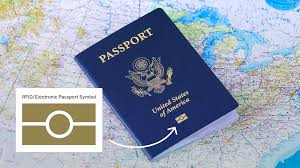
When the app asks you to use NFC make sure it's enabled on your phone and touch the phone to the passport.0 -
Mariolanza said:Thank you Qriz. Maybe my bank will be able to tell me more about this NFC? 😵💫Your bank won't be able to help with your passport NFC.The chip is in your passport, the reader is in your phone.If your phone is too old or low-spec to include an NFC reader, you won't be able to read the NFC chip and won't be able to complete your identity check that way.Do you know if your phone includes NFC capability? Have you ever used it to make a contactless payment, for example?
N. Hampshire, he/him. Octopus Intelligent Go elec / Fuse gas / Vodafone BB / iD mobile. Kirk Hill Co-op member.Economy 7 cap explainer. Gas vs E7 vs peak elec heating costs, Ecoflow Stream, Best kettle :-)
2.72kWp PV facing SSW installed Jan 2012. 11 x 247w panels, 3.6kw inverter. 37 MWh generated, long-term average 2.6 Os.0 -
Hi Flaneurs lobster. My passport does have this golden sign on the front cover.flaneurs_lobster said:Does your smartphone have Near Field Communication (NFC)? The thing is used for contactless payments but can also be used to read the data in your passport if it has the chip embedded in the cover, It will have this symbol on the front if it does
When the app asks you to use NFC make sure it's enabled on your phone and touch the phone to the passport.
But where do I get this NFC from? On Google play?0 -
To turn on NFC on an Android phone, open Settings, search for "NFC," and toggle the switch to "On," Assuming your phone is of a version that contains NFC.0
-
Yes, this.JoeCrystal said:To turn on NFC on an Android phone, open Settings, search for "NFC," and toggle the switch to "On," Assuming your phone is of a version that contains NFC.
NFC is hardware/software built into the phone (or not) just like Bluetooth or Wi-fi.
Can you tell us the make/model of your phone?0 -
My phone is a Samsung Galaxy 26flaneurs_lobster said:
Yes, this.JoeCrystal said:To turn on NFC on an Android phone, open Settings, search for "NFC," and toggle the switch to "On," Assuming your phone is of a version that contains NFC.
NFC is hardware/software built into the phone (or not) just like Bluetooth or Wi-fi.
Can you tell us the make/model of your phone?0 -
Unless you are a time traveller it's not. An S25 at mostMariolanza said:
My phone is a Samsung Galaxy 26flaneurs_lobster said:
Yes, this.JoeCrystal said:To turn on NFC on an Android phone, open Settings, search for "NFC," and toggle the switch to "On," Assuming your phone is of a version that contains NFC.
NFC is hardware/software built into the phone (or not) just like Bluetooth or Wi-fi.
Can you tell us the make/model of your phone?
Any of the 20 series will have NFC capability.0 -
Err, there is such a thing as a Galaxy A26 ???Isthisforreal99 said:
Unless you are a time traveller it's not. An S25 at mostMariolanza said:My phone is a Samsung Galaxy 260









Confirm your email address to Create Threads and Reply

Categories
- All Categories
- 355.8K Banking & Borrowing
- 254.9K Reduce Debt & Boost Income
- 456.2K Spending & Discounts
- 248.3K Work, Benefits & Business
- 606K Mortgages, Homes & Bills
- 179K Life & Family
- 263.8K Travel & Transport
- 1.5M Hobbies & Leisure
- 16.2K Discuss & Feedback
- 37.7K Read-Only Boards