We’d like to remind Forumites to please avoid political debate on the Forum.
This is to keep it a safe and useful space for MoneySaving discussions. Threads that are – or become – political in nature may be removed in line with the Forum’s rules. Thank you for your understanding.
📨 Have you signed up to the Forum's new Email Digest yet? Get a selection of trending threads sent straight to your inbox daily, weekly or monthly!
Buying new laptop / compatibility with older software
Comments
-
sausage_time said:Last time I used Windows I seem to recall it had various compatibility modes for older software if needed. Is that not still the case?Yes it is.If you just try installing the old software on Win10 or Win11 then it may be recognised as old software and flagged to always run in 'Compatibility Mode' as an older Windows version.Or you could do that manually, install the software, right-click it and select Properties and then on the 'Compitibiliy' tab tick the box and choose the old Windows compatibility version you want to run it in.
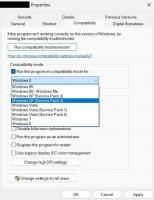 (Sorry about the poor quality screenshot)Note that the compatibility versions offered will/do change depending on just what old software you have right-clicked.
Some will only go back as far as Win8, others will go back as far as Win95:
2 -
Thanks for all responses, and apols for not posting sooner.
Needed to keep it simple for both of us, so went with suggestion of adding a plug in CD drive, which works perfectly, and also enables her to play some of her audio CDs, which she likes to do.
Thanks!1







Confirm your email address to Create Threads and Reply

Categories
- All Categories
- 355.8K Banking & Borrowing
- 254.9K Reduce Debt & Boost Income
- 456.2K Spending & Discounts
- 248.3K Work, Benefits & Business
- 606K Mortgages, Homes & Bills
- 179K Life & Family
- 263.8K Travel & Transport
- 1.5M Hobbies & Leisure
- 16.2K Discuss & Feedback
- 37.7K Read-Only Boards