We’d like to remind Forumites to please avoid political debate on the Forum.
This is to keep it a safe and useful space for MoneySaving discussions. Threads that are – or become – political in nature may be removed in line with the Forum’s rules. Thank you for your understanding.
📨 Have you signed up to the Forum's new Email Digest yet? Get a selection of trending threads sent straight to your inbox daily, weekly or monthly!
Which Mobile (Sim Use) Router for Watching TV?
Comments
-
Not sure if I am misunderstanding, but is your current problem that the wifi signal does not reach all areas of your house due to thick walls? If so, I'm not sure going for a 4g/5g router is going to be a fix.HollyandCo said:
Thanks, I noted your comment about fair usage previously. I would never get anywhere near 650gb in any month.Vitor said:- Please can I have advice on a good Router to suit my needs? -
Your previous thread discussed routers which use SIM cards for WAN - Mobile/Portable Wifi Product Recommendation — MoneySavingExpert Forum
As more SIM card providers are seeing people use them as broadband replacements, they're sneaking in 'reasonable use' clauses into their Unlimited offering; O2 says if you exceed 650GB/month twice in a 6 month period it will 'review' your account.
- I can have an external antenna fitted -
If you need an external aerial to get a strong GSM signal for the indoor SIM card, like a Poynting XPOL-2-5G Antenna : Amazon.co.uk: Electronics & Photo I'd certainly be looking at Starlink for an all-in-one solution.
I do get good coverage for 4g, outside my house. Indoors is a problem and seems to be something to do with having thick walls!
If the speed from ISP to your current router is reasonable (i.e. what a device connected by wire to your router might get) then I fear you will have the same problem with a 4g/5g router, where you get a good speed to router, but wifi is the issue.
Potentially MESH routers to boost wifi signal around your home might be a better option to improve wifi coverage in all rooms. I have 3 MESH routers connected around my house which gives great wifi across the property as the single router from my ISP was not sufficient."We act as though comfort and luxury are the chief requirements of life, when all that we need to make us happy is something to be enthusiastic about” – Albert Einstein1 -
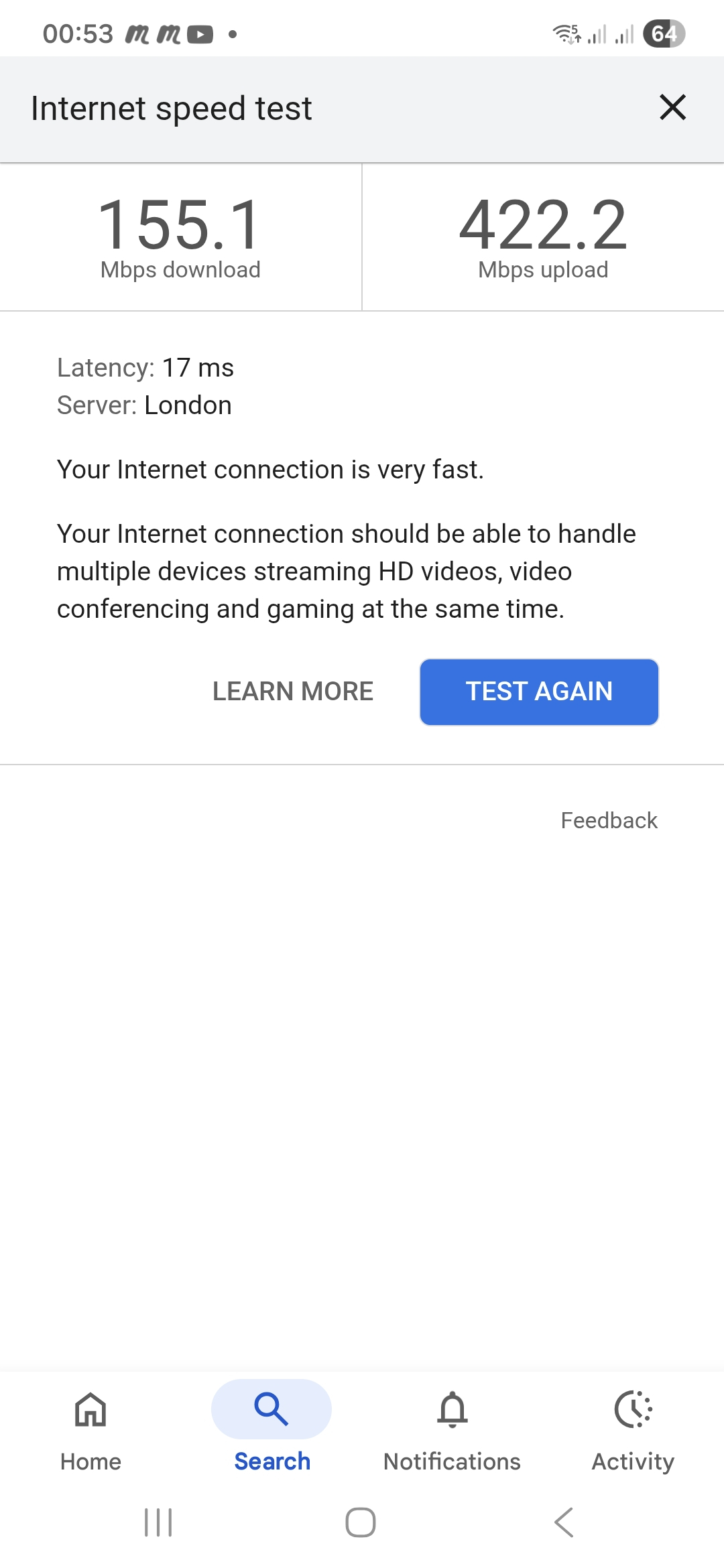
I did speed tests last night. The laptop is very poor but my mobile phone said its very fast. I was sitting in exactly the same spot when I ran the tests. Perhaps my laptop is the problem!

0 -
Also, I don't understand why the server says London. I'm actually in Devon.0
-
Forget the London thing, it's just where the IP address of the speed test server thinks it is.
Think you are right, the laptop seems to be tardy. Any chance you could plug your laptop into your router directly and try that speedtest again?
Those numbers look excellent, there's no reason why you shouldn't be able to run multiple devices off that. The problem is getting the signal round your house.
Where is your router situated? If it's in a corner, low-down, behind a sofa or fish tank then it's going to compromise the signal. If you can get it higher and more central it'll be better.
Is your TV in the same room? Connected by wi-fi?1 -
Yes TV is in the same room and connected via WiFI. Router is in the living room, I've tried moving the Router to the hallway, which is the middle of the house, but then the TV buffers even more.flaneurs_lobster said:Forget the London thing, it's just where the IP address of the speed test server thinks it is.
Think you are right, the laptop seems to be tardy. Any chance you could plug your laptop into your router directly and try that speedtest again?
Those numbers look excellent, there's no reason why you shouldn't be able to run multiple devices off that. The problem is getting the signal round your house.
Where is your router situated? If it's in a corner, low-down, behind a sofa or fish tank then it's going to compromise the signal. If you can get it higher and more central it'll be better.
Is your TV in the same room? Connected by wi-fi?
I think the problem must be that my laptop is naff, although, it wasn't cheap and I've always had the problem. I guess I should by extenders for my house and a new laptop, I find it very weird that I would need extenders though when, in reality I live in a small house - it's double fronted but only one room deep.
I can see clearly I do have a decent signal - I just have to work on getting the signal around the house and perhaps a new laptop and TV :'(0 -
I can't connect the laptop directly to the router as it doesn't have the same ports. Would there be a cable with different ends to try?0
-
Don't sweat it - it would just show your maximum broadband speed and whether your laptop has an iffy Wi-fi adapter. Speed you've got will be fine unless you are online gaming on the laptop.HollyandCo said:I can't connect the laptop directly to the router as it doesn't have the same ports. Would there be a cable with different ends to try?
You can buy adaptors that allow a laptop with no ethernet port to use USB -- adaptor -- network cable -- router but it's not worth worrying about just for a quick test.0 -
Did you get asked for the details of your router?
Make? Model?0 -
I'd like to see speed test results of that. https://testmy.netalanwsg said:
Well, it's something that I, and many others, do.la531983 said:Relying on a 4G signal to power broadband for the whole of the house, including streaming, isnt something I would be doing,
I use a Scancom EE unlimited SIM (Search Amazon) in a MC7010C modem.
No 5G signal where I am, but I get around 250Mb down / 70Mb upload speeds on 4G.
Sim was £220 for 18 months, so about £12.20/month.
As you need to commit to a big outlay in advance, it's very important to check signal in your area before forking out. You can get a monthly unlimited SIM from 1pMobile (on EE) for £12.50 for the first month.
Scancom also do '3' unlimited SIMs, which are even cheaper but no good for me, no signal here.
Their network would need to have an LTE-A deployment, a cell tower nearby and multiple frequency band availability to achieve those speeds.
0 -
I already linked to the MR600 for £50 in their other thread. That will free up money for an outdoor aerialFrozen_up_north said:We have a couple of properties and have fairly good EE 5G signals at both. We use TP-Link NX200 routers with a Scancom EE SIM card, no physical line. At least with the NX200, you can check fairly easily how much data you use. You can text balance to 150 (with EE) from the router and receive a text with the amount of data used.One property is not used much and has a 50 GB/month SIM and the main residence has an "unlimited" one. Cost for the 50 GB one was around £6.30 per month (pay up front a lump sum, throw the SIM when it stops working), the unlimited was about £14 per month. Both from Scancom via Amazon.We have also used TP-Link AC1200 4G+ routers in the past, which are a bit cheaper (and slightly slower).These links should work
https://www.amazon.co.uk/TP-Link-Wireless-Connections-Archer-NX200/dp/B0D33SC5HJ
https://www.amazon.co.uk/TP-Link-technology-Configuration-Archer-MR600/dp/B083KDK9JC
Before proceeding, the OP can inquire with the networks as to what they have available at their location. e.g. LTE-Advanced and the available LTE bands.
If they are complaining about a 35 Mbps connection to a laptop, they may be disappointed by Mobile Broadband, if conditions are not optimal.
0













Confirm your email address to Create Threads and Reply

Categories
- All Categories
- 355.8K Banking & Borrowing
- 254.9K Reduce Debt & Boost Income
- 456.2K Spending & Discounts
- 248.3K Work, Benefits & Business
- 606K Mortgages, Homes & Bills
- 179K Life & Family
- 263.8K Travel & Transport
- 1.5M Hobbies & Leisure
- 16.2K Discuss & Feedback
- 37.7K Read-Only Boards