We’d like to remind Forumites to please avoid political debate on the Forum.
This is to keep it a safe and useful space for MoneySaving discussions. Threads that are – or become – political in nature may be removed in line with the Forum’s rules. Thank you for your understanding.
📨 Have you signed up to the Forum's new Email Digest yet? Get a selection of trending threads sent straight to your inbox daily, weekly or monthly!
System Restore under Win 11 home

MouldyOldDough
Posts: 3,408



 Forumite
in Techie Stuff
Has MS been stupid and removed System Restore from Win 11 ?
I can no longer access this vital utility via Settings,
It appears to now be called GO BACK and is Greyed out under settings
luckily it is still there under Control Panel !If I was half as smart as I think I am - I'd be twice as smart as I REALLY am.
0
Comments
-
Search "system restore" from start button, click "create restore point", its still there.
 0
0 -
I think GO BACK is for reverting to Windows 10 after an upgradeMouldyOldDough said:Has MS been stupid and removed System Restore from Win 11 ?I can no longer access this vital utility via Settings,It appears to now be called GO BACK and is Greyed out under settingsluckily it is still there under Control Panel !
AIUI one has 10 days to do so and then it greys out0 -
Type "create a restore point" in the taskbar search box and this will appear.
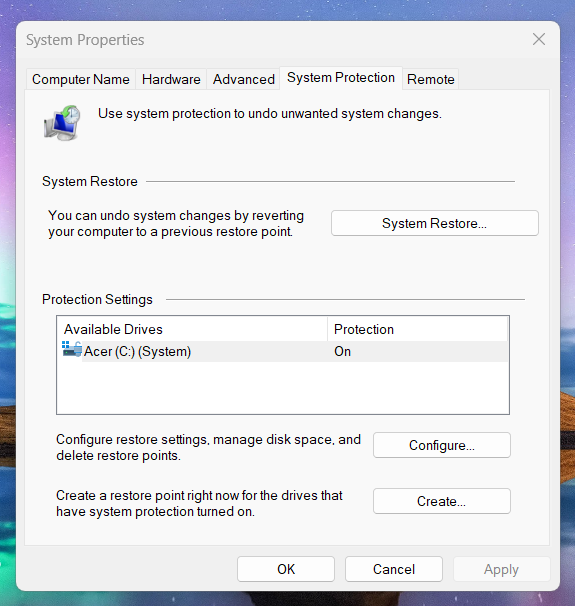
1 -
mluton said:Search "system restore" from start button, click "create restore point", its still there.
Mine doesn't - it shows the main settings menu
If I was half as smart as I think I am - I'd be twice as smart as I REALLY am.0 -
If you go to Control Panel > Recovery > Open System Restore, and other options.0
-
Open a command (cmd) prompt and then use the command "rstrui.exe" to start the process.0






Confirm your email address to Create Threads and Reply

Categories
- All Categories
- 355.8K Banking & Borrowing
- 254.9K Reduce Debt & Boost Income
- 456.2K Spending & Discounts
- 248.3K Work, Benefits & Business
- 605.9K Mortgages, Homes & Bills
- 179K Life & Family
- 263.8K Travel & Transport
- 1.5M Hobbies & Leisure
- 16.2K Discuss & Feedback
- 37.7K Read-Only Boards