📨 Have you signed up to the Forum's new Email Digest yet? Get a selection of trending threads sent straight to your inbox daily, weekly or monthly!
WiFi won't connect on laptop and phone

dollopg
Posts: 5


 Forumite
in Techie Stuff
Hi,
I've got broadband with Vodaphone. For a little while now I haven't been able to connect to my WiFi on my phone and laptop. It comes up that it can't connect, but I'm able to find the WiFi and when I click use this network as is on my phone, I can get on the WiFi. I've googled this and done everything I can think of but I'm having no luck sorting it out. Picture below to show what I get on my phone. If anyone has any ideas what's wrong I'd be really greatfull..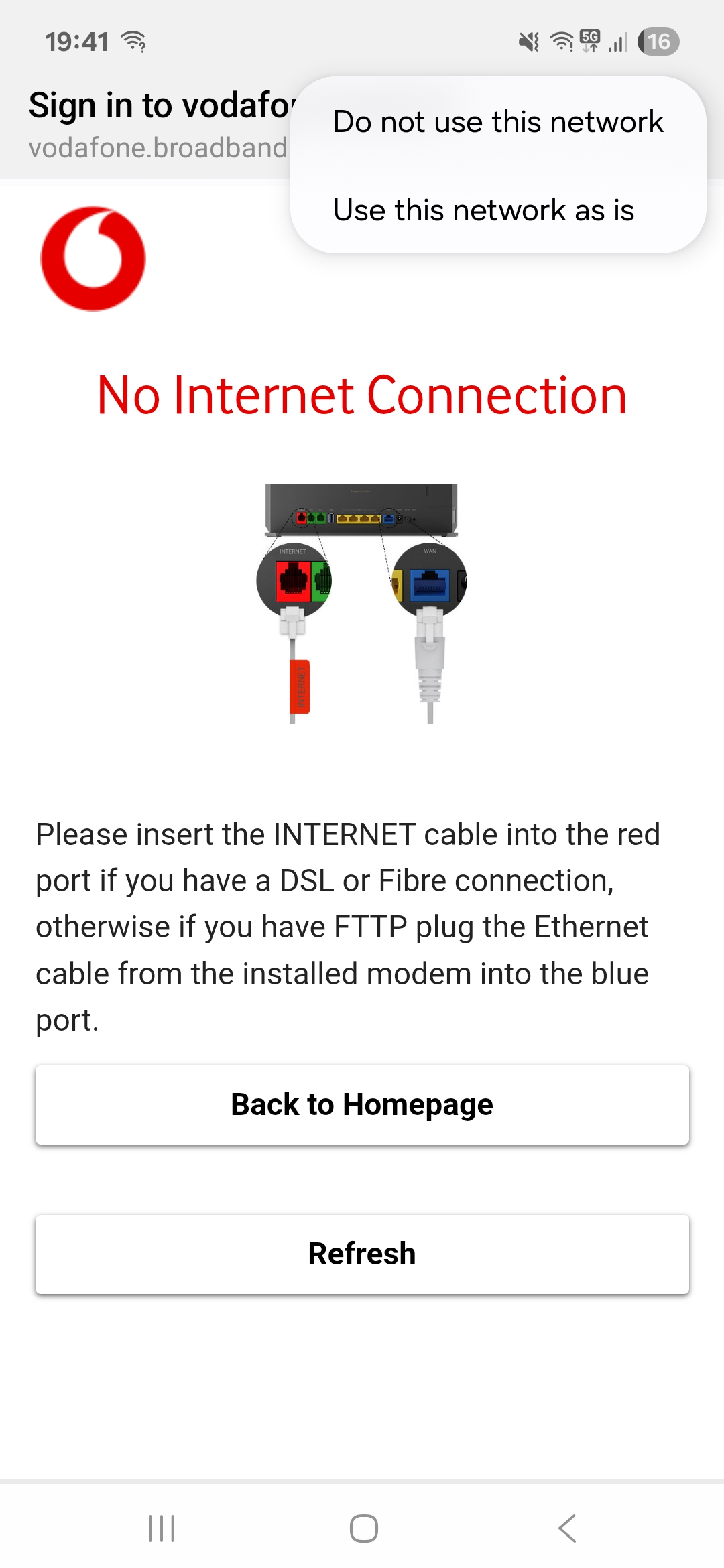
I've got broadband with Vodaphone. For a little while now I haven't been able to connect to my WiFi on my phone and laptop. It comes up that it can't connect, but I'm able to find the WiFi and when I click use this network as is on my phone, I can get on the WiFi. I've googled this and done everything I can think of but I'm having no luck sorting it out. Picture below to show what I get on my phone. If anyone has any ideas what's wrong I'd be really greatfull..
0
Comments
-
You sayI haven't been able to connect to my WiFi on my phone and laptopCan you connect to the internet through your broadband if you use a cable? Or using any other device?Or is the problem that your broadband isn't working at all, with WiFi or cabled connections?N. Hampshire, he/him. Octopus Intelligent Go elec / Fuse gas / Vodafone BB / iD mobile. Kirk Hill Co-op member.Economy 7 cap explainer. Gas vs E7 vs peak elec heating costs, Ecoflow Stream, Best kettle :-)
2.72kWp PV facing SSW installed Jan 2012. 11 x 247w panels, 3.6kw inverter. 37 MWh generated, long-term average 2.6 Os.0 -
Thank you for replying. I can connect to the WiFi on my phone if I click the option "Use this network as is" (pictured above) so it is working, but I don't have this as an option on my laptop.0
-
dollopg said:Thank you for replying. I can connect to the WiFi on my phone if I click the option "Use this network as is" (pictured above) so it is working, but I don't have this as an option on my laptop.Once you've connected to the WiFi, can you then use it to access the internet?There was a similar thread on the "broadband" sub-forum. Let me find a link.
N. Hampshire, he/him. Octopus Intelligent Go elec / Fuse gas / Vodafone BB / iD mobile. Kirk Hill Co-op member.Economy 7 cap explainer. Gas vs E7 vs peak elec heating costs, Ecoflow Stream, Best kettle :-)
2.72kWp PV facing SSW installed Jan 2012. 11 x 247w panels, 3.6kw inverter. 37 MWh generated, long-term average 2.6 Os.0 -
Yes for a few minutes and then it gets too slow/glitchy to use
0 -
The screenshot you've shared is an error page from the Vodafone router. The router thinks / was thinking that it's not connecting to the internet.That, plus the "?" next to the WiFi icon on your phone and your comment about the internet only working for a few minutes, makes me wonder if there's a fault on your line.You might need to phone Vodafone and ask them to check your broadband connection.N. Hampshire, he/him. Octopus Intelligent Go elec / Fuse gas / Vodafone BB / iD mobile. Kirk Hill Co-op member.Economy 7 cap explainer. Gas vs E7 vs peak elec heating costs, Ecoflow Stream, Best kettle :-)
2.72kWp PV facing SSW installed Jan 2012. 11 x 247w panels, 3.6kw inverter. 37 MWh generated, long-term average 2.6 Os.3




Confirm your email address to Create Threads and Reply

Categories
- All Categories
- 355.8K Banking & Borrowing
- 254.9K Reduce Debt & Boost Income
- 456.2K Spending & Discounts
- 248.4K Work, Benefits & Business
- 606K Mortgages, Homes & Bills
- 179K Life & Family
- 263.8K Travel & Transport
- 1.5M Hobbies & Leisure
- 16.2K Discuss & Feedback
- 37.7K Read-Only Boards