We’d like to remind Forumites to please avoid political debate on the Forum.
This is to keep it a safe and useful space for MoneySaving discussions. Threads that are – or become – political in nature may be removed in line with the Forum’s rules. Thank you for your understanding.
📨 Have you signed up to the Forum's new Email Digest yet? Get a selection of trending threads sent straight to your inbox daily, weekly or monthly!
Excel skills are failing me

MyRealNameToo
Posts: 5,351


 Forumite
I have a list of notes (B) that people have put into a form in a XLS. I am trying to see which of these contain certain keywords held in a seperate column (M) so my formula is currently:
=Or(IsNumber(Search(M$2:M$9, B3)))
Drag this down so B3 adjusts for the 20,000 odd rows. This therefore returns a True if any of the keywords are present and False if they arent.
Problem is that if I add a new key term I then need to change M$9 to M$10 and I can't just do M$100 as the blank cells match and suddenly everything becomes True
I need to do some form of indirect lookup which in principle can be done using CountA but can't think how to do a range where the first cell is know and the end cell is calculated.
=Or(IsNumber(Search(M$2:M$9, B3)))
Drag this down so B3 adjusts for the 20,000 odd rows. This therefore returns a True if any of the keywords are present and False if they arent.
Problem is that if I add a new key term I then need to change M$9 to M$10 and I can't just do M$100 as the blank cells match and suddenly everything becomes True
I need to do some form of indirect lookup which in principle can be done using CountA but can't think how to do a range where the first cell is know and the end cell is calculated.
0
Comments
-
Few options:
1) move the list of key words to another tab. Then when you want to add a key word, insert a row somewhere between row 2 and row 9. That way the key words will become row 2:10, but the formulas in your search formula will automatically update for the inserted row.
2) The cell reference you're looking for is "M$2:M$"&counta(M$2:M:$100)+1
Then your formula to copy down is just =isnumber(search(indirect( "M$2:M$"&counta(M$2:M:$100)+1 )),B3))
I think that's what you were trying to do, but warning, indirect cell references are inherently not dynamic, so if you insert a row or change anything else it can get unstable.
3) Filter the list of keywords for non blank entries. So = isnumber( search( filter( M$2:M$100, len(M$2:M$100) > 0) ,B3))
1 -
Thanks, 2 is what I was trying to do
Others may be adding keywords so option 1 whilst simple is probably unreliable. Actually 3 may be the better option in case someone just deletes a row leaving a blank in the middle of the list.0 -
It's hard to test without the data you're using however, I can do this dynamically with:
=OR(ISNUMBER(SEARCH(OFFSET(Sheet1!$M$2,0,0,COUNTA(Sheet1!$M$2:$M$1000),1),B3)))
Drag down. This works dynamically (well pseudo-dynamically depending on how massive you specify the range) if I add values to the M column - does that work for you?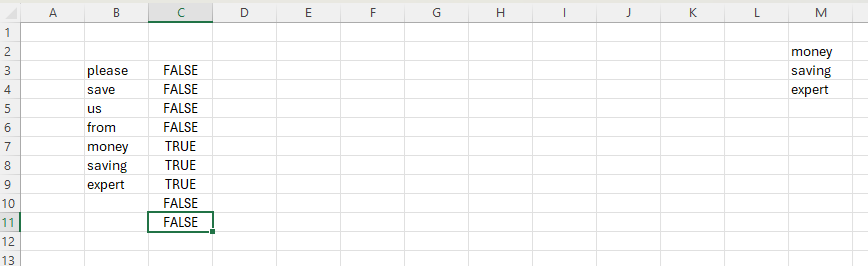
Know what you don't0 -
If you're using a relatively recent Excel try this, assuming your 'notes' start from B3 and your keywords are in M2 and potentially extend to M100. Put this in C3=BYROW(B3:B20000, LAMBDA(note, LET(kws, FILTER(M$2:M$100, M$2:M$100 <> ""),OR(ISNUMBER(SEARCH(kws, note))))))This checks each row in B3:B20000 against the keyword list.It spills the results vertically.You only need to enter it once, no dragging needed.It automatically fills the output column from top to bottom.0








Confirm your email address to Create Threads and Reply

Categories
- All Categories
- 355.8K Banking & Borrowing
- 254.9K Reduce Debt & Boost Income
- 456.2K Spending & Discounts
- 248.3K Work, Benefits & Business
- 606K Mortgages, Homes & Bills
- 179K Life & Family
- 263.8K Travel & Transport
- 1.5M Hobbies & Leisure
- 16.2K Discuss & Feedback
- 37.7K Read-Only Boards