We’d like to remind Forumites to please avoid political debate on the Forum.
This is to keep it a safe and useful space for MoneySaving discussions. Threads that are – or become – political in nature may be removed in line with the Forum’s rules. Thank you for your understanding.
📨 Have you signed up to the Forum's new Email Digest yet? Get a selection of trending threads sent straight to your inbox daily, weekly or monthly!
Gmail + websites

PoGee
Posts: 824


 Forumite
in Techie Stuff
The following has been happening recently -
when going onto a website and clicking 'contact', if I click on the company's email address, it goes straight to my Gmail account as if I want to send an email using my Gmail email account.
How do I stop this?
Other weird thing is that my daughter said that I had been 'liking' every text I sent her, with a heart. I don't even know how to do that. Could my mobile phone be hacked?
when going onto a website and clicking 'contact', if I click on the company's email address, it goes straight to my Gmail account as if I want to send an email using my Gmail email account.
How do I stop this?
Other weird thing is that my daughter said that I had been 'liking' every text I sent her, with a heart. I don't even know how to do that. Could my mobile phone be hacked?
0
Comments
-
Worked out how to turn these emojis on. They come up when I press onto a text already sent. Its ok to sent heart emojis to my daughter albeit sent without my knowledge but the thought they could be sent to business associates, also without my knowledge, is why I want them off. I've clicked the remove animations buttons but the damn things are still showing.0
-
What are you expecting to happen when you click on the email address?
Normally your email client should open with a blank email to the company.
As for the message issue. Which phone have you got ?1 -
Thanks for reply PHK. I usually copy and paste an email address into my virginmedia email address and send any email through there. I had to set up a Gmail account when setting the phone up. It's a 3 year old Motorola Play (it's either a play 9 or play 10). It's only been happening recently, within the week, I'd say.0
-
Go into your email settings on your phone and set the account you want as the default address. This means that every time you start an email that is the account it defaults to. I have an iphone so it's settings/apps/mail then scroll down towards the bottom. Someone else will be able to advise for android but it will be similar0
-
Clicking on an email address on a website will normally cause your email app to open, and a new blank email to that address will appear. This has been standard practice for most mainstream browsers and mail clients for perhaps 15 years? Maybe longer?PoGee said:when going onto a website and clicking 'contact', if I click on the company's email address, it goes straight to my Gmail account as if I want to send an email using my Gmail email account.N. Hampshire, he/him. Octopus Intelligent Go elec / Fuse gas / Vodafone BB / iD mobile. Kirk Hill Co-op member.Economy 7 cap explainer. Gas vs E7 vs peak elec heating costs, Ecoflow Stream, Best kettle :-)
2.72kWp PV facing SSW installed Jan 2012. 11 x 247w panels, 3.6kw inverter. 37 MWh generated, long-term average 2.6 Os.1 -
PoGee said:I usually copy and paste an email address into my virginmedia email address and send any email through there. I had to set up a Gmail account when setting the phone up.When setting up you have set Gmail to be your Default email app.You need to change that so that your Virgin Media email is the Default email app.
Once you have done that then selecting an address link will open VM like you want, with no need for the copy/paste.Look in Settings>Apps>Default apps>Choose default apps.1 -
Do you mean a Moto G9 Play, or G10 Play.PoGee said:Thanks for reply PHK. I usually copy and paste an email address into my virginmedia email address and send any email through there. I had to set up a Gmail account when setting the phone up. It's a 3 year old Motorola Play (it's either a play 9 or play 10). It's only been happening recently, within the week, I'd say.
This uses the Google Messages app, there is no setting to make it automatically like or heart a message, so this must be being done unintentionally. Perhaps the touch and hold time is set to be too short.
Go into Settings/Accessibility and change the touch and hold delay to something longer.0 -
Tried this but still doing the same.PHK said:
Do you mean a Moto G9 Play, or G10 Play.PoGee said:Thanks for reply PHK. I usually copy and paste an email address into my virginmedia email address and send any email through there. I had to set up a Gmail account when setting the phone up. It's a 3 year old Motorola Play (it's either a play 9 or play 10). It's only been happening recently, within the week, I'd say.
This uses the Google Messages app, there is no setting to make it automatically like or heart a message, so this must be being done unintentionally. Perhaps the touch and hold time is set to be too short.
Go into Settings/Accessibility and change the touch and hold delay to something longer.0 -
Seems to be very recent. I don't get updates done so was surprised at this.QrizB said:
Clicking on an email address on a website will normally cause your email app to open, and a new blank email to that address will appear. This has been standard practice for most mainstream browsers and mail clients for perhaps 15 years? Maybe longer?PoGee said:when going onto a website and clicking 'contact', if I click on the company's email address, it goes straight to my Gmail account as if I want to send an email using my Gmail email account.0 -
I've attached a screenshot.Newcad said:PoGee said:I usually copy and paste an email address into my virginmedia email address and send any email through there. I had to set up a Gmail account when setting the phone up.When setting up you have set Gmail to be your Default email app.You need to change that so that your Virgin Media email is the Default email app.
Once you have done that then selecting an address link will open VM like you want, with no need for the copy/paste.Look in Settings>Apps>Default apps>Choose default apps.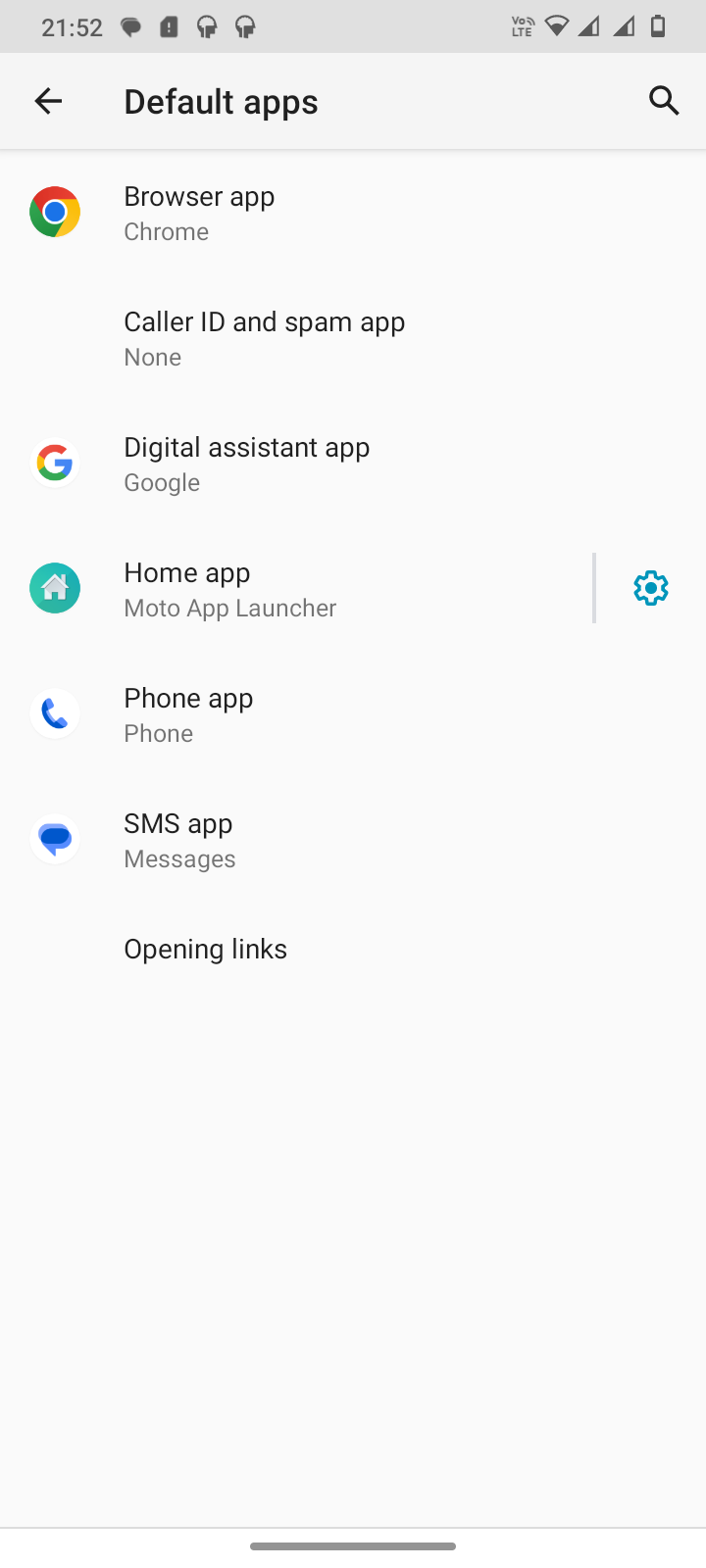 0
0








Confirm your email address to Create Threads and Reply

Categories
- All Categories
- 355.8K Banking & Borrowing
- 254.9K Reduce Debt & Boost Income
- 456.1K Spending & Discounts
- 248.3K Work, Benefits & Business
- 605.9K Mortgages, Homes & Bills
- 179K Life & Family
- 263.7K Travel & Transport
- 1.5M Hobbies & Leisure
- 16.2K Discuss & Feedback
- 37.7K Read-Only Boards