We’d like to remind Forumites to please avoid political debate on the Forum.
This is to keep it a safe and useful space for MoneySaving discussions. Threads that are – or become – political in nature may be removed in line with the Forum’s rules. Thank you for your understanding.
📨 Have you signed up to the Forum's new Email Digest yet? Get a selection of trending threads sent straight to your inbox daily, weekly or monthly!
The Forum now has a brand new text editor, adding a bunch of handy features to use when creating posts. Read more in our how-to guide
The Old Regular Savers Discussion Thread 28/12/24-29/1/26
Comments
-
I just sent a note online to the Nottingham BS asking if I can open an issue 2 Reg Saver as well as my current issue 1 i.e. do they treat the Online Regular Saver (Issue) 2 and the Online Regular Saver 1 as different products.
The reply was "what is the issue that is coming up" - and they "resolved" my query!.
So does anyone here know as I don't think I will try their online private message thing again (although it is only 4.75% Variable).0 -
The problem is that these instructions weren’t provided by Melton themselves. I am up and running, but because of MSErs instructions and not Melton’s. Maybe we have jumped the gun so can’t really complain, but in my case I did not receive anything from Melton about withdrawals being suspended and only knew because I read it here. They are also 2 days late and did not keep customers updated. We only know the system is now live due to MSErs going to the website and trying to log in.francoghezzi said:
MELTONsubjecttocontract said:
It seems others are having all sorts of problems. Have you read earlier posts on this thread ?francoghezzi said:
What nightmare? It took 1 minute to go back on line following the instructions.subjecttocontract said:
I have a couple of Melton BS accounts. They haven't contacted me about any changes so I'm currently doing nothing. Payments are being made by standing order. If they muck up they can sort it out. I'll just wait until I get the official communication telling me what to do/change/reset etc. Sounds like a nightmare......Im staying well away from it.Ch1ll1Phlakes said:
From their email at the end of September they're trying to make improvements on the whole to their online site and account offerings. See belowsubjecttocontract said:Perhaps they're just getting to many regular saver applications and want to cool things down so, change the system, make it confusing, let people struggle (I bet the people on here having problems are just the tip of the iceburg) and all is fine.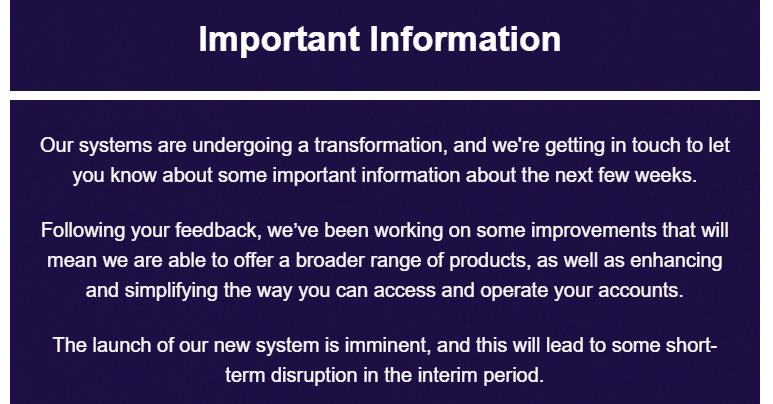
They're using a brand new platform meaning everyone has to now set up brand new log in details. From what I've seen on the new platform, this change also seems to have affected the actual account number. As discussed previously, the account number for the old system was XXX1234567XXX where the first three letters denoted the account name (i.e. ARG for Adcock Regular), 7 digits of your account number and the three last letters denoted the first three letters of your surname (i.e. PHL for Phlakes).
The new system is using the 7 digits of the previous with a preceding 0 to update the account number to the standard form of 8 digits. With this change in mind I imagine any new accounts released by Melton from this point onward may only require a sort code and the new account number, instead of requiring the reference as before. Though please do not try changing your payment details unless advised to do so by Melton themselves.
I did, and still don't understand where the problems are. The instructions are very clear: once you have found your current account number (something that very few store safely) and followed what the website says you must just re-apply for the online version with a new password. The only not intuitive action is the way you need to follow to confirm your nominated account. I really don't see any nightmare considering what a lot of people (not me because I don't want anything to do with that company) had to cope with Monmouth recently. Never, ever, doubted a single moment to find the October payments duly registered and to be fair Melton people are between the best when it comes to assist their members. I wouldn't call a 'nightmare' 50 seconds spent outside our comfort zone: just a way to make our 'grey cells' work a bit
3 -
I nust say I never mind scrolling past posts that are in the grey area and not immediately of interest to me but I know plenty feel otherwise.SFindlay said:
I'm aware of that however that was some time ago and how to access their online systems is irrelevant to Regular Savers. More likely to get support by contacting the institution ot creating a thread where a wider community who are slightly interested and be relevant to them may reply?? Save the rest of us who are able to follow instructions and access their accounts to read what we came here for?s71hj said:
They relased a couple of pretty good regular savers in the past year and a lot of us opened them.SFindlay said:
Read them but still trying to figure out what its got to do with The Top Regular Savers!!!!!subjecttocontract said:
It seems others are having all sorts of problems. Have you read earlier posts on this thread ?francoghezzi said:
What nightmare? It took 1 minute to go back on line following the instructions.subjecttocontract said:
I have a couple of Melton BS accounts. They haven't contacted me about any changes so I'm currently doing nothing. Payments are being made by standing order. If they muck up they can sort it out. I'll just wait until I get the official communication telling me what to do/change/reset etc. Sounds like a nightmare......Im staying well away from it.Ch1ll1Phlakes said:
From their email at the end of September they're trying to make improvements on the whole to their online site and account offerings. See belowsubjecttocontract said:Perhaps they're just getting to many regular saver applications and want to cool things down so, change the system, make it confusing, let people struggle (I bet the people on here having problems are just the tip of the iceburg) and all is fine.
They're using a brand new platform meaning everyone has to now set up brand new log in details. From what I've seen on the new platform, this change also seems to have affected the actual account number. As discussed previously, the account number for the old system was XXX1234567XXX where the first three letters denoted the account name (i.e. ARG for Adcock Regular), 7 digits of your account number and the three last letters denoted the first three letters of your surname (i.e. PHL for Phlakes).
The new system is using the 7 digits of the previous with a preceding 0 to update the account number to the standard form of 8 digits. With this change in mind I imagine any new accounts released by Melton from this point onward may only require a sort code and the new account number, instead of requiring the reference as before. Though please do not try changing your payment details unless advised to do so by Melton themselves.2 -
I'm glad I learned about the issues and solutions in this thread as it means I've been able to sort it out now, not further down the road where I may have less tolerance for p-poor communication and total incompetence in requiring people to munge the details that are requested with no clues on the registration form. Thanks to the kind people who took the time to share instructions here, I was able to get past all of that relatively unscathed. Although for the first time in ages I had to enable my Don't F* with Paste extension in my browser and manually edit a password to remove characters that were unsupported (hinting at insecure database storage practices).4
-
If you think there is an issue with the security of their database, please report this to their DPO so they can fix it.masonic said:I'm glad I learned about the issues and solutions in this thread as it means I've been able to sort it out now, not further down the road where I may have less tolerance for p-poor communication and total incompetence in requiring people to munge the details that are requested with no clues on the registration form. Thanks to the kind people who took the time to share instructions here, I was able to get past all of that relatively unscathed. Although for the first time in ages I had to enable my Don't F* with Paste extension in my browser and manually edit a password to remove characters that were unsupported (hinting at insecure database storage practices).If you want me to definitely see your reply, please tag me @forumuser7 Thank you.
N.B. (Amended from Forum Rules): You must investigate, and check several times, before you make any decisions or take any action based on any information you glean from any of my content, as nothing I post is advice, rather it is personal opinion and is solely for discussion purposes. I research before my posts, and I never intend to share anything that is misleading, misinforming, or out of date, but don't rely on everything you read. Some of the information changes quickly, is my own opinion or may be incorrect. Verify anything you read before acting on it to protect yourself because you are responsible for any action you consequently make... DYOR, YMMV etc.0 -
These are the instructions I followed on Melton web site today at 11.30am. Still I don't understand what else should be needed. Anyway ... we managed to overcome even this 'difficult' test in our livesKim_13 said:
The problem is that these instructions weren’t provided by Melton themselves. I am up and running, but because of MSErs instructions and not Melton’s. Maybe we have jumped the gun so can’t really complain, but in my case I did not receive anything from Melton about withdrawals being suspended and only knew because I read it here. They are also 2 days late and did not keep customers updated. We only know the system is now live due to MSErs going to the website and trying to log in.francoghezzi said:
MELTONsubjecttocontract said:
It seems others are having all sorts of problems. Have you read earlier posts on this thread ?francoghezzi said:
What nightmare? It took 1 minute to go back on line following the instructions.subjecttocontract said:
I have a couple of Melton BS accounts. They haven't contacted me about any changes so I'm currently doing nothing. Payments are being made by standing order. If they muck up they can sort it out. I'll just wait until I get the official communication telling me what to do/change/reset etc. Sounds like a nightmare......Im staying well away from it.Ch1ll1Phlakes said:
From their email at the end of September they're trying to make improvements on the whole to their online site and account offerings. See belowsubjecttocontract said:Perhaps they're just getting to many regular saver applications and want to cool things down so, change the system, make it confusing, let people struggle (I bet the people on here having problems are just the tip of the iceburg) and all is fine.
They're using a brand new platform meaning everyone has to now set up brand new log in details. From what I've seen on the new platform, this change also seems to have affected the actual account number. As discussed previously, the account number for the old system was XXX1234567XXX where the first three letters denoted the account name (i.e. ARG for Adcock Regular), 7 digits of your account number and the three last letters denoted the first three letters of your surname (i.e. PHL for Phlakes).
The new system is using the 7 digits of the previous with a preceding 0 to update the account number to the standard form of 8 digits. With this change in mind I imagine any new accounts released by Melton from this point onward may only require a sort code and the new account number, instead of requiring the reference as before. Though please do not try changing your payment details unless advised to do so by Melton themselves.
I did, and still don't understand where the problems are. The instructions are very clear: once you have found your current account number (something that very few store safely) and followed what the website says you must just re-apply for the online version with a new password. The only not intuitive action is the way you need to follow to confirm your nominated account. I really don't see any nightmare considering what a lot of people (not me because I don't want anything to do with that company) had to cope with Monmouth recently. Never, ever, doubted a single moment to find the October payments duly registered and to be fair Melton people are between the best when it comes to assist their members. I wouldn't call a 'nightmare' 50 seconds spent outside our comfort zone: just a way to make our 'grey cells' work a bit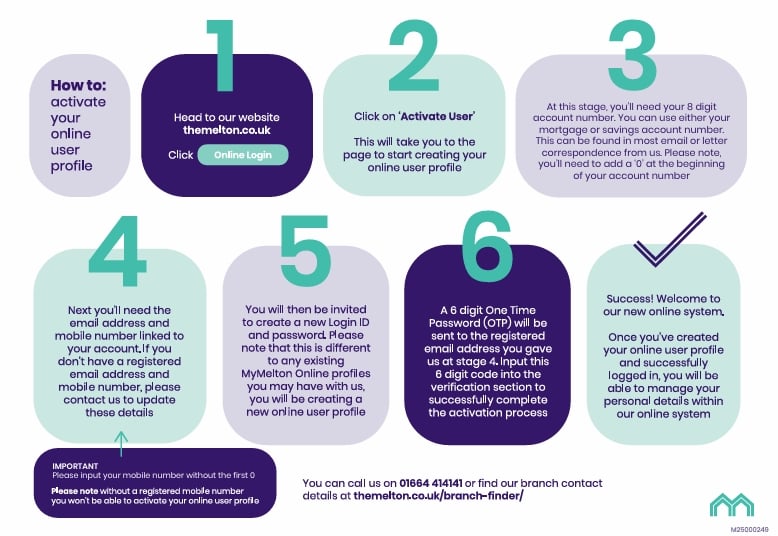 0
0 -
The link to the instructions appears to be on a revolving banner on their home page. If you don't have the page open long enough, you won't see it and it could be more easily missed than if they'd included them in an email or attached the file to the online login page.francoghezzi said:
These are the instructions I followed on Melton web site today at 11.30am. Still I don't understand what else should be needed. Anyway ... we managed to overcome even this 'difficult' test in our livesKim_13 said:
The problem is that these instructions weren’t provided by Melton themselves. I am up and running, but because of MSErs instructions and not Melton’s. Maybe we have jumped the gun so can’t really complain, but in my case I did not receive anything from Melton about withdrawals being suspended and only knew because I read it here. They are also 2 days late and did not keep customers updated. We only know the system is now live due to MSErs going to the website and trying to log in.francoghezzi said:
MELTONsubjecttocontract said:
It seems others are having all sorts of problems. Have you read earlier posts on this thread ?francoghezzi said:
What nightmare? It took 1 minute to go back on line following the instructions.subjecttocontract said:
I have a couple of Melton BS accounts. They haven't contacted me about any changes so I'm currently doing nothing. Payments are being made by standing order. If they muck up they can sort it out. I'll just wait until I get the official communication telling me what to do/change/reset etc. Sounds like a nightmare......Im staying well away from it.Ch1ll1Phlakes said:
From their email at the end of September they're trying to make improvements on the whole to their online site and account offerings. See belowsubjecttocontract said:Perhaps they're just getting to many regular saver applications and want to cool things down so, change the system, make it confusing, let people struggle (I bet the people on here having problems are just the tip of the iceburg) and all is fine.
They're using a brand new platform meaning everyone has to now set up brand new log in details. From what I've seen on the new platform, this change also seems to have affected the actual account number. As discussed previously, the account number for the old system was XXX1234567XXX where the first three letters denoted the account name (i.e. ARG for Adcock Regular), 7 digits of your account number and the three last letters denoted the first three letters of your surname (i.e. PHL for Phlakes).
The new system is using the 7 digits of the previous with a preceding 0 to update the account number to the standard form of 8 digits. With this change in mind I imagine any new accounts released by Melton from this point onward may only require a sort code and the new account number, instead of requiring the reference as before. Though please do not try changing your payment details unless advised to do so by Melton themselves.
I did, and still don't understand where the problems are. The instructions are very clear: once you have found your current account number (something that very few store safely) and followed what the website says you must just re-apply for the online version with a new password. The only not intuitive action is the way you need to follow to confirm your nominated account. I really don't see any nightmare considering what a lot of people (not me because I don't want anything to do with that company) had to cope with Monmouth recently. Never, ever, doubted a single moment to find the October payments duly registered and to be fair Melton people are between the best when it comes to assist their members. I wouldn't call a 'nightmare' 50 seconds spent outside our comfort zone: just a way to make our 'grey cells' work a bit
I navigated directly there via the shortcut I had for the old login page and there were no instructions there.1 -
Sadly UK data protection legislation doesn't mandate anything specific about passwords, just a requirement to use "appropriate technical and organisational measures", which is highly subjective. The ICO provide guidance and they will be well aware of the parts of that they are not complying with. It's also unclear how much of this Finestra is responsible for (the provider of the new system). But I fear we are drifting a little too far off topic now.ForumUser7 said:
If you think there is an issue with the security of their database, please report this to their DPO so they can fix it.masonic said:I'm glad I learned about the issues and solutions in this thread as it means I've been able to sort it out now, not further down the road where I may have less tolerance for p-poor communication and total incompetence in requiring people to munge the details that are requested with no clues on the registration form. Thanks to the kind people who took the time to share instructions here, I was able to get past all of that relatively unscathed. Although for the first time in ages I had to enable my Don't F* with Paste extension in my browser and manually edit a password to remove characters that were unsupported (hinting at insecure database storage practices).1 -
I got on fine but I believe this is v2 of the instructions and the original document missed out some elements which may be why some did not find it straightforward.francoghezzi said:
These are the instructions I followed on Melton web site today at 11.30am. Still I don't understand what else should be needed. Anyway ... we managed to overcome even this 'difficult' test in our livesKim_13 said:
The problem is that these instructions weren’t provided by Melton themselves. I am up and running, but because of MSErs instructions and not Melton’s. Maybe we have jumped the gun so can’t really complain, but in my case I did not receive anything from Melton about withdrawals being suspended and only knew because I read it here. They are also 2 days late and did not keep customers updated. We only know the system is now live due to MSErs going to the website and trying to log in.francoghezzi said:
MELTONsubjecttocontract said:
It seems others are having all sorts of problems. Have you read earlier posts on this thread ?francoghezzi said:
What nightmare? It took 1 minute to go back on line following the instructions.subjecttocontract said:
I have a couple of Melton BS accounts. They haven't contacted me about any changes so I'm currently doing nothing. Payments are being made by standing order. If they muck up they can sort it out. I'll just wait until I get the official communication telling me what to do/change/reset etc. Sounds like a nightmare......Im staying well away from it.Ch1ll1Phlakes said:
From their email at the end of September they're trying to make improvements on the whole to their online site and account offerings. See belowsubjecttocontract said:Perhaps they're just getting to many regular saver applications and want to cool things down so, change the system, make it confusing, let people struggle (I bet the people on here having problems are just the tip of the iceburg) and all is fine.
They're using a brand new platform meaning everyone has to now set up brand new log in details. From what I've seen on the new platform, this change also seems to have affected the actual account number. As discussed previously, the account number for the old system was XXX1234567XXX where the first three letters denoted the account name (i.e. ARG for Adcock Regular), 7 digits of your account number and the three last letters denoted the first three letters of your surname (i.e. PHL for Phlakes).
The new system is using the 7 digits of the previous with a preceding 0 to update the account number to the standard form of 8 digits. With this change in mind I imagine any new accounts released by Melton from this point onward may only require a sort code and the new account number, instead of requiring the reference as before. Though please do not try changing your payment details unless advised to do so by Melton themselves.
I did, and still don't understand where the problems are. The instructions are very clear: once you have found your current account number (something that very few store safely) and followed what the website says you must just re-apply for the online version with a new password. The only not intuitive action is the way you need to follow to confirm your nominated account. I really don't see any nightmare considering what a lot of people (not me because I don't want anything to do with that company) had to cope with Monmouth recently. Never, ever, doubted a single moment to find the October payments duly registered and to be fair Melton people are between the best when it comes to assist their members. I wouldn't call a 'nightmare' 50 seconds spent outside our comfort zone: just a way to make our 'grey cells' work a bit
I’ll add that I was surprised that the onus was put on the customers to keep checking to see when the new system was up (especially once Monday had passed) and register themselves instead of it being automated as everyone needs new details.
Don’t get me wrong, I like the new system but there’s a lot that could have been done better (mainly around communication which could have easily been foreseen) as right now customers are having the lead their own switchover instead of the society doing it. And even if there is a plan for wider communication coming, customers don’t know about it.1 -
I fed this back to Melton along with only 2 accounts showing without another click, the hard to find external transfer and a few other things that I thought would be helpful to them and us.Kim_13 said:
The link to the instructions appears to be on a revolving banner on their home page. If you don't have the page open long enough, you won't see it and it could be more easily missed than if they'd included them in an email or attached the file to the online login page.francoghezzi said:
These are the instructions I followed on Melton web site today at 11.30am. Still I don't understand what else should be needed. Anyway ... we managed to overcome even this 'difficult' test in our livesKim_13 said:
The problem is that these instructions weren’t provided by Melton themselves. I am up and running, but because of MSErs instructions and not Melton’s. Maybe we have jumped the gun so can’t really complain, but in my case I did not receive anything from Melton about withdrawals being suspended and only knew because I read it here. They are also 2 days late and did not keep customers updated. We only know the system is now live due to MSErs going to the website and trying to log in.francoghezzi said:
MELTONsubjecttocontract said:
It seems others are having all sorts of problems. Have you read earlier posts on this thread ?francoghezzi said:
What nightmare? It took 1 minute to go back on line following the instructions.subjecttocontract said:
I have a couple of Melton BS accounts. They haven't contacted me about any changes so I'm currently doing nothing. Payments are being made by standing order. If they muck up they can sort it out. I'll just wait until I get the official communication telling me what to do/change/reset etc. Sounds like a nightmare......Im staying well away from it.Ch1ll1Phlakes said:
From their email at the end of September they're trying to make improvements on the whole to their online site and account offerings. See belowsubjecttocontract said:Perhaps they're just getting to many regular saver applications and want to cool things down so, change the system, make it confusing, let people struggle (I bet the people on here having problems are just the tip of the iceburg) and all is fine.
They're using a brand new platform meaning everyone has to now set up brand new log in details. From what I've seen on the new platform, this change also seems to have affected the actual account number. As discussed previously, the account number for the old system was XXX1234567XXX where the first three letters denoted the account name (i.e. ARG for Adcock Regular), 7 digits of your account number and the three last letters denoted the first three letters of your surname (i.e. PHL for Phlakes).
The new system is using the 7 digits of the previous with a preceding 0 to update the account number to the standard form of 8 digits. With this change in mind I imagine any new accounts released by Melton from this point onward may only require a sort code and the new account number, instead of requiring the reference as before. Though please do not try changing your payment details unless advised to do so by Melton themselves.
I did, and still don't understand where the problems are. The instructions are very clear: once you have found your current account number (something that very few store safely) and followed what the website says you must just re-apply for the online version with a new password. The only not intuitive action is the way you need to follow to confirm your nominated account. I really don't see any nightmare considering what a lot of people (not me because I don't want anything to do with that company) had to cope with Monmouth recently. Never, ever, doubted a single moment to find the October payments duly registered and to be fair Melton people are between the best when it comes to assist their members. I wouldn't call a 'nightmare' 50 seconds spent outside our comfort zone: just a way to make our 'grey cells' work a bit
I navigated directly there via the shortcut I had for the old login page and there were no instructions there.They also sorted out my problem of my 1st of October payments not showing and reassured me that there will be no loss of interest as they are backdated until when they should have arrived. At present they can see the payments in my account now (they couldn't earlier) but I can't yet. I'm assuming a midnight will sort that out. They had to be manually transferred from their "suspense" account where they had ended up.
The lady I've been dealing with could not have been more helpful and was genuinely interested in feedback, taking notes so that she could pass the information on to the right people.3













This discussion has been closed.
Confirm your email address to Create Threads and Reply

Categories
- All Categories
- 353.6K Banking & Borrowing
- 254.2K Reduce Debt & Boost Income
- 455.1K Spending & Discounts
- 246.7K Work, Benefits & Business
- 603K Mortgages, Homes & Bills
- 178.1K Life & Family
- 260.7K Travel & Transport
- 1.5M Hobbies & Leisure
- 16K Discuss & Feedback
- 37.7K Read-Only Boards