We’d like to remind Forumites to please avoid political debate on the Forum.
This is to keep it a safe and useful space for MoneySaving discussions. Threads that are – or become – political in nature may be removed in line with the Forum’s rules. Thank you for your understanding.
📨 Have you signed up to the Forum's new Email Digest yet? Get a selection of trending threads sent straight to your inbox daily, weekly or monthly!
The Forum now has a brand new text editor, adding a bunch of handy features to use when creating posts. Read more in our how-to guide
Wireless connection - Help Please!

swebb
Posts: 1,042 Forumite
in Techie Stuff
I have given my daughter my old PC. Her prvious PC connected to the wireless network in the house no problem. This was via USB stick.
I've now loaded the (Belkin) software onto the new PC. It scans for a wireless network (and finds a neighbours), but not the one in our house. I have a connection on a separate laptop no problem. So, a bit of a mystery.
I have not published the SSID (again no problem on the old PC and the laptop). When I check the settings on the PC that I've given my daughter, every time I put the name in the SSID box it disappears next time I check it.
Anyone have any ideas please?
I've now loaded the (Belkin) software onto the new PC. It scans for a wireless network (and finds a neighbours), but not the one in our house. I have a connection on a separate laptop no problem. So, a bit of a mystery.
I have not published the SSID (again no problem on the old PC and the laptop). When I check the settings on the PC that I've given my daughter, every time I put the name in the SSID box it disappears next time I check it.
Anyone have any ideas please?
0
Comments
-
Try broadcasting the SSID for your first time connection either by connecting to the router vian LAN cable or wireless via your laptop. Once the PC is successfully connected you should be able to uncheck your SSID broadcast.Apparently I'm 10 years old on MSE. Happy birthday to me...etc0
-
you could let window manage the wireless, rather than the belkin software, once you've told it to connect to your ssid automatically, with the password, it shouldn't matter if it is being broadcasted or not.Ever get the feeling you are wasting your time? :rolleyes:0
-
Thanks guys - I'll give that a go. Will be back with any queries later. Daughter is missing myspace already...0
-
albertross wrote: »you could let window manage the wireless, rather than the belkin software, once you've told it to connect to your ssid automatically, with the password, it shouldn't matter if it is being broadcasted or not.
How can I tell it to this? I have tried to connect via Windows instead of the Belkin software, but no joy. I have gone intot the settings and manually typed the SSID, but after hitting ok I still get no connection. I go back into the properties again and the SSID is blank!0 -
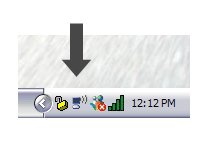
properties, wireless networks
tick the box at the top, enter your ssid, and encryption type/password
click advanced, select infrastructure networks onlyEver get the feeling you are wasting your time? :rolleyes:0 -
Done and done!
I published the SSID - it then connected. I've then hidden the SSID and all is well.
Any chance you can check out my previous post?!
http://forums.moneysavingexpert.com/showthread.html?t=655101
cheers.0

This discussion has been closed.
Confirm your email address to Create Threads and Reply

Categories
- All Categories
- 354.4K Banking & Borrowing
- 254.4K Reduce Debt & Boost Income
- 455.4K Spending & Discounts
- 247.3K Work, Benefits & Business
- 604K Mortgages, Homes & Bills
- 178.4K Life & Family
- 261.5K Travel & Transport
- 1.5M Hobbies & Leisure
- 16K Discuss & Feedback
- 37.7K Read-Only Boards