We’d like to remind Forumites to please avoid political debate on the Forum.
This is to keep it a safe and useful space for MoneySaving discussions. Threads that are – or become – political in nature may be removed in line with the Forum’s rules. Thank you for your understanding.
📨 Have you signed up to the Forum's new Email Digest yet? Get a selection of trending threads sent straight to your inbox daily, weekly or monthly!
The Forum now has a brand new text editor, adding a bunch of handy features to use when creating posts. Read more in our how-to guide
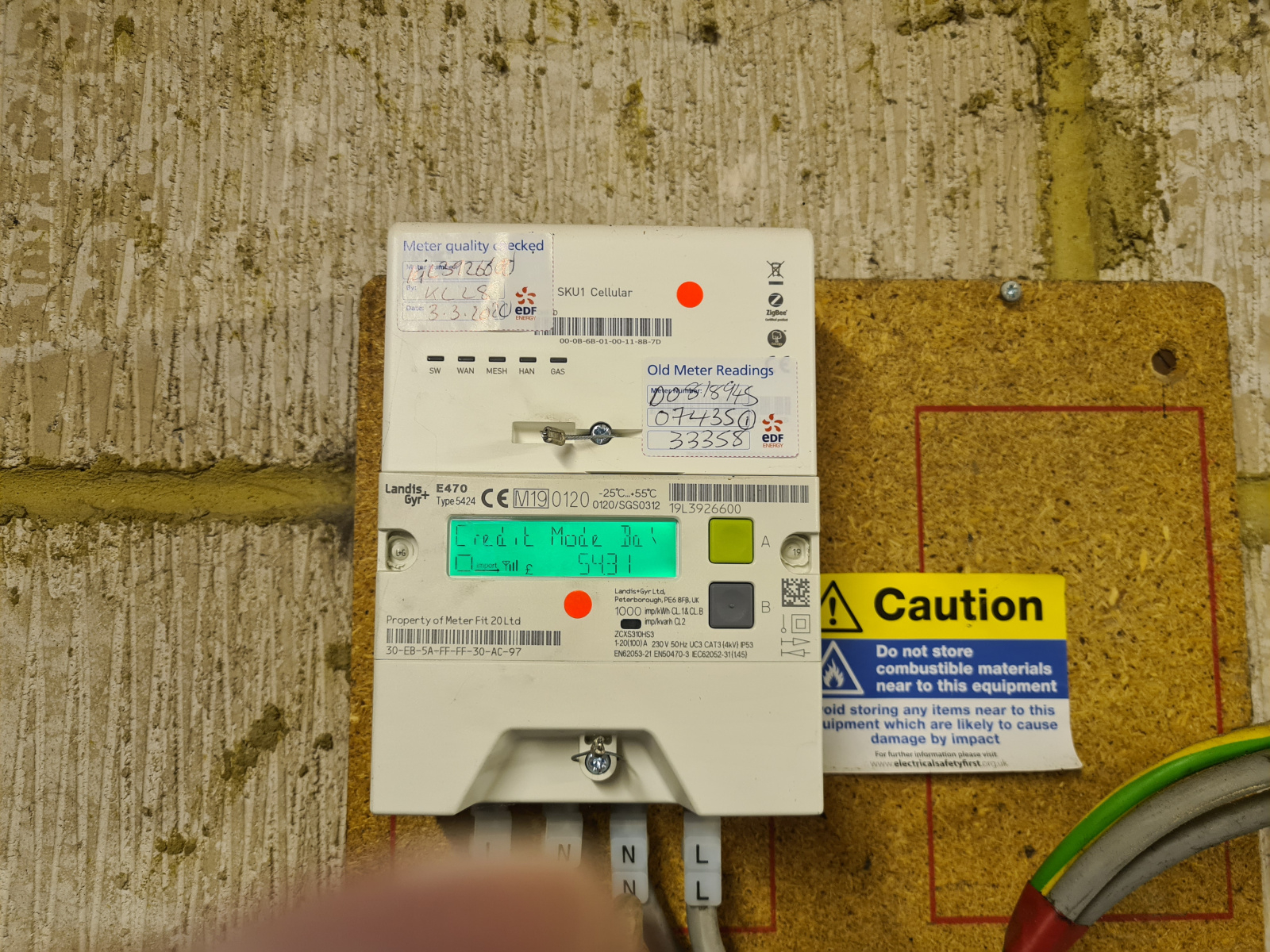
Can someone tell me how how the hell I'm supposed to read this meter?????




Comments
-
Never mind. Got it.0
-
-
You have to wonder at the perverse imagnination of an engineer that designs a user interface for a electricity meter and makes you cycle through all the possible items of data to get to the only peice of data the consumer regularly needs to access! Why not display that data item all time and allow the user to cycle through the other data items that are only of interest occasionally!
The comments I post are my personal opinion. While I try to check everything is correct before posting, I can and do make mistakes, so always try to check official information sources before relying on my posts.5 -
Labelling the buttons just A and B doesn't help.0
-
Couldn't agree more. I am software engineer (aka programmer) myself, or rather was... retired now, and the quality of software these days (for a pretty long definition of "these days") is shocking, both for stuff that's running in the back end as well as UX (user interface) issues. The latter especially can drive me up a wall... one programmer has to spend just an additional hour or so to implement a simple UX feature which will save 100.000s (sometimes millions) of users a lot of time... and doesn't.tacpot12 said:You have to wonder at the perverse imagnination of an engineer that designs a user interface for a electricity meter and makes you cycle through all the possible items of data to get to the only peice of data the consumer regularly needs to access! Why not display that data item all time and allow the user to cycle through the other data items that are only of interest occasionally!
0 -
All meters should have been standardised when newer ones started coming out.
Any manufacturers could make them but make them all work in the same way to get any types of readings.
Some of the button presses to get the info you need are just crazy.
Even worse when they up at the ceiling or the back of a cupboard.
Old, non smart meters are a joy to read from virtually anywhere0 -
Glad to see the OP has figured it out - For the benefit of anyone else coming across this thread, the Landis & Gyr E470 electric meter can be read by doing the following:
- The current reading is always displayed on screen by default (when the display is not backlit in green). If you're on a single rate with no solar panels this should be the only reading you need to see/provide. If on an Economy 7 or similar multi-rate tariff, the rate shown will be the one which is currently active.
- On multi-rate set ups, you can switch between the rates by holding B for a short time (approx 5-10 seconds) then pressing A
- For a total reading of all rates combined or for solar export readings - Pressing A twice will bring you to the "Credit mode bal" screen. Hold A for a few seconds until the current time shows. Continue to press A to cycle through the different displays, one of these will be a Total Import (all rates combined) and another will be a Total Export (for solar installations)
- The display can be lit up by pressing either of the buttons, but if this takes you to a different display you may need to wait a moment for it to return to the reading. Pressing B may ask if you want to activate the Boost function (for Economy 7 circuits wired in a certain way), but pressing A (No) will return to the now backlit reading.
- If you end up on a screen you didn't want to be on, the display will reset back to the current reading after a period of inactivity
Moo…0

 https://youtu.be/vfzD51O_mvk?si=b12rCP4Nk_-mHjIh





Confirm your email address to Create Threads and Reply

Categories
- All Categories
- 354.6K Banking & Borrowing
- 254.5K Reduce Debt & Boost Income
- 455.5K Spending & Discounts
- 247.5K Work, Benefits & Business
- 604.3K Mortgages, Homes & Bills
- 178.5K Life & Family
- 261.9K Travel & Transport
- 1.5M Hobbies & Leisure
- 16.1K Discuss & Feedback
- 37.7K Read-Only Boards