We’d like to remind Forumites to please avoid political debate on the Forum.
This is to keep it a safe and useful space for MoneySaving discussions. Threads that are – or become – political in nature may be removed in line with the Forum’s rules. Thank you for your understanding.
📨 Have you signed up to the Forum's new Email Digest yet? Get a selection of trending threads sent straight to your inbox daily, weekly or monthly!
External hard drive connection?

TUVOK
Posts: 538 Forumite



in Techie Stuff
I have a approximate 10 year old 'Seagate Free Agent' external hard drive with I think about a 50 Gb capacity.
I ran this on a PC which I replaced yesterday with a new model PC.
The connection on the Seagate is a 'pin' connection going into the hard drive body and a USB connector going to the PC.
This 'Seagate' does have a USB port also on the side of it, it's a small USB port about a quarter of an inch, can any one inform me if their is a cable with that size USB on one end a USB end which will fit into a modern PC.
Also I believe that external hard drives now have a far larger capacity, is it better to buy a portable drive or a external drive linked to the PC, any recommendations would be very informative.
Apologies if this query seems a bit simple, but I'm getting on a bit and struggling to still keep up with technology such as this query, any answers as always would be very much appreciated.
I ran this on a PC which I replaced yesterday with a new model PC.
The connection on the Seagate is a 'pin' connection going into the hard drive body and a USB connector going to the PC.
This 'Seagate' does have a USB port also on the side of it, it's a small USB port about a quarter of an inch, can any one inform me if their is a cable with that size USB on one end a USB end which will fit into a modern PC.
Also I believe that external hard drives now have a far larger capacity, is it better to buy a portable drive or a external drive linked to the PC, any recommendations would be very informative.
Apologies if this query seems a bit simple, but I'm getting on a bit and struggling to still keep up with technology such as this query, any answers as always would be very much appreciated.
0
Comments
-
Do you have the original cable you were using? Does your new PC have a USB-A port or only USB-C? If it's only USB-C then you can get an A to C adapter.
If you don't have the original cable then matchup the shape of the ports to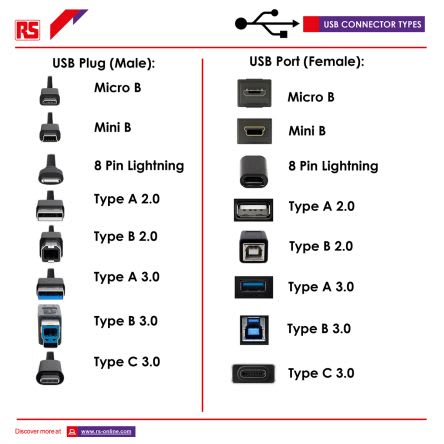
And then just but a cable thats got the right ends, so if its Mirco B for the drive and C for the pc something like https://www.amazon.co.uk/AmazonBasics-USB-Type-C-Micro-B-Cable/dp/B01GGKYAIU/1 -
a close up.photo of the socket would help1
-
Looks like a standard usb a to mini USB available from amazon or ebay
30 quid gets you a far larger 1tb drive , I would personally not use your old drive for back ups being 10 years old and quite small1 -
Sorry, not tech savvy as yet on new pc to show connector photo.
 0
0 -
Have a smart phone to take a pic and post on here?Or have you full details of your pc spec or the make/model/version?0
-
Thanks again for all replies and help, great response as always.
I'm going to take the Seagate hard drive to a local PC shop or Curry's, one of them should be able to help.0 -
I assume that the new PC is a laptop and doesn't have the older, USB-A style socket on it and only has the newer USB-C style?
If so, something like https://www.amazon.co.uk/iJiGui-Adapter-Connector-MacBook-Samsung/dp/B0BRJH6LH7/ would do and allow you to continue to use the original cable.0 -
Thankfully I've solved it!400ixl said:I assume that the new PC is a laptop and doesn't have the older, USB-A style socket on it and only has the newer USB-C style?
If so, something like https://www.amazon.co.uk/iJiGui-Adapter-Connector-MacBook-Samsung/dp/B0BRJH6LH7/ would do and allow you to continue to use the original cable.
The new Pc is a tower but only has two A type which are in use, but found a cable that does the job, all sorted.
Thanks again for all replies.0






Confirm your email address to Create Threads and Reply

Categories
- All Categories
- 355.3K Banking & Borrowing
- 254.7K Reduce Debt & Boost Income
- 455.9K Spending & Discounts
- 248K Work, Benefits & Business
- 605.2K Mortgages, Homes & Bills
- 178.9K Life & Family
- 262.9K Travel & Transport
- 1.5M Hobbies & Leisure
- 16.1K Discuss & Feedback
- 37.7K Read-Only Boards