We’d like to remind Forumites to please avoid political debate on the Forum.
This is to keep it a safe and useful space for MoneySaving discussions. Threads that are – or become – political in nature may be removed in line with the Forum’s rules. Thank you for your understanding.
📨 Have you signed up to the Forum's new Email Digest yet? Get a selection of trending threads sent straight to your inbox daily, weekly or monthly!
The Forum now has a brand new text editor, adding a bunch of handy features to use when creating posts. Read more in our how-to guide
USB charging

MouldyOldDough
Posts: 3,022 Forumite



in Techie Stuff
How do I enable USB charging / power delivery - on a Win 11 laptop
The USB ports did supply 5v to charge phones etc - but it looks as if a Windows Update has stopped it from working !!
If I was half as smart as I think I am - I'd be twice as smart as I REALLY am.
0
Comments
-
Check power settings, USB is probably on selective support for power saving purposes.
0 -
This might be obvious to you, but are you using the computer whilst charging? On my Windows laptop, if the computer is not in use but is turned on, power stops going to the USB port so no charging.So if I am using my computer then go off and do something else away fom the computer, when the computer goes into 'sleep' mode, then the power to the USB port stops.
0 -
Are you sure that your laptop actually has PD, if so I would have thought that there would be info on how to do it. My laptop has USB-C ports but does not offer PD, so its just basic 5v at 500mA.
Generally for PD the host has to handshake with the device that's being charged, so it may not need a specific setting, just a device which can communicate with the host and an appropriate USB cable.
Ensure that you are using at least the USB cable that came with your device assuming that it had a charger with PD as some cheaper cables may not have all the pins wired to allow the handshake.
https://www.dignited.com/63970/usb-c-power-delivery-port/
look here to check if your laptop has got it -Never under estimate the power of stupid people in large numbers1 -
PD wasn't mentioned, it's the 5V charging that has stopped.
@MouldyOldDough See if the following sorts it out for you.
Open the old style Control Panel and select Power Options.
Select 'Change when the computer sleeps' and then 'Change advanced power settings'.
Go to 'USB selective suspend setting' and disable it: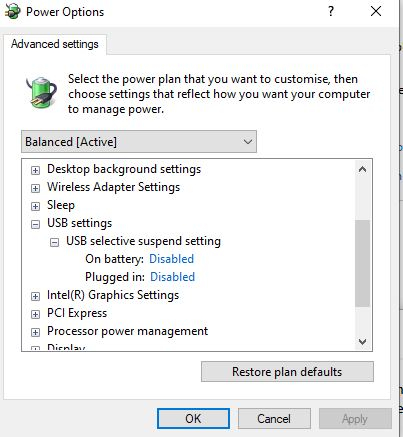
0 -
Yes it does have USB C power delivery but I cant even get USB A power to work nowmatelodave said:Are you sure that your laptop actually has PD, if so I would have thought that there would be info on how to do it. My laptop has USB-C ports but does not offer PD, so its just basic 5v at 500mA.
Generally for PD the host has to handshake with the device that's being charged, so it may not need a specific setting, just a device which can communicate with the host and an appropriate USB cable.
Ensure that you are using at least the USB cable that came with your device assuming that it had a charger with PD as some cheaper cables may not have all the pins wired to allow the handshake.
https://www.dignited.com/63970/usb-c-power-delivery-port/
look here to check if your laptop has got it -
The laptop is an MSI vector GP77
If I was half as smart as I think I am - I'd be twice as smart as I REALLY am.0 -
I don't have USB settings ...but the laptop DOES have USB PD !!Newcad said:PD wasn't mentioned, it's the 5V charging that has stopped.
@MouldyOldDough See if the following sorts it out for you.
Open the old style Control Panel and select Power Options.
Select 'Change when the computer sleeps' and then 'Change advanced power settings'.
Go to 'USB selective suspend setting' and disable it: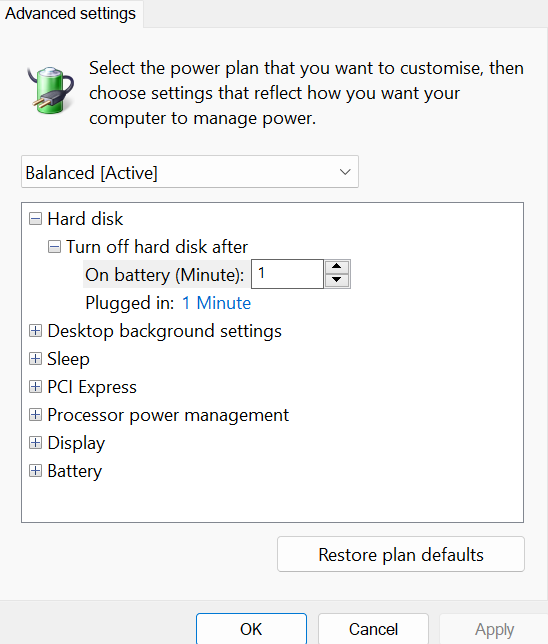
If I was half as smart as I think I am - I'd be twice as smart as I REALLY am.0 -
Dunno, maybe different setting options in Win11, or maybe device specific?
0



Confirm your email address to Create Threads and Reply

Categories
- All Categories
- 353.5K Banking & Borrowing
- 254.1K Reduce Debt & Boost Income
- 455K Spending & Discounts
- 246.6K Work, Benefits & Business
- 602.9K Mortgages, Homes & Bills
- 178K Life & Family
- 260.5K Travel & Transport
- 1.5M Hobbies & Leisure
- 16K Discuss & Feedback
- 37.7K Read-Only Boards