We’d like to remind Forumites to please avoid political debate on the Forum.
This is to keep it a safe and useful space for MoneySaving discussions. Threads that are – or become – political in nature may be removed in line with the Forum’s rules. Thank you for your understanding.
📨 Have you signed up to the Forum's new Email Digest yet? Get a selection of trending threads sent straight to your inbox daily, weekly or monthly!
The Forum now has a brand new text editor, adding a bunch of handy features to use when creating posts. Read more in our how-to guide
Save Tab Mising

laserbeam
Posts: 183 Forumite


in Techie Stuff
I have just done a Exel spreadsheet and need to save it but the save button top L/H corner is not there how do I gt it back
0
Comments
-
Try this . . . hold down the ALT key and while you’re still pressing it briefly press ‘F’ then ‘A’. If it works it’ll open up a ‘Dialogue Box’ that will ask you what name you want to save the spreadsheet as and which folder you want to save it in.If it didn’t work, try holding down the CTRL key and while it’s still down briefly press ‘S’.Let me know how you get on.
would've . . . could've . . . should've . . .
A.A.A.S. (Associate of the Acronym Abolition Society)
There's definitely no 'a' in 'definitely'.0 -
Thank's Teapot 55 I trie both your suggestions but neither worked thank's anyway much appreciated1
-
Is there a dropdown arrow to the right of where the save button used to be? If so, is there a save option in there without at tick? Selecting it shoud bring the save button back.This all depends on what version of Excel you're using of course.0
-
Do you mean the Quick Access Toolbar? If so, just look to the right and you should see an arrow, click on it and you should see something like this: -laserbeam said:I have just done a Exel spreadsheet and need to save it but the save button top L/H corner is not there how do I gt it back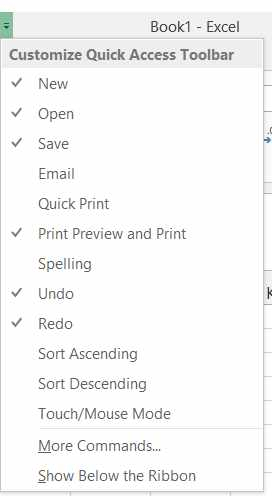
If so, can you tick the Save or Save As words or go to "More Commands"
1








Confirm your email address to Create Threads and Reply

Categories
- All Categories
- 353.5K Banking & Borrowing
- 254.1K Reduce Debt & Boost Income
- 455K Spending & Discounts
- 246.6K Work, Benefits & Business
- 602.9K Mortgages, Homes & Bills
- 178K Life & Family
- 260.5K Travel & Transport
- 1.5M Hobbies & Leisure
- 16K Discuss & Feedback
- 37.7K Read-Only Boards