We’d like to remind Forumites to please avoid political debate on the Forum.
This is to keep it a safe and useful space for MoneySaving discussions. Threads that are – or become – political in nature may be removed in line with the Forum’s rules. Thank you for your understanding.
📨 Have you signed up to the Forum's new Email Digest yet? Get a selection of trending threads sent straight to your inbox daily, weekly or monthly!
The Forum now has a brand new text editor, adding a bunch of handy features to use when creating posts. Read more in our how-to guide
Any Outlook users out there?

Jon_01
Posts: 5,931 Forumite



in Techie Stuff
I've never used it, so I'm in the dark here. . .
My mate is getting a 'Do you want to restore items?' popup everytime he starts the program and a yes or no box. Doesn't matter which he clicks the message is back next time.
This has been going on for weeks, he tells me.
He doesn't have a clue with 'computer stuff' (his words) he just uses it!!!!
I'm not sure which version of Outlook he's using, it's an Office install I think, maybe Office 2019.
Can anyone suggest a fix?
Thanks...
0
Comments
-
-
0
-
That link gives me:Neil_Jones said:
Error: Unexpected base URL at Config.getEnvironment (C:\home\site\wwwroot\dist\office\server\main.js:1:503504) at new AppComponent (C:\home\site\wwwroot\dist\office\server\main.js:1:337123) at NodeInjectorFactory.AppComponent_Factory [as factory] (C:\home\site\wwwroot\dist\office\server\main.js:1:339332) at getNodeInjectable (C:\home\site\wwwroot\dist\office\server\main.js:1:2695398) at createRootComponent (C:\home\site\wwwroot\dist\office\server\main.js:1:2844704) at ComponentFactory.create (C:\home\site\wwwroot\dist\office\server\main.js:1:2842096) at ApplicationRef.bootstrap (C:\home\site\wwwroot\dist\office\server\main.js:1:3048650) at C:\home\site\wwwroot\dist\office\server\main.js:1:3044354 at Array.forEach () at PlatformRef._moduleDoBootstrap (C:\home\site\wwwroot\dist\office\server\main.js:1:3044336)
🤷♀️
BTW - I'm getting the same issue, and it's only happened fairly recently.Jenni x0 -
Hmm, that's interesting.If I paste the link into Google and load it from there, it works. If I load it from the above ink it doesn't. It definitely worked when I pasted it and it is still working so...Try that.0
-
Do this:1) Make sure Outlook is closed. Press windows key + R.(N.B. Ignore the following speech marks)2) Type "regedit" in the box that opens3) Go to this location - HKEY_CURRENT_USER\Software\Microsoft\Office\16.0\Outlook\Preferences(N.B. If "16.0 isn't there got to the highest number that is there as there may be previous Office/Outlook installations)4) Select edit/new/dword(32-bit) value5) Type "ReopenWindowsOption" and press return key6) Right click "ReopenWindowsOption", left click on "modify" and change value from "0" to "1".7) Select file/exit.8) Restart PC and then try Outlook again.
Sorry! Did the middle of my sentence interrupt the beginning of yours!0 -
Just have - thanks. However that doesn't help as I don't even have that item listed under Startup Options ... in fact there is nothing there.Neil_Jones said:Hmm, that's interesting.If I paste the link into Google and load it from there, it works. If I load it from the above ink it doesn't. It definitely worked when I pasted it and it is still working so...Try that.
Re. the regedit advice above - I've tried that too. Works first time but thereafter the popup comes back. Jenni x0
 -
Jenni_D said:
Just have - thanks. However that doesn't help as I don't even have that item listed under Startup Options ... in fact there is nothing there.Neil_Jones said:Hmm, that's interesting.If I paste the link into Google and load it from there, it works. If I load it from the above ink it doesn't. It definitely worked when I pasted it and it is still working so...Try that.Mine is blank as well in MS Office 21 Plus. Hence I went the registry route.Re. the regedit advice above - I've tried that too. Works first time but thereafter the popup comes back.This should work if the registry value is correct.Did you follow the procedure all the way through?Check in Regedit that the value is correct. Here's a screenshot of mine as an example - 4th line from bottom: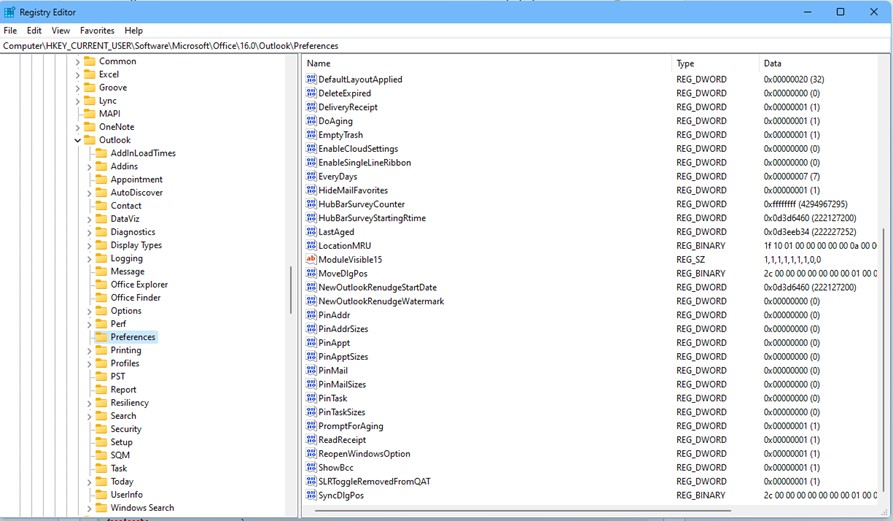 If the registry value you have is the same as mine then goto control panel/programs and select uninstall a program, left click on your MS Office, goto top bar where it should list 'Organise Uninstall Change'. Left click 'Change' and select quick repair. Once complete, restart PC, do regedit as previously listed, restart then try Outlook again. HTH.Sorry! Did the middle of my sentence interrupt the beginning of yours!0
 -
I had, but did it again. (I also did the full online repair). At first it made no difference ... however today I opened Outlook (after starting up my laptop) and it is now working. 🤷♀️Jenni x0
-
Just to update ... Outlook is still behaving itself.

Typical ... it's gone back to showing the popup. Seems to have a mind of its own. 🙄
20-Jul-23: And now it's working properly again - seems to have a mind of its own! 🙄Jenni x0




Confirm your email address to Create Threads and Reply

Categories
- All Categories
- 353.5K Banking & Borrowing
- 254.2K Reduce Debt & Boost Income
- 455.1K Spending & Discounts
- 246.6K Work, Benefits & Business
- 603K Mortgages, Homes & Bills
- 178.1K Life & Family
- 260.6K Travel & Transport
- 1.5M Hobbies & Leisure
- 16K Discuss & Feedback
- 37.7K Read-Only Boards