We’d like to remind Forumites to please avoid political debate on the Forum.
This is to keep it a safe and useful space for MoneySaving discussions. Threads that are – or become – political in nature may be removed in line with the Forum’s rules. Thank you for your understanding.
📨 Have you signed up to the Forum's new Email Digest yet? Get a selection of trending threads sent straight to your inbox daily, weekly or monthly!
The Forum now has a brand new text editor, adding a bunch of handy features to use when creating posts. Read more in our how-to guide
Problem adding money to Chip

charlie12525
Posts: 113 Forumite



The App is driving me insane today.
Their chatbot is not helping and I can't get it to put me through to a person.
I would like to make a large deposit from my linked bank account with Nationwide. The only option it is giving me is via debit card (max 5k and with a 3 day delay). I haven't added cash for a few weeks but last time I did I had another option and I "pulled" the money in from Nationwide instantly.
Does anyone know why I might no longer have that option?
It tells me I still have 23 days of my bank account link left.
0
Comments
-
The option to 'pull' from my bank account is showing for me. You can also use faster payments from your bank account; your Chip account details are at the bottom of the 'Add money' page under 'manual deposit'.charlie12525 said:The App is driving me insane today.Their chatbot is not helping and I can't get it to put me through to a person.I would like to make a large deposit from my linked bank account with Nationwide. The only option it is giving me is via debit card (max 5k and with a 3 day delay). I haven't added cash for a few weeks but last time I did I had another option and I "pulled" the money in from Nationwide instantly.Does anyone know why I might no longer have that option?It tells me I still have 23 days of my bank account link left.'Compound interest is the eighth wonder of the world. He who understands it, earns it; he who doesn’t, pays it' - Albert Einstein.1 -
Please elaborate on the faster payment method.Doctor_Who said:
The option to 'pull' from my bank account is showing for me. You can also use faster payments from your bank account; your Chip account details are at the bottom of the 'Add money' page under 'manual deposit'.charlie12525 said:The App is driving me insane today.Their chatbot is not helping and I can't get it to put me through to a person.I would like to make a large deposit from my linked bank account with Nationwide. The only option it is giving me is via debit card (max 5k and with a 3 day delay). I haven't added cash for a few weeks but last time I did I had another option and I "pulled" the money in from Nationwide instantly.Does anyone know why I might no longer have that option?It tells me I still have 23 days of my bank account link left.
When I tap "add money" it only gives me 2 options - the debit card option I mentioned and a "transfer from chip " option.
I can see no manual deposit option.0 -
You need to link your Nationwide account via Open Banking and then successfully make at least one transfer via Open Banking in order to use the faster payment option for subsequent transfers.charlie12525 said:
Please elaborate on the faster payment method.Doctor_Who said:
The option to 'pull' from my bank account is showing for me. You can also use faster payments from your bank account; your Chip account details are at the bottom of the 'Add money' page under 'manual deposit'.charlie12525 said:The App is driving me insane today.Their chatbot is not helping and I can't get it to put me through to a person.I would like to make a large deposit from my linked bank account with Nationwide. The only option it is giving me is via debit card (max 5k and with a 3 day delay). I haven't added cash for a few weeks but last time I did I had another option and I "pulled" the money in from Nationwide instantly.Does anyone know why I might no longer have that option?It tells me I still have 23 days of my bank account link left.
When I tap "add money" it only gives me 2 options - the debit card option I mentioned and a "transfer from chip " option.
I can see no manual deposit option.
1 -
I made a successful payment in via OB of 18k a few weeks ago. It says my bank link is still active.masonic said:
You need to link your Nationwide account via Open Banking and then successfully make at least one transfer via Open Banking in order to use the faster payment option for subsequent transfers.charlie12525 said:
Please elaborate on the faster payment method.Doctor_Who said:
The option to 'pull' from my bank account is showing for me. You can also use faster payments from your bank account; your Chip account details are at the bottom of the 'Add money' page under 'manual deposit'.charlie12525 said:The App is driving me insane today.Their chatbot is not helping and I can't get it to put me through to a person.I would like to make a large deposit from my linked bank account with Nationwide. The only option it is giving me is via debit card (max 5k and with a 3 day delay). I haven't added cash for a few weeks but last time I did I had another option and I "pulled" the money in from Nationwide instantly.Does anyone know why I might no longer have that option?It tells me I still have 23 days of my bank account link left.
When I tap "add money" it only gives me 2 options - the debit card option I mentioned and a "transfer from chip " option.
I can see no manual deposit option.0 -
This is what I see. In 'Manual deposit' you can see your Chip sort code and account number. It sounds like your Nationwide account has become unlinked.charlie12525 said:
Please elaborate on the faster payment method.Doctor_Who said:
The option to 'pull' from my bank account is showing for me. You can also use faster payments from your bank account; your Chip account details are at the bottom of the 'Add money' page under 'manual deposit'.charlie12525 said:The App is driving me insane today.Their chatbot is not helping and I can't get it to put me through to a person.I would like to make a large deposit from my linked bank account with Nationwide. The only option it is giving me is via debit card (max 5k and with a 3 day delay). I haven't added cash for a few weeks but last time I did I had another option and I "pulled" the money in from Nationwide instantly.Does anyone know why I might no longer have that option?It tells me I still have 23 days of my bank account link left.
When I tap "add money" it only gives me 2 options - the debit card option I mentioned and a "transfer from chip " option.
I can see no manual deposit option.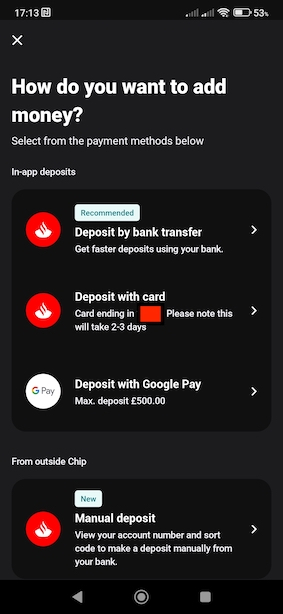
'Compound interest is the eighth wonder of the world. He who understands it, earns it; he who doesn’t, pays it' - Albert Einstein.1 -
Yes, the top option is missing and that is the option I used before.Doctor_Who said:
This is what I see. In 'Manual deposit' you can see your Chip sort code and account number. It sounds like your Nationwide account has become unlinked.charlie12525 said:
Please elaborate on the faster payment method.Doctor_Who said:
The option to 'pull' from my bank account is showing for me. You can also use faster payments from your bank account; your Chip account details are at the bottom of the 'Add money' page under 'manual deposit'.charlie12525 said:The App is driving me insane today.Their chatbot is not helping and I can't get it to put me through to a person.I would like to make a large deposit from my linked bank account with Nationwide. The only option it is giving me is via debit card (max 5k and with a 3 day delay). I haven't added cash for a few weeks but last time I did I had another option and I "pulled" the money in from Nationwide instantly.Does anyone know why I might no longer have that option?It tells me I still have 23 days of my bank account link left.
When I tap "add money" it only gives me 2 options - the debit card option I mentioned and a "transfer from chip " option.
I can see no manual deposit option.
But it says my bank link is still active and the link is showing active in my nationwide internet banking too.
I don't have a manual deposit option.
Maybe I should delete and reload the App?
0 -
charlie12525 said:
Yes, the top option is missing and that is the option I used before.Doctor_Who said:
This is what I see. In 'Manual deposit' you can see your Chip sort code and account number. It sounds like your Nationwide account has become unlinked.charlie12525 said:
Please elaborate on the faster payment method.Doctor_Who said:
The option to 'pull' from my bank account is showing for me. You can also use faster payments from your bank account; your Chip account details are at the bottom of the 'Add money' page under 'manual deposit'.charlie12525 said:The App is driving me insane today.Their chatbot is not helping and I can't get it to put me through to a person.I would like to make a large deposit from my linked bank account with Nationwide. The only option it is giving me is via debit card (max 5k and with a 3 day delay). I haven't added cash for a few weeks but last time I did I had another option and I "pulled" the money in from Nationwide instantly.Does anyone know why I might no longer have that option?It tells me I still have 23 days of my bank account link left.
When I tap "add money" it only gives me 2 options - the debit card option I mentioned and a "transfer from chip " option.
I can see no manual deposit option.
But it says my bank link is still active and the link is showing active in my nationwide internet banking too.
I don't have a manual deposit option.
Maybe I should delete and reload the App?
The first option is the Open Banking transfer. If that is missing, then it suggests there is something wrong with the OB link. You could try reinstalling the app, but I suspect you will need to message them to remove the link so that you can add it afresh.
1 -
Oops...
Went to the Google Play Store and there was an update available.
I thought Chip would have told me I needed to update!
Anyway, all working correctly now.
Thanks all for your efforts!2 -
It really should detect that it is not up to date and warn you if it results in limited functionality. One to remember for the future!
1 -
Play Store shows a Chip app update for me as well. My app was working fine, but no notification from the app about an update. You'd think if the update was required to maintain functionality they would at least notify you when you opened the app!charlie12525 said:Oops...
Went to the Google Play Store and there was an update available.
I thought Chip would have told me I needed to update!
Anyway, all working correctly now.
Thanks all for your efforts!'Compound interest is the eighth wonder of the world. He who understands it, earns it; he who doesn’t, pays it' - Albert Einstein.0





Confirm your email address to Create Threads and Reply

Categories
- All Categories
- 353.5K Banking & Borrowing
- 254.1K Reduce Debt & Boost Income
- 455K Spending & Discounts
- 246.6K Work, Benefits & Business
- 602.9K Mortgages, Homes & Bills
- 178.1K Life & Family
- 260.6K Travel & Transport
- 1.5M Hobbies & Leisure
- 16K Discuss & Feedback
- 37.7K Read-Only Boards